emMCP Connect an AI agent to your Dolibarr, without giving it more rights than your own users have.
emMCP exposes your Dolibarr data (thirdparties, invoices, products, stock…) to Claude.ai, Claude Code or any compatible MCP client, through an API secured by OAuth 2.1 or an API key — the standard business tools run with the user's existing Dolibarr permissions, no new right required.
1 year of updates and downloads included
Why emMCP?
emMCP installs an MCP (Model Context Protocol) server directly inside Dolibarr. A compatible client — Claude.ai, Claude Code, or a custom MCP HTTP client — can then query and act on your data through dedicated tools (thirdparties, invoices, products, stock, Dolibarr environment…), in natural language, with no script and no manual export.
The key point: for the standard business tools, emMCP introduces no new right. Every call authenticates as a real Dolibarr user (API key or OAuth 2.1) and inherits that user's existing rights through Dolibarr's REST API. An agent connected with a salesperson's rights cannot do more than that salesperson can do in Dolibarr. The SQL query tool is the one exception: it is a separate, dedicated right that does not exist in a standard Dolibarr (see below).
PHP ≥ 8.1 · HTTPS required · Standalone module (no dependency on another E-dem module to run)
Connect in one copy-paste
The setup page shows your MCP server URL and generates the ready-to-paste command or file for the three common ways to connect.
- Claude.ai: custom connector with automatic OAuth 2.1 discovery, no key to copy
- Claude Code: ready-to-use CLI command with the authentication header included
- Generic MCP client: ready-to-use mcp.json file (HTTP transport)
- API key generated from each Dolibarr user's own record ('API key' tab)
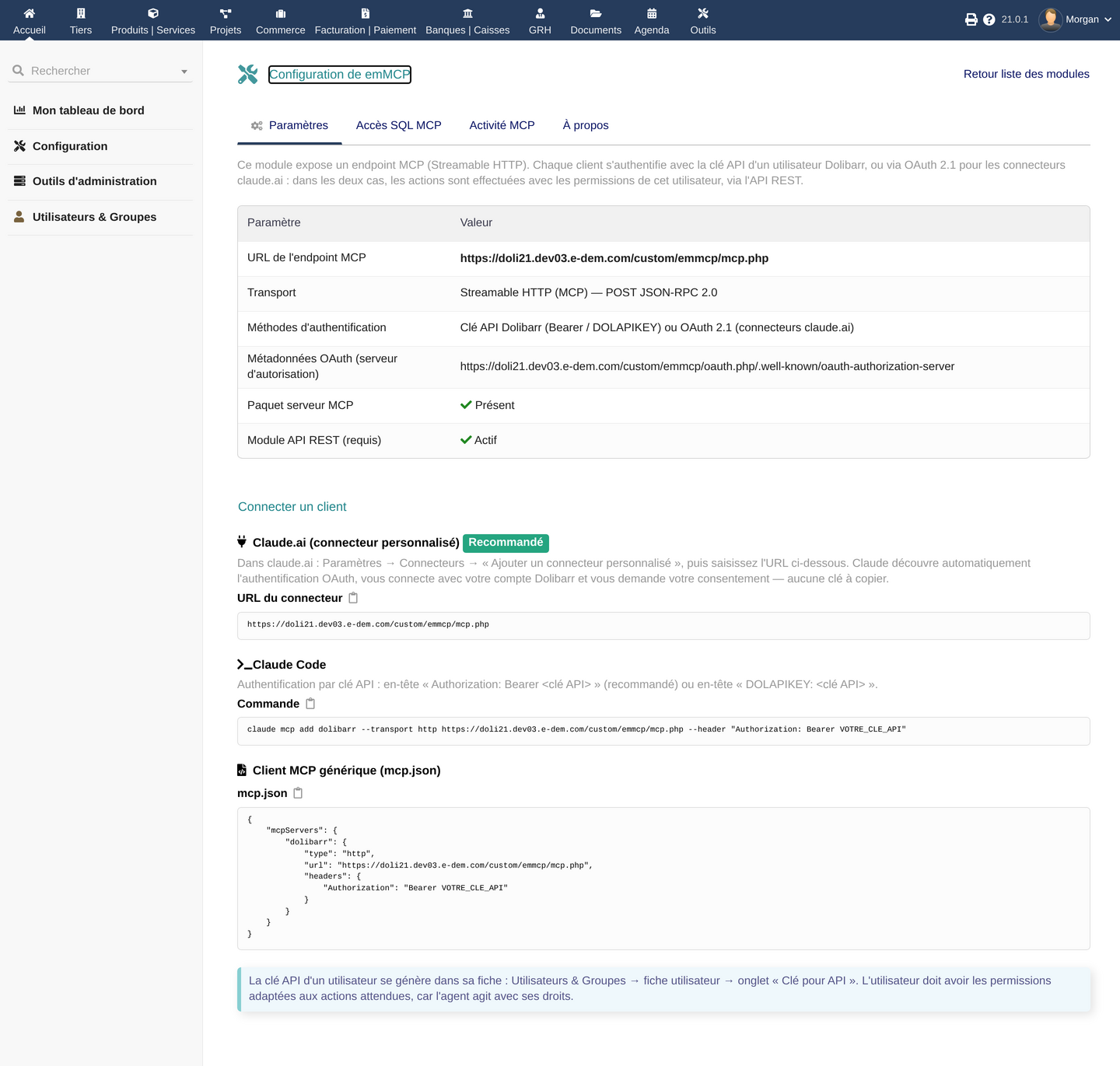
The setup page provides the connector URL, the Claude Code command and the mcp.json file ready to copy
Dolibarr permissions, to the letter
emMCP does not create a separate technical account: it relies on Dolibarr's existing authentication and rights.
- Dolibarr API key authentication (Bearer header or DOLAPIKEY) for clients that support it
- OAuth 2.1 with mandatory PKCE (S256) for connectors like claude.ai, compliant with RFC 9728 / 8414 / 7591
- Short-lived tokens (1h), rotated on every refresh, stored only as a hash
- Standard business tools grant no action beyond the authenticated user's own existing Dolibarr rights
💡 Revocation: regenerating the API key cuts off clients that use it (Claude Code, generic clients), but not necessarily an already-authorized OAuth connector (claude.ai) — its access token (1h) renews itself automatically via its refresh token. To cut an OAuth connector's access immediately, disable the associated Dolibarr user or the emMCP module. There is no single-token revoke button in this version: contact support for that specific case.
Read-only SQL access, disabled by default
Beyond the standard business tools, emMCP can expose a read-only SQL query tool. This is not an ordinary Dolibarr business right: it is broad access to your data, which stays closed until four conditions are all met. Dolibarr itself spells it out: granting this access gives broad read access to the database, well beyond usual business permissions (margins, salaries, every thirdparty with no commercial restriction).
- Global switch, disabled by default in the module's configuration
- Dedicated Dolibarr right required for the user ('SQL MCP access')
- Additional individual opt-in per user, on top of the right — without it, access stays disabled even with the right granted
- Blocked in a Multicompany environment, unless multi-entity support is explicitly enabled
- A single SELECT or WITH statement per call, on the existing Dolibarr connection — no separate MySQL account to create — parsed by a lexer/parser that rejects anything that isn't structurally a SELECT (a word like 'UPDATE' inside a searched text value stays allowed: it isn't a write)
- Default caps: 200 rows (max 5000) and 256 KiB of response (max 4 MiB), enforced by the module itself while streaming the results; a 5-second timeout (max 30) and a read-only transaction, those enforced by the MySQL/MariaDB session itself
- Sensitive columns (passwords, API keys, tokens, secrets) refused by name; SELECT * is resolved column by column and blocked if it would expose a sensitive column; risky functions (sleep, benchmark, get_lock, load_file…) are blocked
- Every query is logged with its metadata; results are never stored, and the query text itself can be reduced to a SHA-256 fingerprint if your policy requires it
⚠️ Restricted to MySQL/MariaDB (PostgreSQL is not supported for this tool). This is a volume and scope safeguard, not an absolute guarantee against every risk: keep it disabled if you have no use for it, and only grant it to users who already have, organizationally, the right to see all of this data.
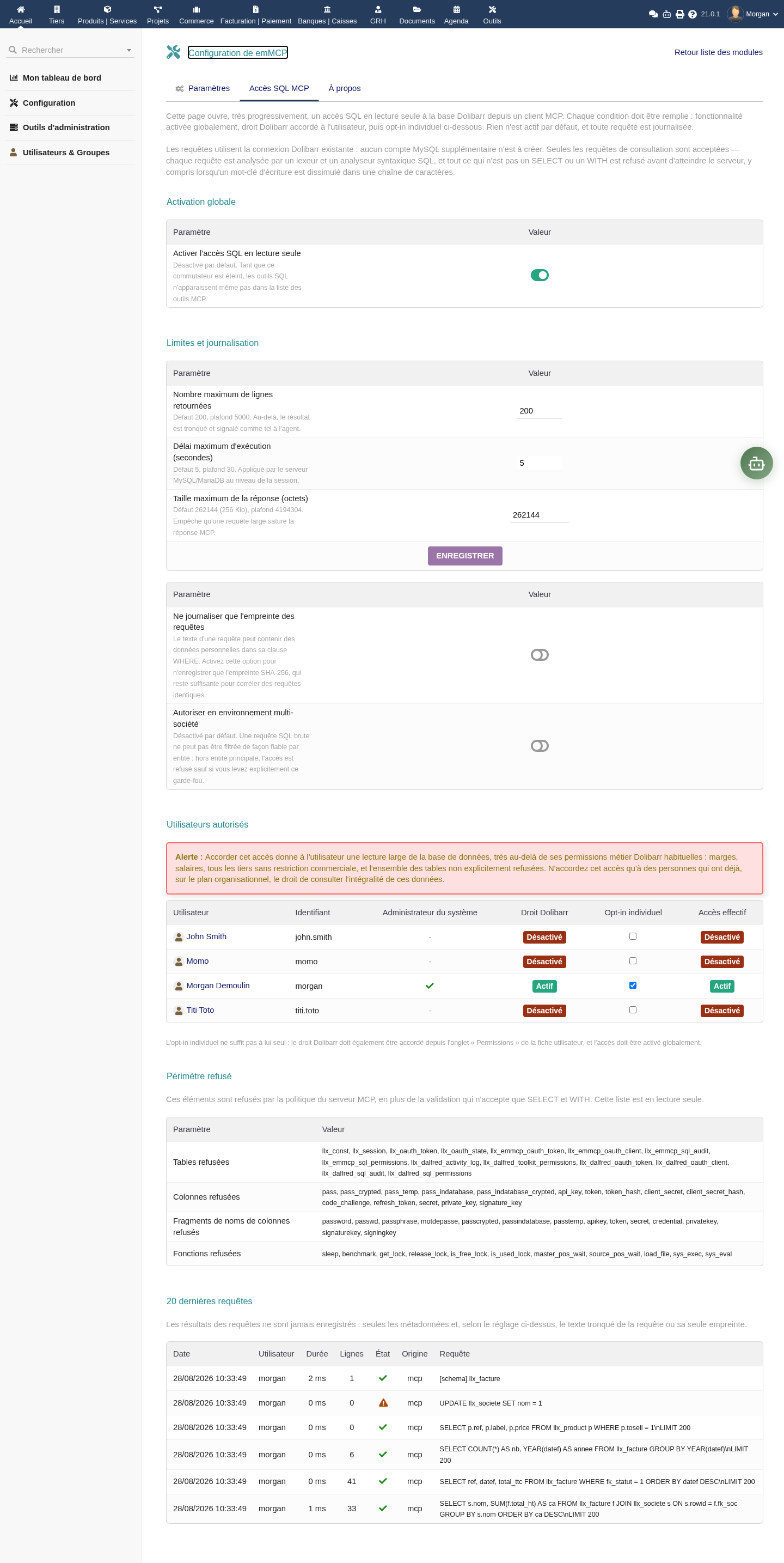
Read-only SQL access: disabled by default, granted user by user, with an explicit refused scope and a query log
Logging, quota and alerts, under your control
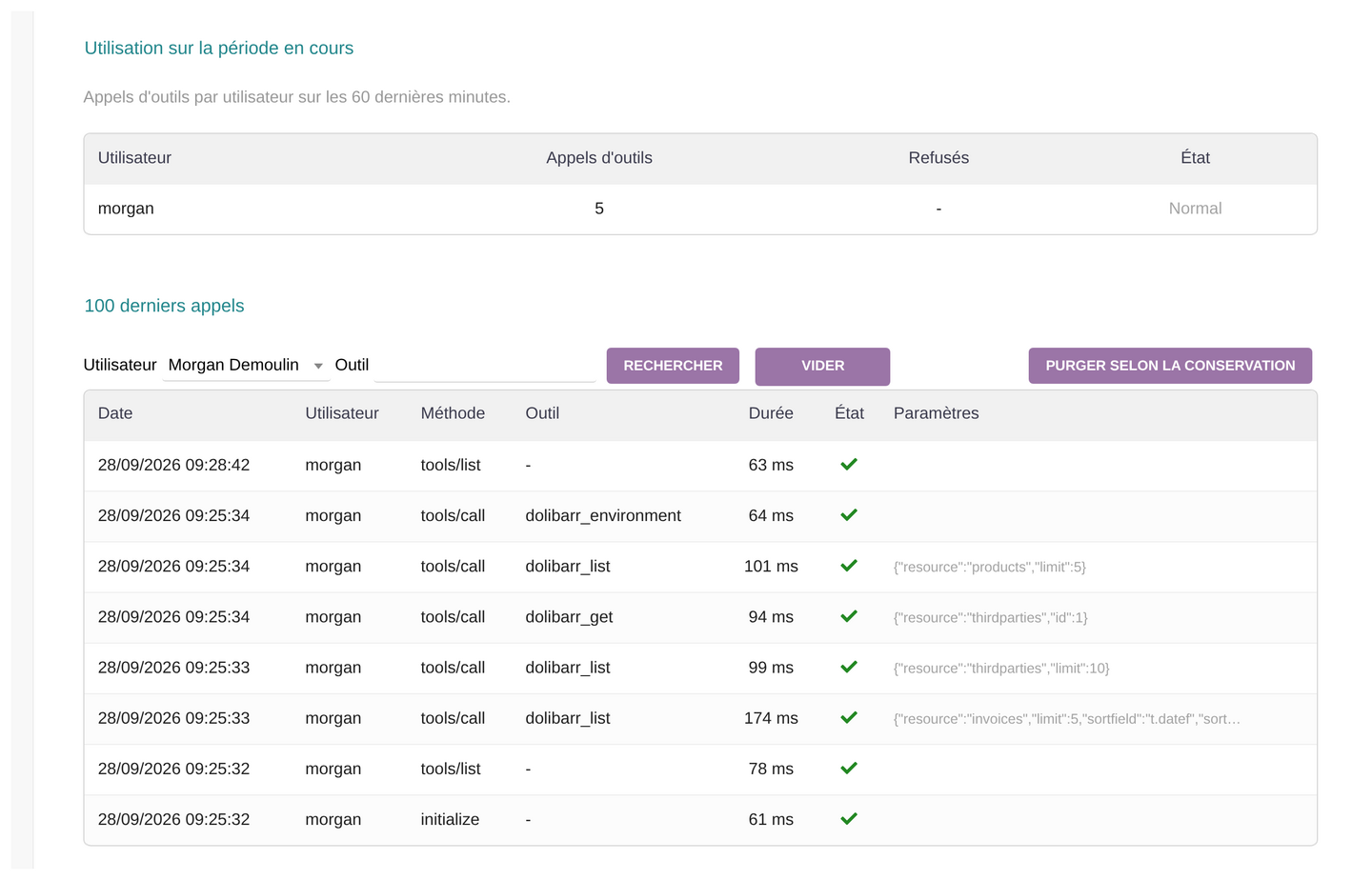
Every call received by the MCP server can be traced: who, which tool, with which parameters, how long it took, and the outcome. Enough to monitor an agent in production without guessing what it did.
- Logging enabled by default; the last 100 calls can be browsed and filtered by user/tool
- Recording call parameters can be disabled separately for privacy (results themselves are never stored)
- Configurable log retention, 90 days by default, one-click purge available
- Rolling per-user call quota (disabled by default) and an email alert threshold with a configurable anti-duplicate cooldown
💡 Good to know: the quota only counts tools that actually ran — connecting and listing available tools cost nothing against it. To keep a quota or an alert meaningful, leave logging enabled and disable only argument recording if you need privacy.
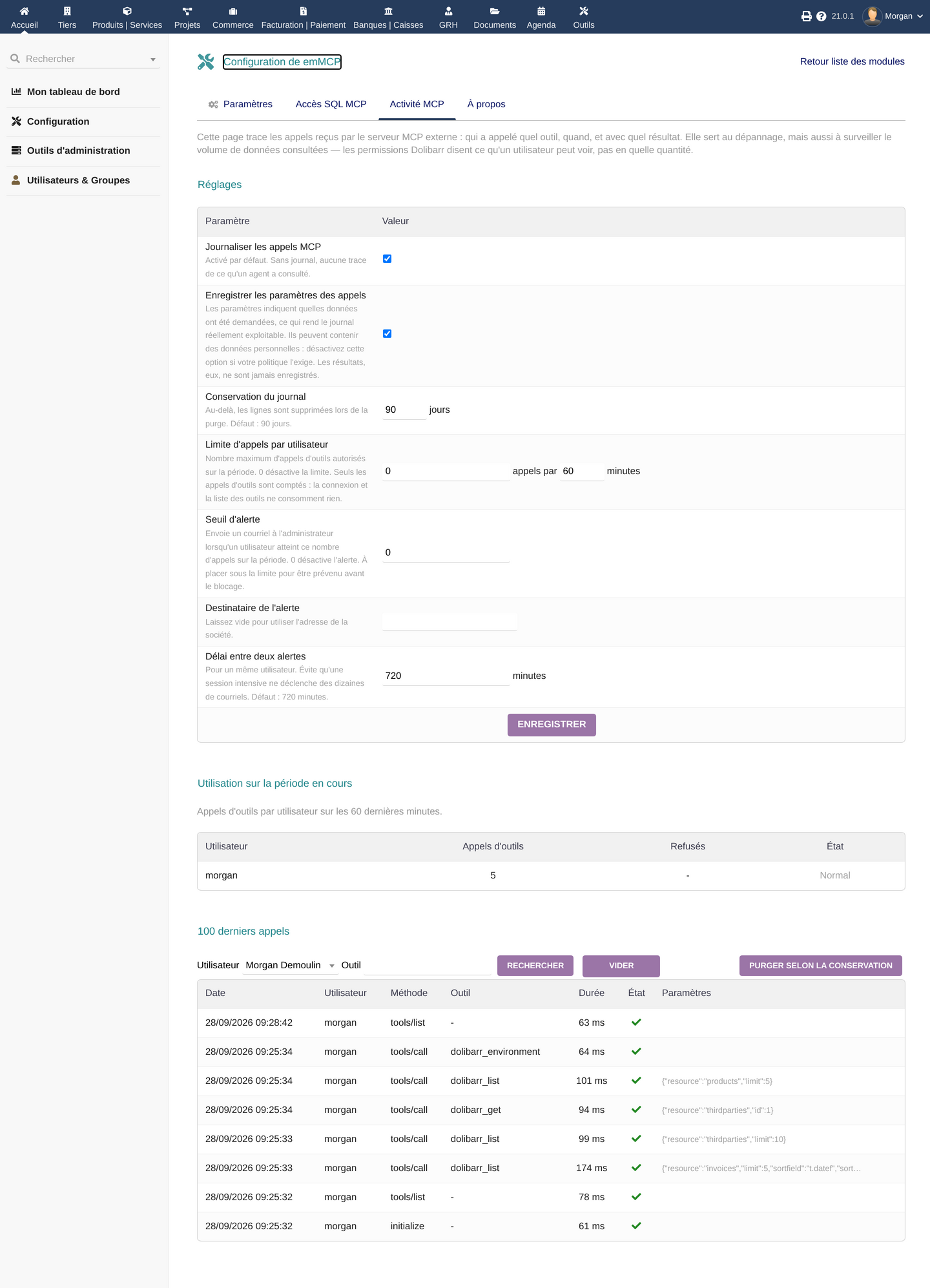
Every call from the agent is traced: who, which tool, with which parameters, how long it took
Compatibility & technical requirements
Dolibarr
PHP
Transport
Authentication
emMCP in pictures
Click an image to enlarge it
Frequently asked questions
Which clients does emMCP work with?
Claude.ai (custom connector with OAuth 2.1), Claude Code (API key authentication), and any MCP client compatible with the HTTP (Streamable) transport.
What permissions does the agent get on my data?
For the standard business tools: exactly those of the Dolibarr user used to connect, through the REST API — emMCP does not create a separate account or role. The SQL query tool is the one exception: it is a separate, dedicated Dolibarr right that does not exist by default.
Is SQL access enabled by default?
No. It is disabled by default and requires a global switch, a dedicated Dolibarr right, an individual per-user opt-in, and no Multicompany block — all four conditions must be met.
Does emMCP work with PostgreSQL?
The direct SQL query tool is restricted to MySQL/MariaDB. PostgreSQL is not supported for this specific tool.
I get a 401 error right after giving OAuth consent — what should I do?
This is usually caused by the HTTP Authorization header not being forwarded by default under Apache in CGI/FPM mode. The module ships the required .htaccess rules to re-expose it; see the technical documentation for details.
How do I cut off an agent's access?
It depends on the connection mode. For an API-key client (Claude Code): regenerate the user's API key. For an OAuth connector (claude.ai), regenerating the API key is not enough — its token renews itself via its refresh token: disable the associated Dolibarr user or the emMCP module to cut access immediately. There is no single-token revoke button in this version.
Does emMCP depend on the Dalfred module?
No. emMCP is a standalone module, shipped with its own dependencies: no other E-dem module needs to be installed first.
What does the DoliStore price include?
Purchasing the module includes 1 year of updates and downloads from the DoliStore.
Does my data stay inside Dolibarr?
No, not exclusively. emMCP does run on your own server, but its whole purpose is to send the requested data to the AI client you connected (claude.ai, Claude Code, or another MCP client) so it can answer. That data leaves Dolibarr for the AI provider you chose, under that provider's own terms and privacy policy — this isn't specific to emMCP, it's how the MCP protocol works.
Looking for a full AI agent rather than an MCP server?
Dalfred is our AI agent built into Dolibarr, with its own conversational interface — and its own MCP access.
Ready to connect an AI agent to your Dolibarr?
Buy emMCP on the DoliStore or contact us to review your use case before purchasing.