- Requirements
- Installation
- Connecting a client
- Permissions and authentication
- Available tools
- Read-only SQL access
- Activity, quota and alerts
- Troubleshooting
- Known limits
- FAQ
emMCP — MCP Server for Dolibarr
emMCP installs an MCP (Model Context Protocol) server directly inside Dolibarr. A compatible client — Claude.ai, Claude Code, or a custom MCP HTTP client — can then query and act on your Dolibarr data (thirdparties, invoices, products, stock, environment…) in natural language.
The core principle: for the standard business tools, emMCP introduces no new right. Every call authenticates as a real Dolibarr user (API key or OAuth 2.1) and goes through Dolibarr's REST API, which applies that user's existing rights. The SQL query tool is the one exception: it is a separate, dedicated Dolibarr right that does not exist in a standard Dolibarr (see the dedicated section below).
Privacy: emMCP runs on your own server, but its role is to send the requested data to the AI client you connected (claude.ai, Claude Code, or another). That data leaves Dolibarr for the AI provider you chose, under that provider's own terms — self-hosting the module does not mean the data stays exclusively inside Dolibarr, that's how the MCP protocol works.
Requirements
| Item | Minimum version |
|---|---|
| Dolibarr | Recent version |
| PHP | PHP ≥ 8.1 |
| Dolibarr REST API module | Active (required) |
| Connection | HTTPS required |
| Database | MySQL or MariaDB for the SQL tool (see below) |
emMCP is a standalone module: it ships its own dependencies (MCP server, OAuth handling, SQL engine). No other E-dem module needs to be installed first.
Note: Dolibarr's native REST API module must be enabled — emMCP relies on it to run actions with the authenticated user's permissions.
Installation
From the DoliStore
- Go to the DoliStore and search for emMCP
- Buy the module and download the ZIP archive
- Extract it into the
htdocs/custom/folder of your Dolibarr installation - The resulting folder must be
htdocs/custom/emmcp/
Activation
- Log into Dolibarr as an administrator
- Go to Home → Setup → Modules/Applications
- Search for "emMCP" and click Activate
- Make sure Dolibarr's REST API module is also active
A new emMCP setup menu appears, with four tabs: Settings, SQL MCP Access, MCP Activity, About.
Upgrading the module
Back up your Dolibarr database and the current module directory before replacing any files, and test the upgrade on a non-production instance when possible.
- Download the new version from the DoliStore
- Replace the files in
htdocs/custom/emmcp/(or extract over the existing installation) - Go back to emMCP setup and check the SQL and Activity tabs to apply any updates to their tables
- Your settings (SQL, logging, quota, alerts) and your authorized users are preserved
Reconnecting a client after a URL or key change
If you change domains, regenerate an API key, or recreate a claude.ai connector:
- Claude.ai: remove the old custom connector and recreate it with the new URL — OAuth consent needs to be given again
- Claude Code: remove the old entry with
claude mcp remove dolibarr, then rerun theclaude mcp addcommand below with the new URL and/or API key, using the same configuration scope as before - Generic client: update
urland/orheaders.Authorizationin yourmcp.json
Connecting a client
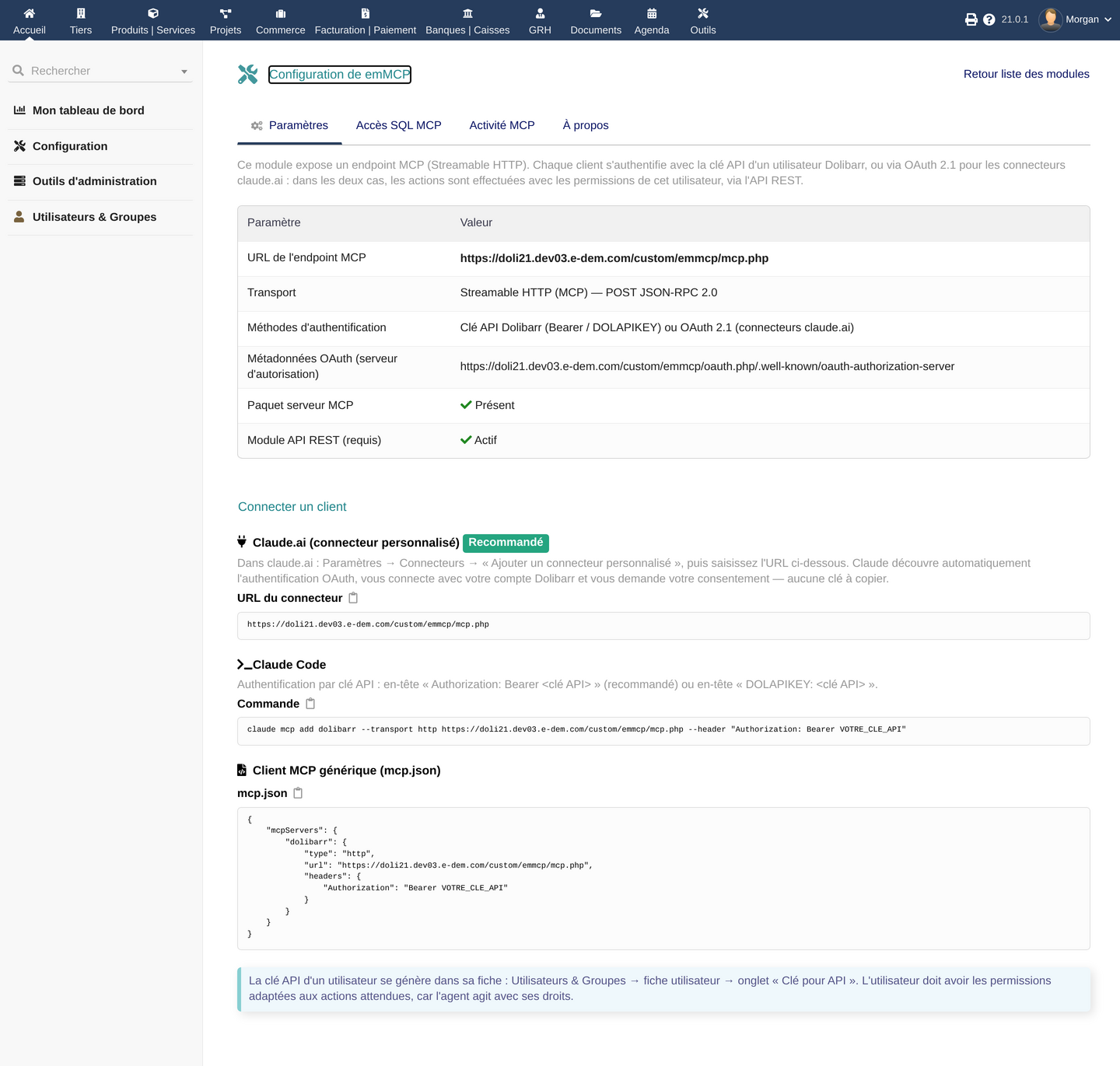
The Settings tab shows your MCP server URL and generates the ready-to-paste command or file for each type of client.
Claude.ai (custom connector — recommended)
- In claude.ai: Settings → Connectors → "Add custom connector"
- Paste the connector URL shown on the emMCP setup page (
https://your-dolibarr/custom/emmcp/mcp.php) - Claude automatically discovers OAuth 2.1, redirects you to your Dolibarr to sign in, and asks for your consent — no key to copy
Claude Code
Dolibarr API key authentication, via the Authorization: Bearer header (recommended) or DOLAPIKEY.
claude mcp add dolibarr --transport http https://your-dolibarr/custom/emmcp/mcp.php \
  --header "Authorization: Bearer YOUR_API_KEY"
Generic MCP client (mcp.json)
For any MCP client that supports the HTTP transport:
{
    "mcpServers": {
        "dolibarr": {
            "type": "http",
            "url": "https://your-dolibarr/custom/emmcp/mcp.php",
            "headers": {
                "Authorization": "Bearer YOUR_API_KEY"
            }
        }
    }
}
Getting an API key
A user's API key is generated from their own record: Users & Groups → user record → "API key" tab. The user should have the Dolibarr permissions matching what the agent is expected to do, since the agent acts with that user's rights.
Replace
YOUR_API_KEYwith the real key generated for that user. Never share this key and never commit it to a code repository.
Permissions and authentication
emMCP does not create a separate technical account. It fully relies on Dolibarr's existing authentication and rights.
Authentication methods
| Method | Used by |
|---|---|
Dolibarr API key (Authorization: Bearer or DOLAPIKEY) |
Claude Code, generic MCP clients, scripts |
| OAuth 2.1 with mandatory PKCE (S256) | Claude.ai and equivalent connectors |
The OAuth implementation complies with RFC 9728 (Protected Resource Metadata), 8414 (Authorization Server Metadata) and 7591 (Dynamic Client Registration). Access tokens are short-lived (1 hour), refresh tokens (30 days) are automatically replaced on every refresh (rotation), and all tokens are stored only as a hash — never in plain text.
Effective permissions
There is no "AI agent" role in Dolibarr: every standard business tool runs with exactly the rights of the authenticated Dolibarr user, through the native REST API. These tools show up in the list offered to the agent regardless of your actual right on the target object — it is Dolibarr's REST API that refuses execution if the right is missing (the tool is visible, the action is refused). Only the SQL query tool is structurally hidden until its four conditions are met (see below): that is the real difference between "invisible tool" and "visible tool refused at execution time".
To reduce an agent's blast radius, the recommended practice is still to give it a dedicated, restricted Dolibarr user (least privilege), using Dolibarr's fine-grained per-object permissions (read-only on some modules, no delete right, etc.) rather than connecting an administrator account.
Revoking access
There is no generic "emMCP access" right to remove: standard business tools simply follow the user's usual Dolibarr rights. Revocation depends on the connection mode:
- API-key client (Claude Code, generic client): regenerate the API key of the relevant Dolibarr user (user record → "API key" tab). This immediately cuts that client's access.
- OAuth connector (claude.ai): regenerating the API key is not enough — the OAuth access token (1 hour) renews itself automatically via its refresh token, independently of the API key; expiry is not the same as revocation. To cut access immediately, disable the associated Dolibarr user or disable the emMCP module.
There is no self-service button to revoke a specific OAuth token in this version. For a targeted revocation need beyond disabling a user or the module, contact E-dem support.
Dedicated SQL right: the "SQL MCP access" right (
emmcp->sqlquery->read) is a real Dolibarr right that can normally be removed from the user record, in addition to its opt-in — see the SQL section below.
Available tools
emMCP exposes a set of MCP tools covering most of Dolibarr's REST API. They all appear in the list offered to the agent; it is Dolibarr's REST API that refuses execution if the user's right is missing.
| Family | Tools | Role |
|---|---|---|
| Reading | dolibarr_list, dolibarr_get, dolibarr_get_contacts |
List, retrieve one record, list linked contacts |
| Writing | dolibarr_create, dolibarr_create_from, dolibarr_update, dolibarr_delete |
Create, create from another object (e.g. quote → invoice), update, delete |
| Lines & time | dolibarr_add_line, dolibarr_add_time_spent |
Add a line to a document, log time spent |
| Workflow | dolibarr_action |
Trigger a business action (e.g. validate a document) |
| Contacts | dolibarr_link_contact |
Link a contact to an object |
| Extra fields | dolibarr_extrafield_update, dolibarr_extrafield_delete |
Manage an object's extrafields |
| Documents | dolibarr_documents_list, dolibarr_documents_upload, dolibarr_documents_download, dolibarr_documents_delete, dolibarr_documents_builddoc |
Manage attached files and generate a document (e.g. a PDF) |
| Files | dolibarr_files_create |
Create a generic file |
| Diagnostics | dolibarr_environment, dolibarr_api_explorer |
Information about the connected instance; explore available REST endpoints |
| SQL | dolibarr_sql_query, dolibarr_sql_schema |
Read-only SQL query and schema — hidden until all 4 conditions are met, see below |
Example: a cautious workflow before a data-changing action
Writing tools (dolibarr_create, dolibarr_update, dolibarr_delete, dolibarr_action for a validation…) genuinely act on your Dolibarr. Recommended practice for these:
- First ask the agent to list or retrieve the relevant record (
dolibarr_list/dolibarr_get) and show what it intends to change - Confirm yourself that it is indeed the expected record
- Then explicitly ask for the write action, rather than giving it a broad, implicit mandate ("take care of my invoices")
This is about how you use the AI client (Claude.ai, Claude Code) rather than an emMCP setting: the module enforces Dolibarr's rights, but cannot tell whether a natural-language request is ambiguous.
The exact set of tools available depends on your Dolibarr rights: a tool that assumes a right you don't have simply does not appear in the list offered to the agent.
Read-only SQL access
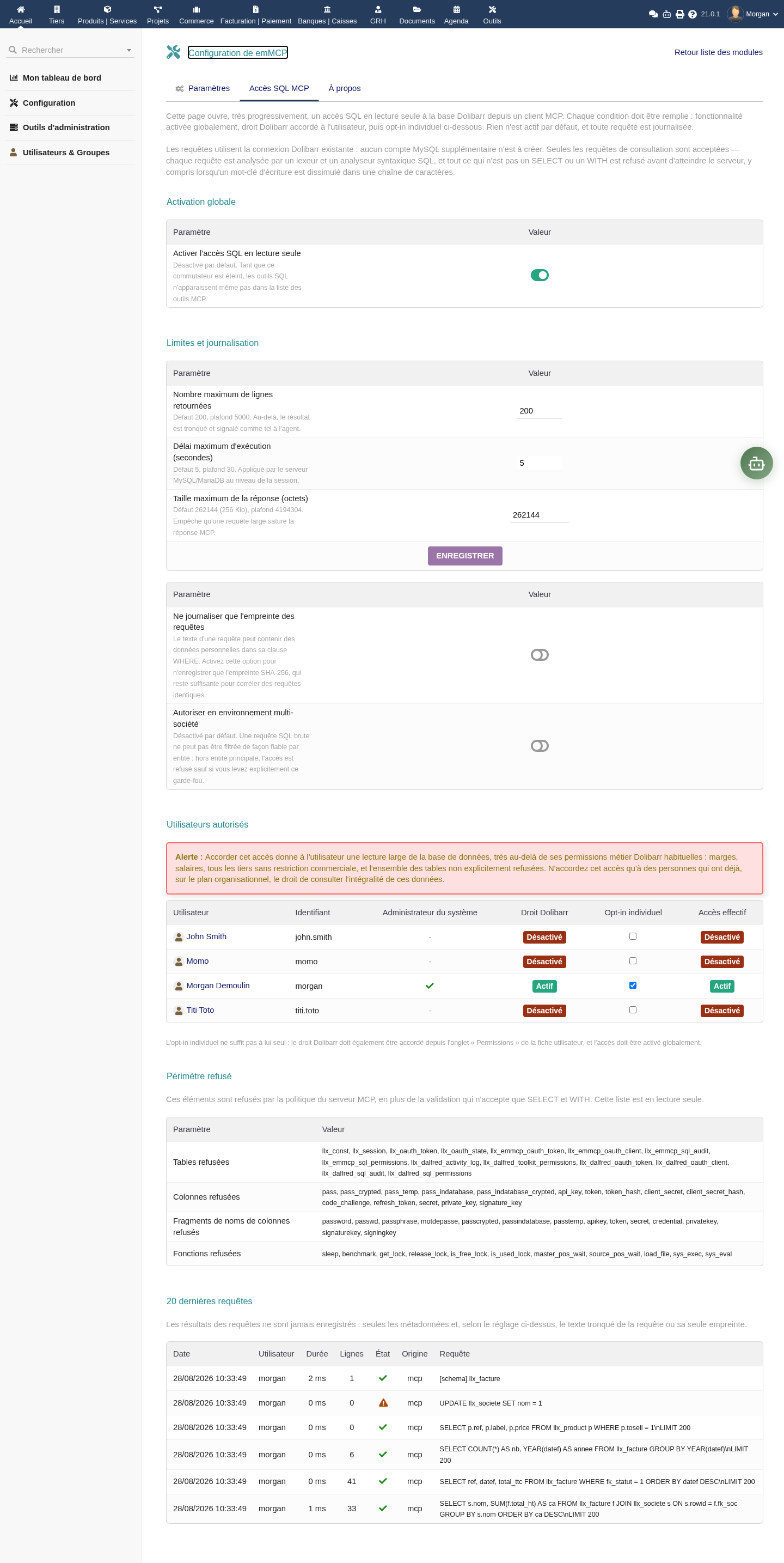
Beyond the standard business tools, emMCP can expose a read-only SQL query tool. This is not an ordinary Dolibarr business right: granting this access gives broad read access to the database, well beyond usual business permissions (margins, salaries, every thirdparty with no commercial restriction). Dolibarr itself displays this warning on the setup page.
The four conditions
The SQL tool stays invisible to the agent until all four of these conditions are met:
- Global switch enabled in the module's configuration (disabled by default)
- Dedicated Dolibarr right granted to the user ("SQL MCP access", in the Permissions tab of their record)
- Individual opt-in checked by name for the user on the setup page — the right alone is not enough
- No Multicompany block: in a multi-entity environment, access is refused by default (a raw SQL query cannot be reliably filtered by entity), unless multi-entity support is explicitly enabled
What protects the query itself
- A single
SELECTorWITHstatement per call, on the existing Dolibarr connection — no separate MySQL account is required or created. Queries run on Dolibarr's own credentials, on a separate mysqli session. - Every query is parsed by a lexer and syntax analyzer that reject any query that isn't structurally a SELECT (a word like 'UPDATE' inside a searched text value stays allowed — it isn't a write, only the query's structure matters).
- Default caps: 200 rows (configurable up to 5000) and 256 KiB of response size (up to 4 MiB), enforced by the module itself while streaming the results without loading them fully into memory; a 5-second timeout (up to 30) and a read-only transaction, those enforced by the MySQL/MariaDB session itself.
Example accepted query
SELECT rowid, ref, total_ttc, datef
FROM llx_facture
WHERE fk_statut = 1
ORDER BY datef DESC
LIMIT 20
A query that names its columns explicitly, like the one above, is easier to audit in the log than a SELECT * — even though the latter stays allowed when no sensitive column is exposed.
- Sensitive columns refused by name: passwords, API keys, tokens, secrets (
pass,pass_crypted,api_key,token,client_secret,refresh_token,secret,private_key…), as well as any column name containing a sensitive fragment (password,token,secret,credential…). SELECT *is not blocked outright: it is resolved column by column, and refused by name only if it would expose a sensitive column.- Risky functions blocked:
sleep,benchmark,get_lock,release_lock,load_file,sys_exec,sys_eval, etc. - Technical tables excluded: session tables, OAuth token tables, and the emMCP module's own audit/permission tables (and, where applicable, other E-dem modules sharing the database) are explicitly out of scope.
- Every query is logged with its metadata (user, duration, row count, status); results themselves are never stored. The query text itself can be reduced to a SHA-256 fingerprint if your privacy policy requires it ("Fingerprint-only query logging" option).
Honest limits
⚠️ This tool is restricted to MySQL/MariaDB — PostgreSQL is not supported for the SQL tool. This is a volume and scope safeguard, not an absolute guarantee against every risk: keep it disabled if you have no use for it, and only grant the right and the opt-in to users who already have, organizationally, the right to see all of this data.
Activity, quota and alerts
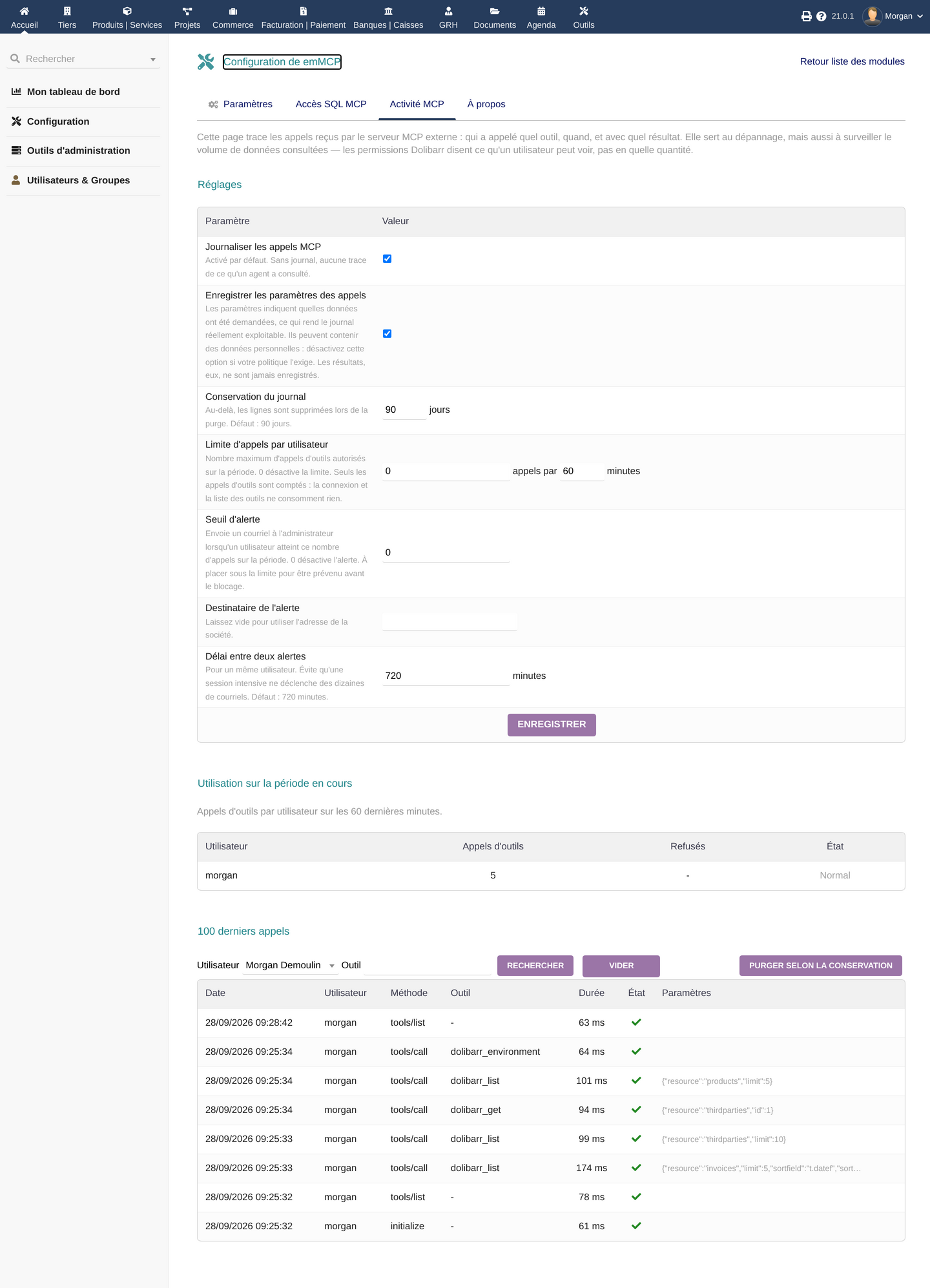
The MCP Activity tab traces calls received by the external MCP server: who called which tool, when, and with what result.
Settings (with their defaults)
| Setting | Default | Effect |
|---|---|---|
| Log MCP calls | Enabled | Without logging, there is no trace of what an agent looked at |
| Record call parameters | Enabled | Parameters show which data was requested; may contain personal data — can be disabled separately for privacy (results themselves are never stored either way) |
| Log retention | 90 days | Beyond this, rows are deleted on purge |
| Per-user call limit | 0 (disabled), 60-minute window | Maximum number of tool calls allowed over the rolling period; 0 disables the limit |
| Alert threshold | 0 (disabled) | Sends an email to the administrator when a user reaches this number of calls over the period |
| Cooldown between alerts | 720 minutes (12h) | For a given user, prevents an intensive session from triggering dozens of emails |
A "Purge according to retention" button lets you manually trigger deletion of entries beyond the configured duration.
About the quota
The quota only counts tools that actually ran (a successful tools/call): connecting (initialize) and listing available tools (tools/list) cost nothing against it. A database counting failure is deliberately fail-open (it does not fail the request): this mechanism is a volume safeguard, not an anti-exfiltration security guarantee.
Important: to keep a quota or an alert meaningful, leave global logging enabled — disabling it also stops the quota and alert counters. Disable only argument recording if your privacy policy requires it.
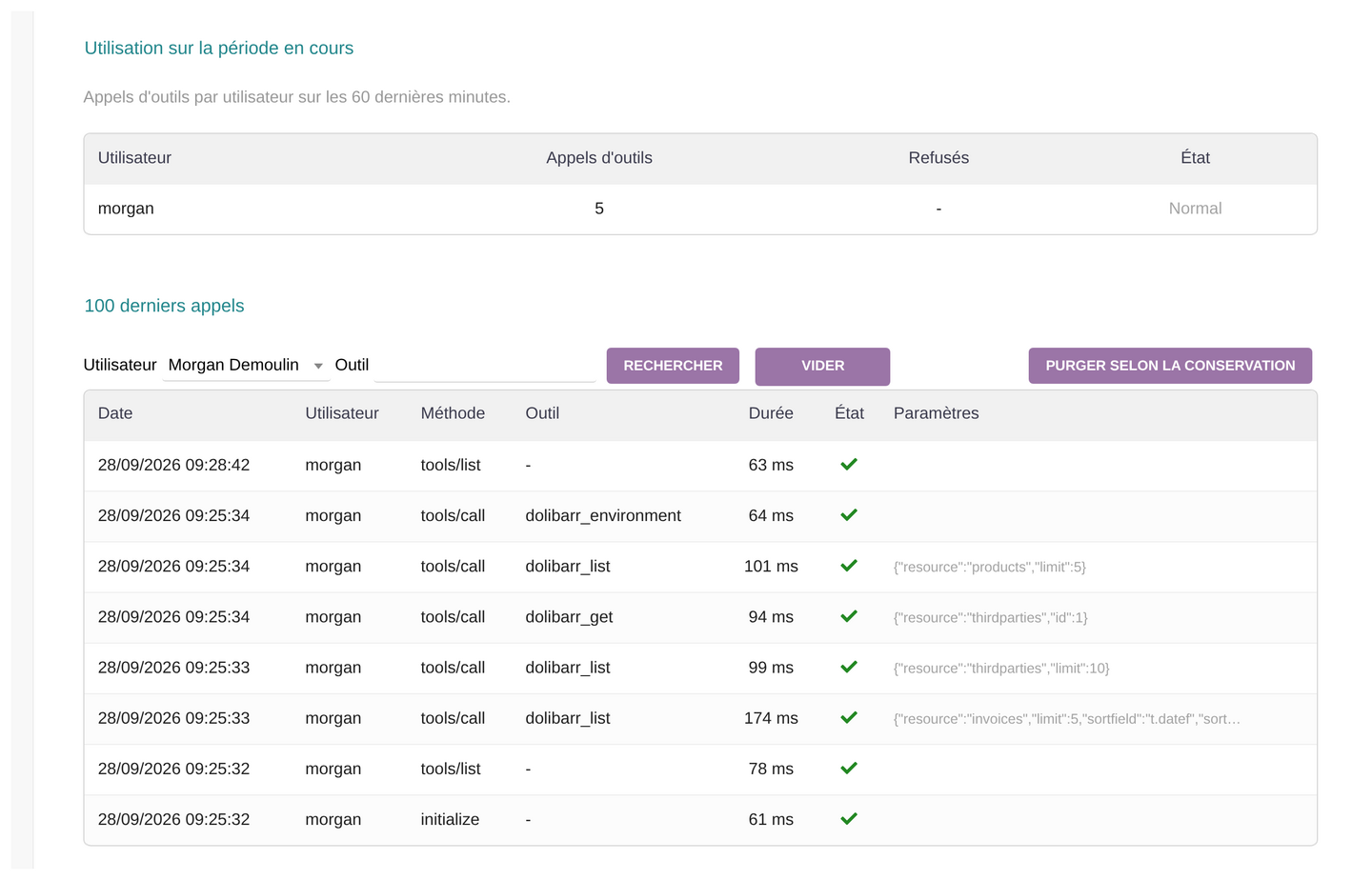
The "last 100 calls" table can be filtered by user and by tool, and shows the date, user, MCP method, tool called, duration and status (success, refused, error).
Troubleshooting
401 error right after OAuth consent
This is the most common issue, usually caused by the HTTP Authorization header not being forwarded by default under Apache in CGI/FPM mode (classic mod_php is not affected), or by an HTTPS reverse proxy in front of your server that strips it. The module ships .htaccess rules (RewriteRule and SetEnvIfNoCase re-exposing HTTP_AUTHORIZATION / REDIRECT_HTTP_AUTHORIZATION), but .htaccess only works where the host allows it — it is not guaranteed to be enough on every hosting setup. If the error persists:
- Check that the module's
.htaccessis actually applied (AllowOverrideneeds to be permitted for thecustom/emmcp/folder — some shared hosts disable it) - If you manage the Apache vhost yourself,
CGIPassAuth Onis the more robust, server-level fix — add it to the relevant<VirtualHost>or<Directory>block:
On shared hosting, ask your hosting provider/admin to enable this if you cannot edit the vhost yourself.<Directory "/path/to/dolibarr/htdocs/custom/emmcp"> CGIPassAuth On </Directory> - Under Nginx + PHP-FPM, add
fastcgi_param HTTP_AUTHORIZATION $http_authorization;to your configuration if needed - Behind an HTTPS reverse proxy or load balancer, make sure it explicitly forwards the
Authorizationheader end to end — some proxies strip it by default - Under Apache with
mod_php, this issue normally does not occur
The claude.ai connector can't find the OAuth configuration
Check that the connector URL points to mcp.php (not another page), and that your Dolibarr is reachable over HTTPS with a valid certificate — HTTPS is required, not optional.
SQL tools don't show up for a user
Reminder of the four conditions: global switch, Dolibarr right, individual opt-in, no Multicompany block. Missing just one is enough to keep the tool hidden — check all four in order.
A call is refused even though the user seems to have the rights
Check the activity log (MCP Activity tab): the Status column shows whether the call succeeded, was refused, or failed. An SQL tool refusal can come from a detected sensitive column, non-SELECT syntax, or a cap being exceeded (rows/time/size).
The quota seems to trigger too fast (or never)
Check that global logging is enabled: disabling it also stops quota and alert counting, even if the limit is configured to a non-zero value.
Known limits
- The direct SQL query tool is restricted to MySQL/MariaDB — PostgreSQL is not supported for this tool (other tools, based on the Dolibarr REST API, are not affected by this SQL-engine-specific limit).
- No targeted OAuth revocation button: rotate the key for an API-key client; to block an OAuth connector immediately, disable its associated user or the module. Rotating an API key does not revoke OAuth tokens.
- The SQL safeguards (caps, refused columns, gates) reduce the risk but are not an absolute guarantee: only grant this access to users who already have, organizationally, the right to see all of this data.
FAQ
Which clients does emMCP work with?
Claude.ai (custom connector with OAuth 2.1), Claude Code (API key authentication), and any MCP client compatible with the HTTP (Streamable) transport.
Does emMCP depend on the Dalfred module?
No. emMCP is a standalone module, shipped with its own dependencies (MCP server, OAuth handling, SQL engine). No other E-dem module needs to be installed first.
What permissions does the agent get on my data?
For standard business tools, the connected Dolibarr user's permissions, enforced by the REST API. Optional SQL access is an exception: its dedicated permission and opt-in grant broader read access without the usual business restrictions. Only grant it to users authorized to consult that data.
Is SQL access enabled by default?
No. It is disabled by default and requires a global switch, a dedicated Dolibarr right, an individual per-user opt-in, and no Multicompany block — all four conditions must be met.
What does the DoliStore price include?
Purchasing the module (15.00 € excl. VAT) includes 1 year of updates and downloads from the DoliStore.
Does my data stay inside Dolibarr?
No, not exclusively. emMCP does run on your own server, but its whole purpose is to send the requested data to the AI client you connected (claude.ai, Claude Code, or another) so it can answer. That data leaves Dolibarr for the AI provider you chose, under that provider's own terms — this isn't specific to emMCP, it's how the MCP protocol works.
Where can I get help?
- E-dem support: Contact us for any technical question
- MCP documentation: modelcontextprotocol.io for the protocol specifications
- See also: Dalfred, our AI agent built into Dolibarr with its own conversational interface and its own MCP access