- What is Peppol?
- Why EMPeppol?
- Prerequisites
- Installation
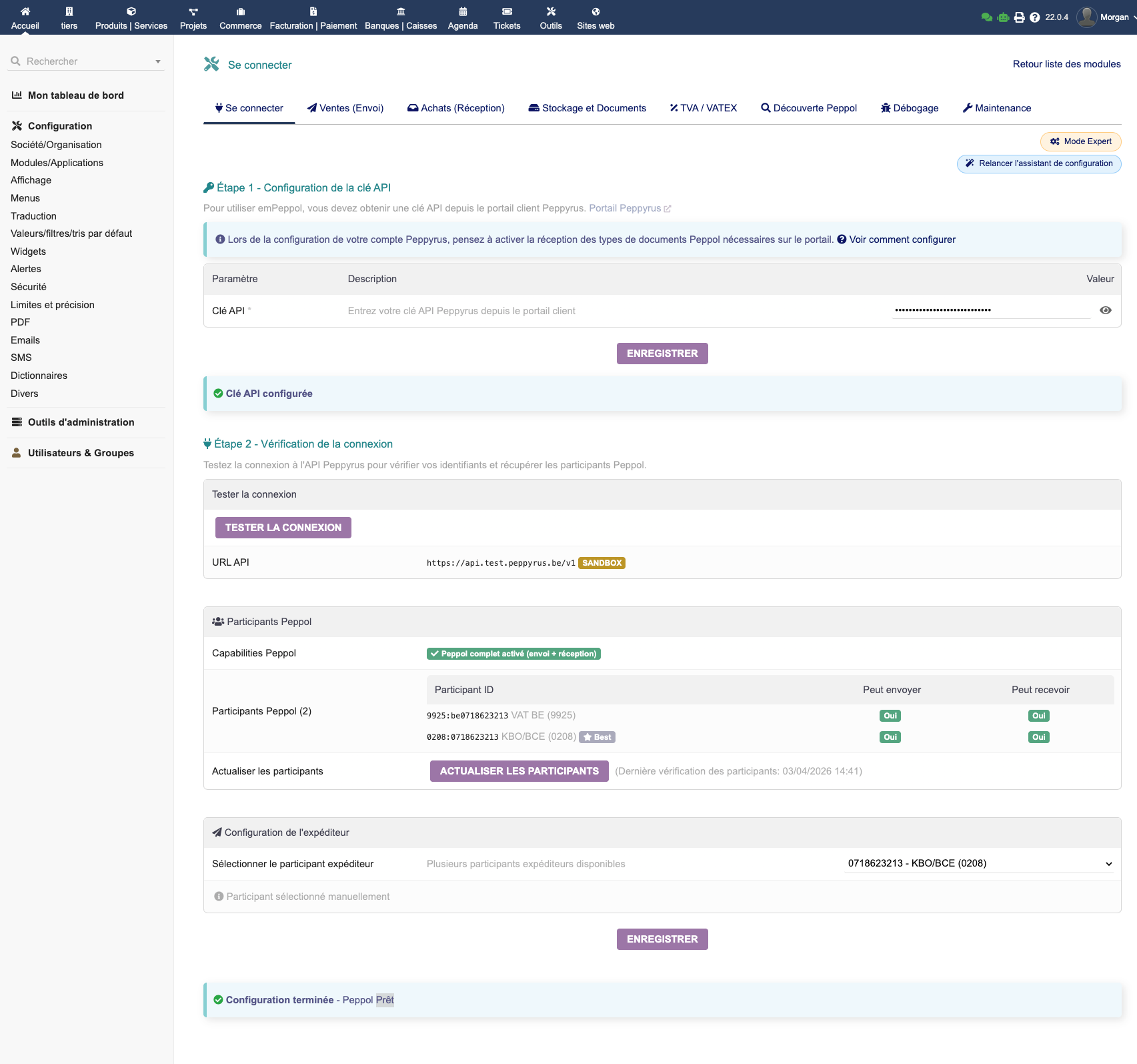
- Initial Configuration (Wizard)
- Sending Invoices
- Receiving Invoices
- Peppol Messaging (Invoice Message Response)
- Peppol Discovery & Multi-ID
- VAT / VATEX Mapping
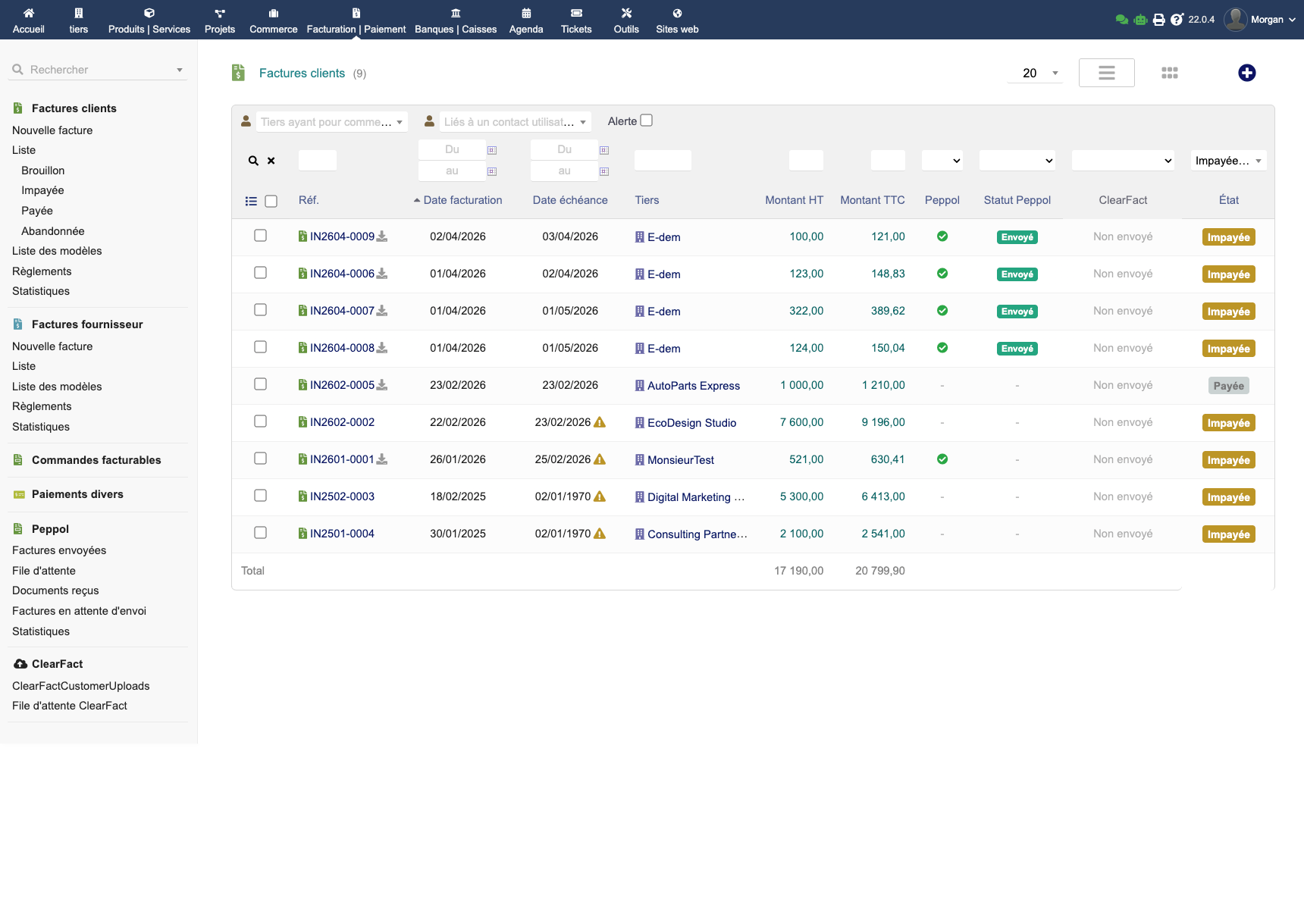
- Tracking & Statistics
- Advanced Configuration
- Maintenance and Diagnostics
- FAQ
EMPeppol — Peppol Electronic Invoicing for Dolibarr
EMPeppol connects your Dolibarr ERP to the European Peppol network via the Peppyrus access point. It allows you to send and receive electronic invoices in UBL format, compliant with the EN 16931 and Peppol BIS Billing 3.0 standards, directly from your Dolibarr interface.
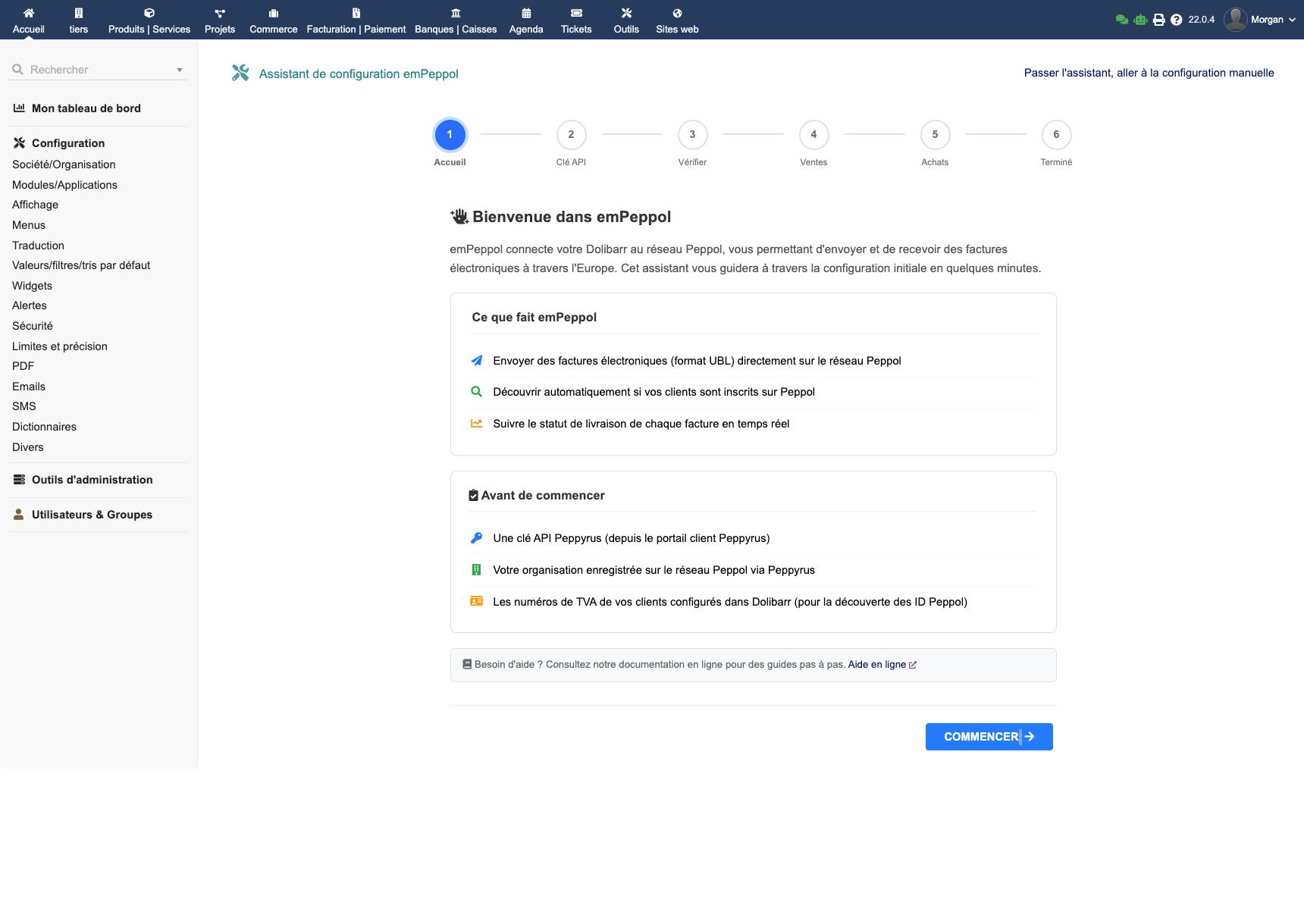
What is Peppol?
Peppol (Pan-European Public Procurement OnLine) is a standardised international network for exchanging electronic business documents. Used in over 30 countries, it is:
- Mandatory for B2G (Business-to-Government) invoicing in most EU countries
- Mandatory in Belgium for B2B starting 2026
- The reference standard for electronic invoicing in Europe
Why EMPeppol?
- Native integration — Send and receive your Peppol invoices directly from Dolibarr, without third-party software
- Free and unlimited sending — Thanks to Peppyrus, no cost per exchanged document. You pay for the module once, that's it
- Full compliance — EN 16931, Peppol BIS 3.0, VATEX codes, Invoice Message Response
- 5-minute setup — A setup wizard guides you step by step
- Multiple file attachments — Attach the invoice PDF and other documents to the UBL file
- Compatible with recent Dolibarr versions — PHP ≥ 7.4, Multicompany supported
Prerequisites
| Component | Minimum version |
|---|---|
| Dolibarr | Recent version |
| PHP | PHP ≥ 7.4 |
| PHP Extensions | soap, xml, json, curl |
You will also need a Peppyrus account (the Peppol access point used by EMPeppol). Your API key will be provided upon subscription.
Note: EMPeppol is compatible with Dolibarr multi-entity installations (Multicompany). Each entity can have its own configuration.
Installation
From the DoliStore
- Go to the DoliStore and search for EMPeppol
- Purchase the module and download the ZIP archive
- Extract the archive into the
htdocs/custom/folder of your Dolibarr installation - The final folder should be
htdocs/custom/empeppol/
Activation
- Log in to Dolibarr as an administrator
- Go to Home → Setup → Modules/Applications
- Search for "EMPeppol" and click Enable
A new EMPeppol menu appears in your navigation bar.
Initial Configuration (Wizard)
On first access, a setup wizard guides you through 6 steps.
Step 1: Peppyrus API Key
Enter your Peppyrus API key. The connection is tested automatically.
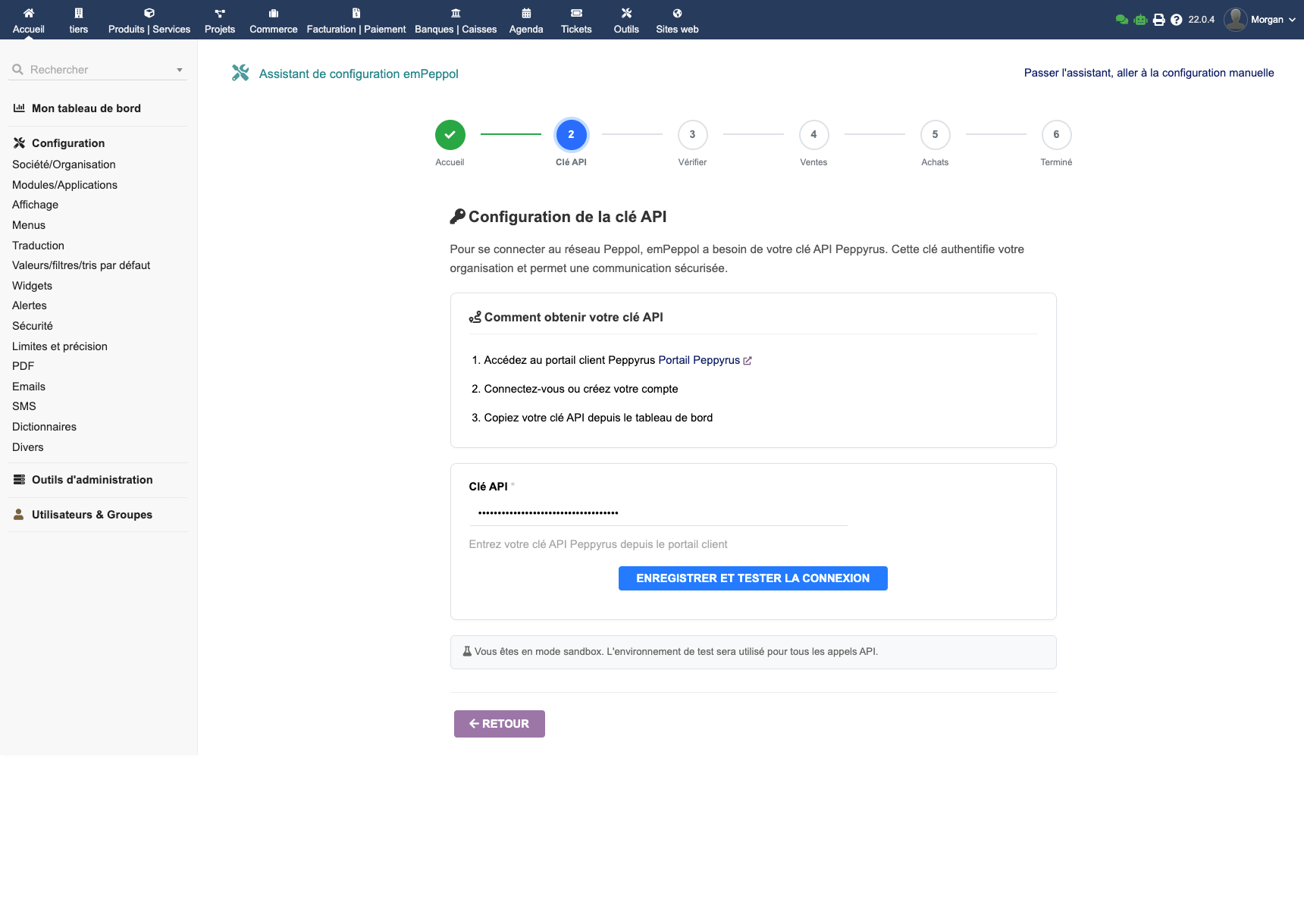
Tip: If you don't have an API key yet, contact Peppyrus to obtain one. EMPeppol works in both test and production environments.
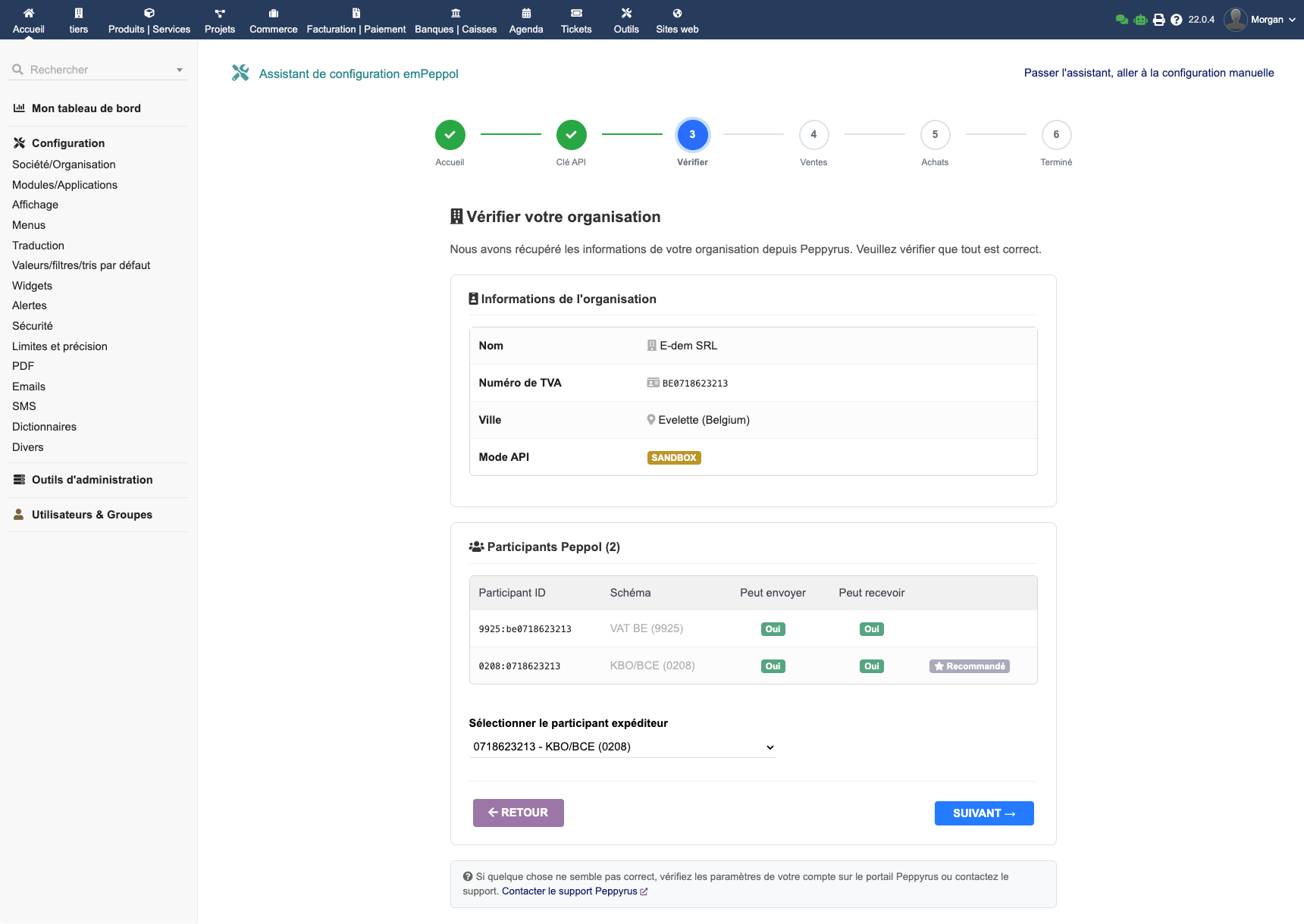
Step 2: Organisation Verification
EMPeppol automatically retrieves your organisation information from Peppyrus: name, VAT number, associated Peppol participants. Select the sender participant matching your company.
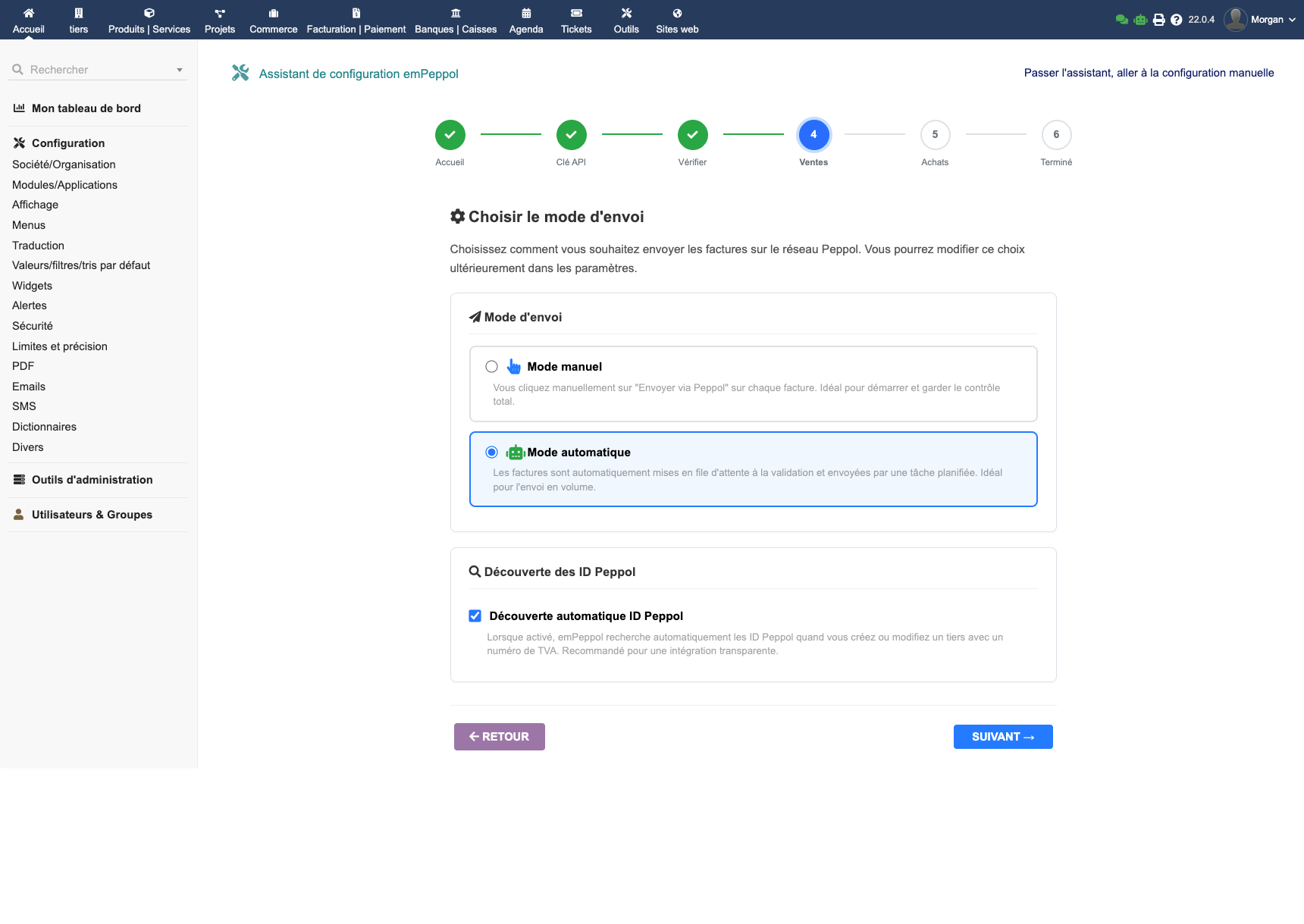
Step 3: Sending Mode
Choose your preferred sending mode:
- Manual: a send button on each invoice — you stay in control
- Automatic: invoices are sent as soon as they are validated in Dolibarr
You can also enable automatic discovery of your customers' Peppol identifiers.
Step 4: Reception
Enable incoming supplier invoice reception and configure automatic creation of unknown supplier third parties.
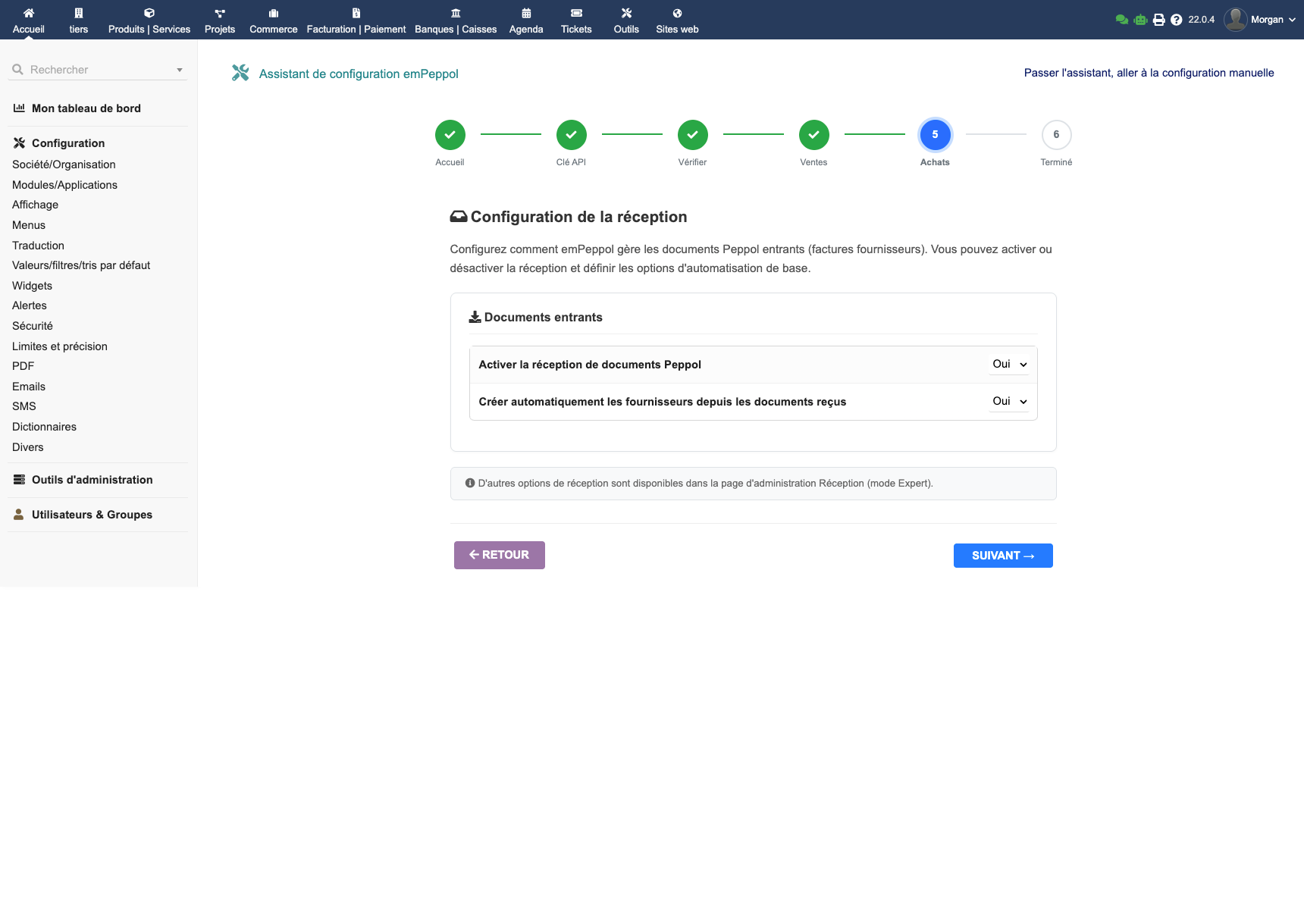
Step 5: VAT Mapping
Configure the correspondence between your Dolibarr VAT rates and Peppol categories. EMPeppol offers smart auto-detection that does the work for you in one click.
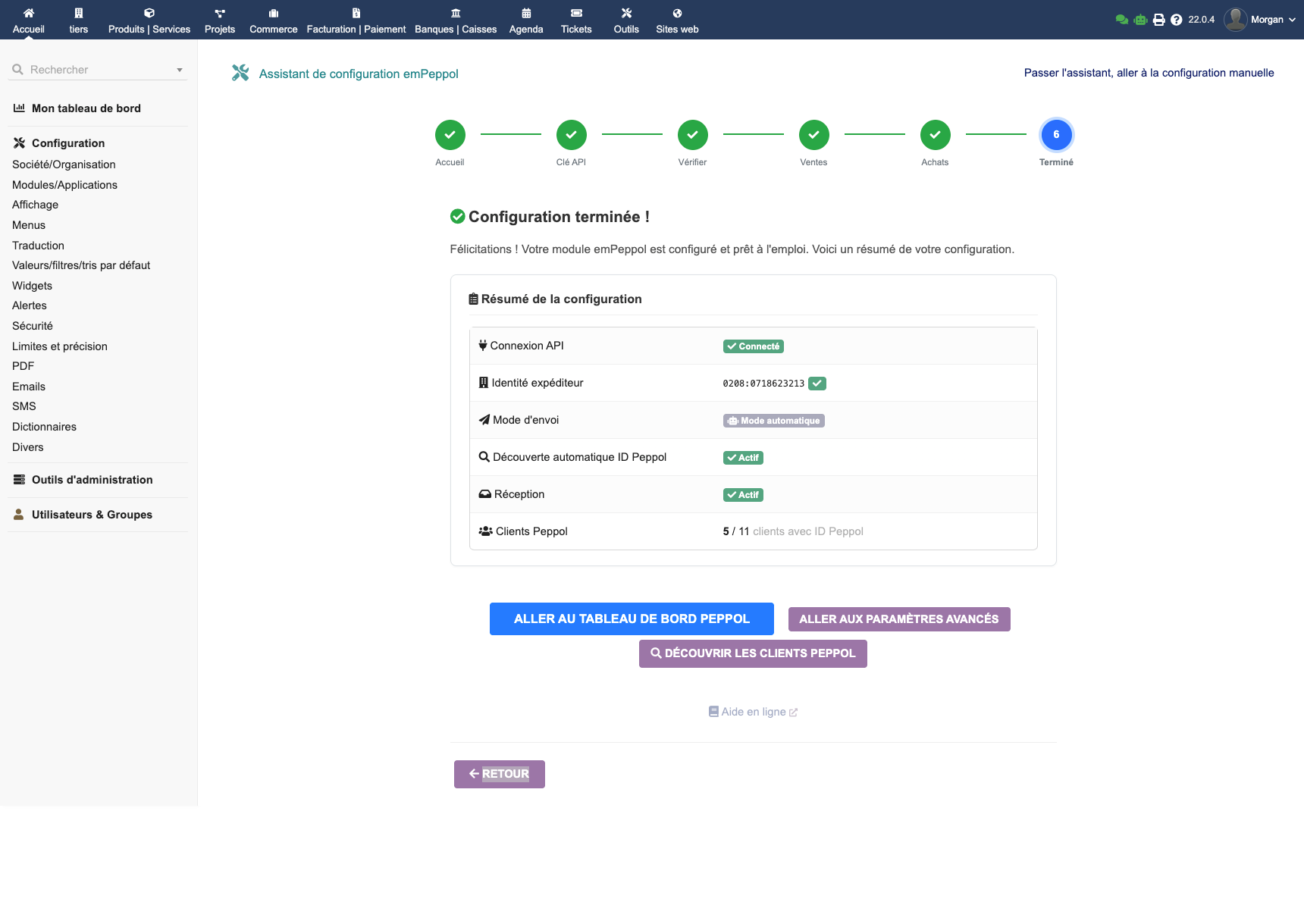
Step 6: Summary
The wizard displays a summary of your configuration and confirms that everything is operational.
Sending Invoices
Preparing an Invoice
For an invoice to be sent via Peppol, it must meet these conditions:
- The invoice must be validated (status "Unpaid" or higher)
- The customer must have a Peppol identifier filled in (company number, GLN, etc.)
- The invoice VAT rates must be mapped in the VATEX configuration
Sending an Invoice
- Open the invoice in Dolibarr
- Click on the Peppol tab
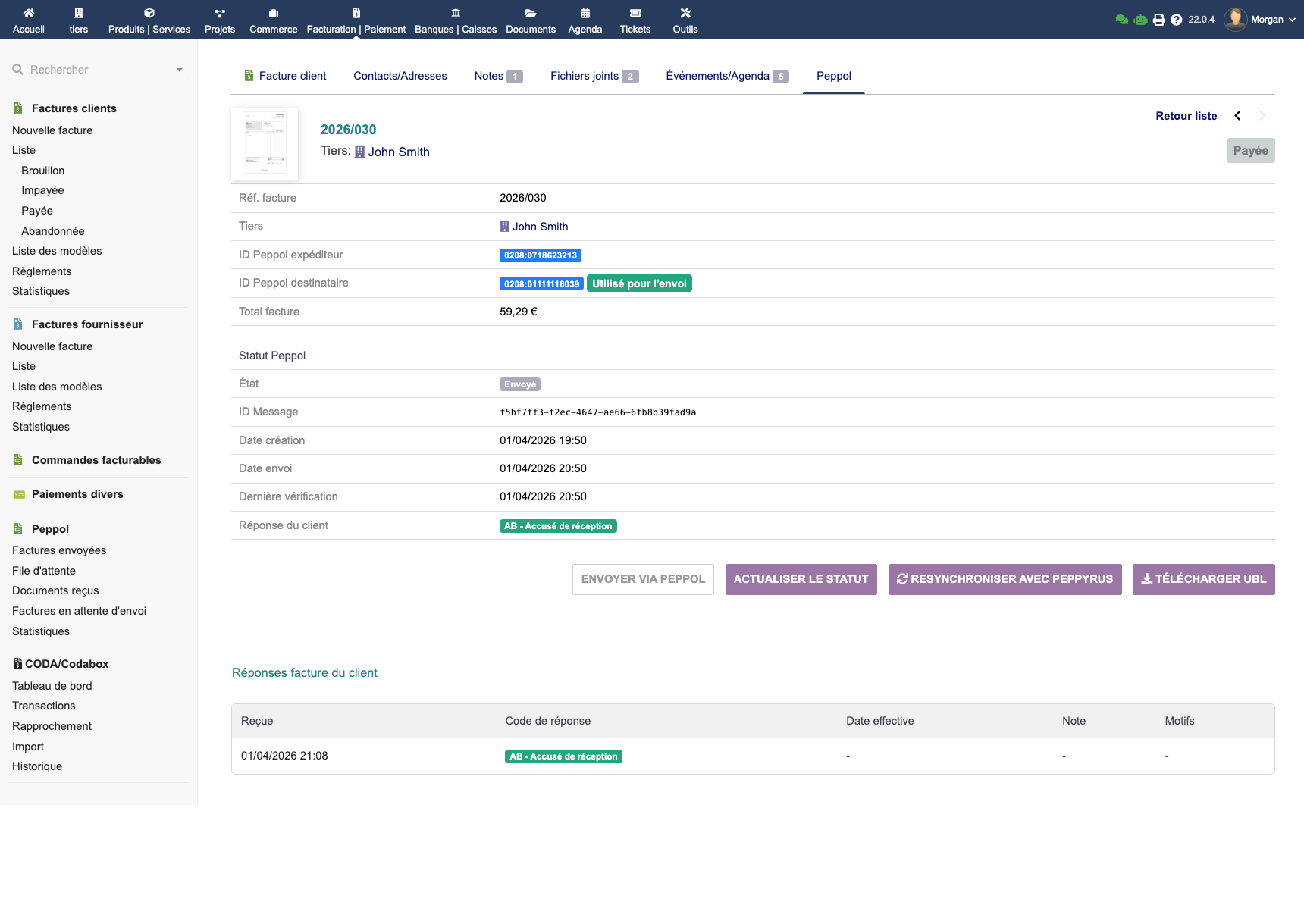
- Review the summary and recipient information
- Click Send via Peppol
The system generates the UBL document, sends it via Peppyrus and displays the status in real time.
Multiple File Attachments
EMPeppol allows you to attach multiple files to the UBL invoice sent over the Peppol network. In addition to the invoice PDF (included automatically), you can add annexes, purchase orders, plans or any other relevant document.
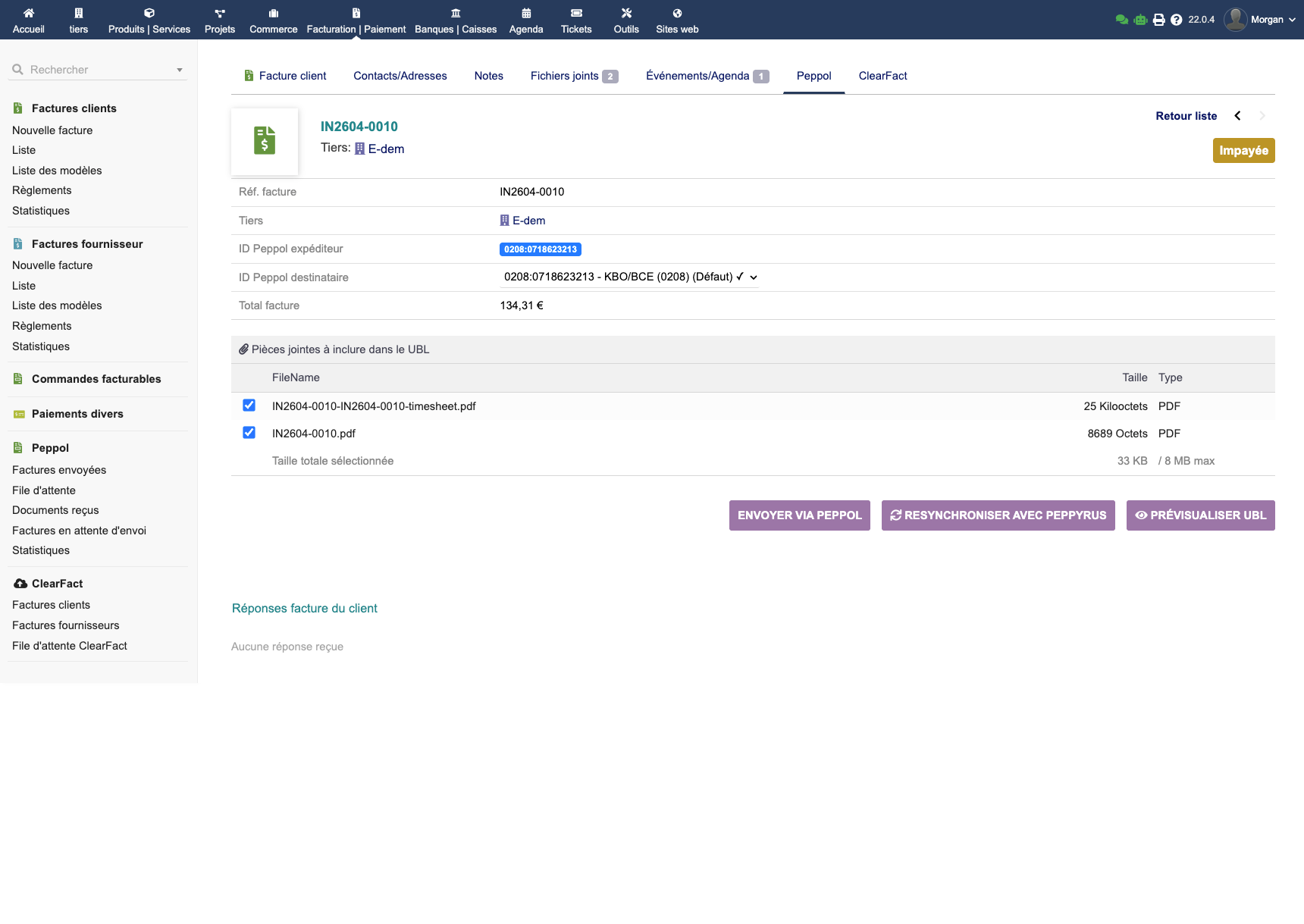
The recipient receives a complete package with the invoice and all supporting documents — directly in their accounting system.
Sending Statuses
| Status | Description |
|---|---|
| Pending | The invoice is ready but has not yet been sent |
| Sent | The invoice has been transmitted to the Peppol network |
| Delivered | The recipient has acknowledged receipt |
| Error | Sending failed (see the error message) |
Sending Queue
EMPeppol manages a sending queue for invoices in automatic mode. You can view pending invoices, resend them manually or process them in bulk.
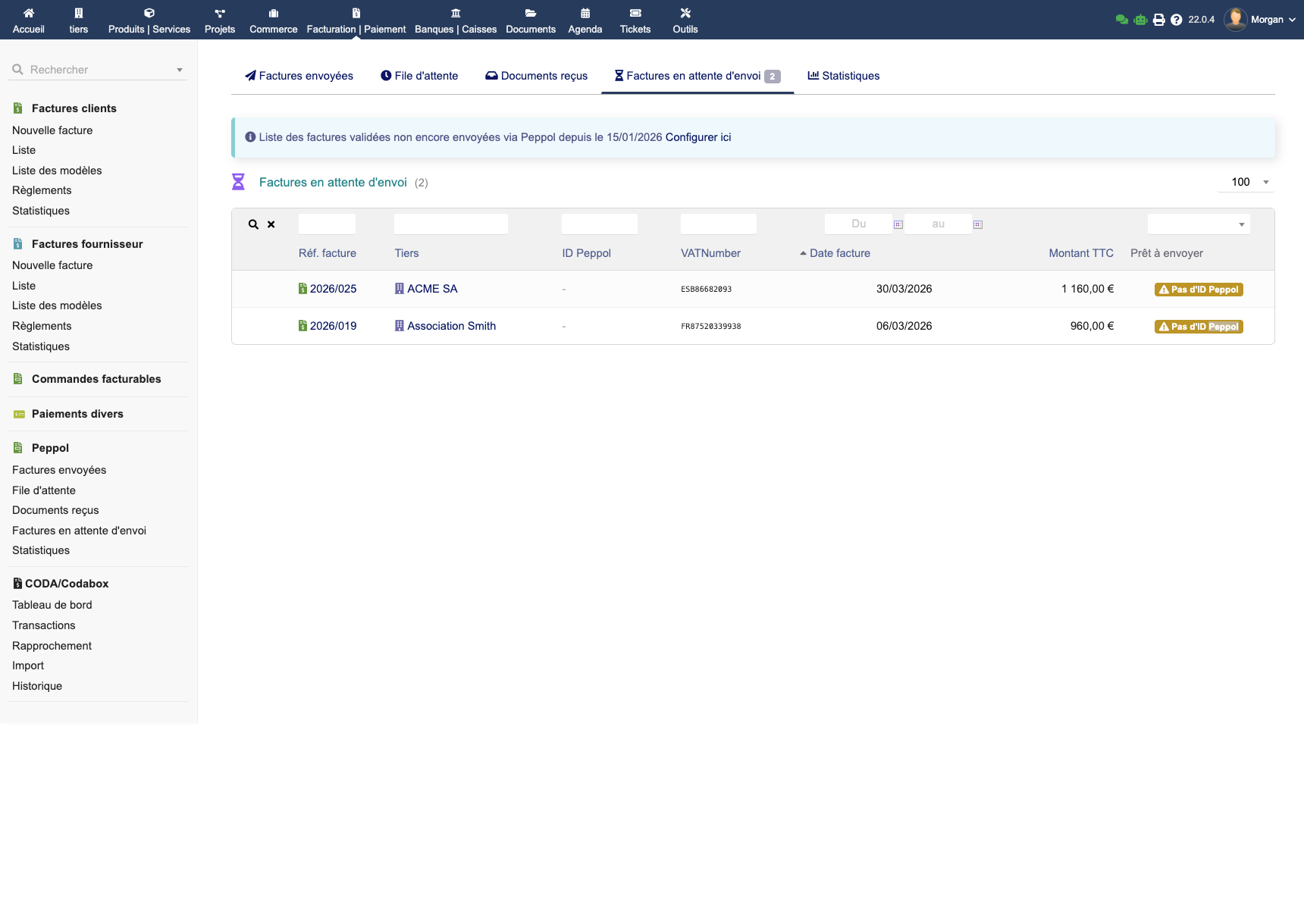
For experts: The sending queue can be configured with a start date (for historical catch-up), a maximum number of retry attempts, and scheduled tasks (cron) for automatic processing and status verification.
Receiving Invoices
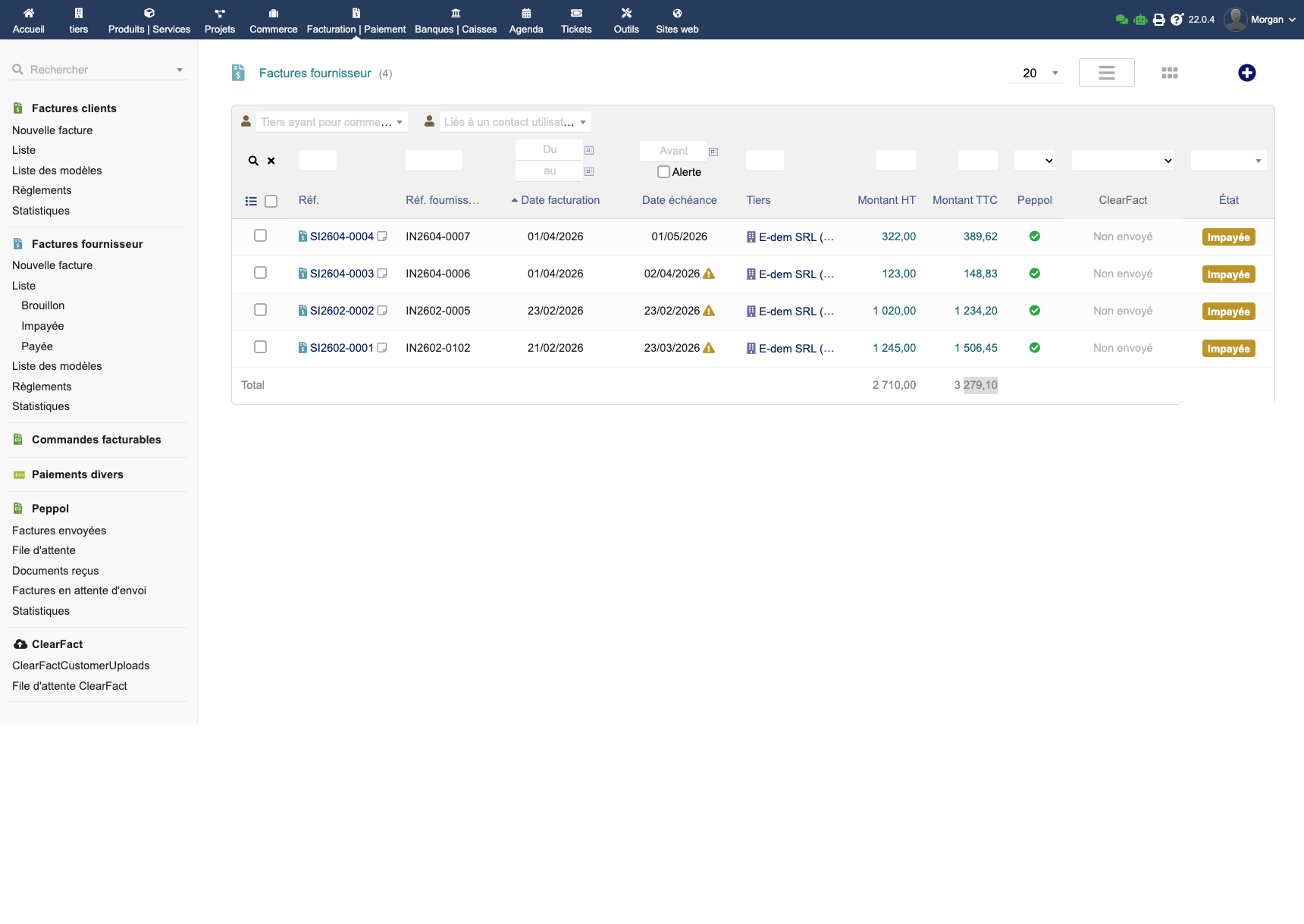
EMPeppol automatically receives incoming supplier invoices via the Peppol network and integrates them into Dolibarr.
How It Works
- EMPeppol periodically queries Peppyrus for new documents
- Each received document is parsed and converted into a Dolibarr supplier invoice
- If the sender matches an existing third party, the invoice is linked automatically
- Otherwise, a new supplier third party is created (if the option is enabled)
- Invoice lines are created with the amounts, VAT rates and descriptions from the Peppol document
Received Invoice List
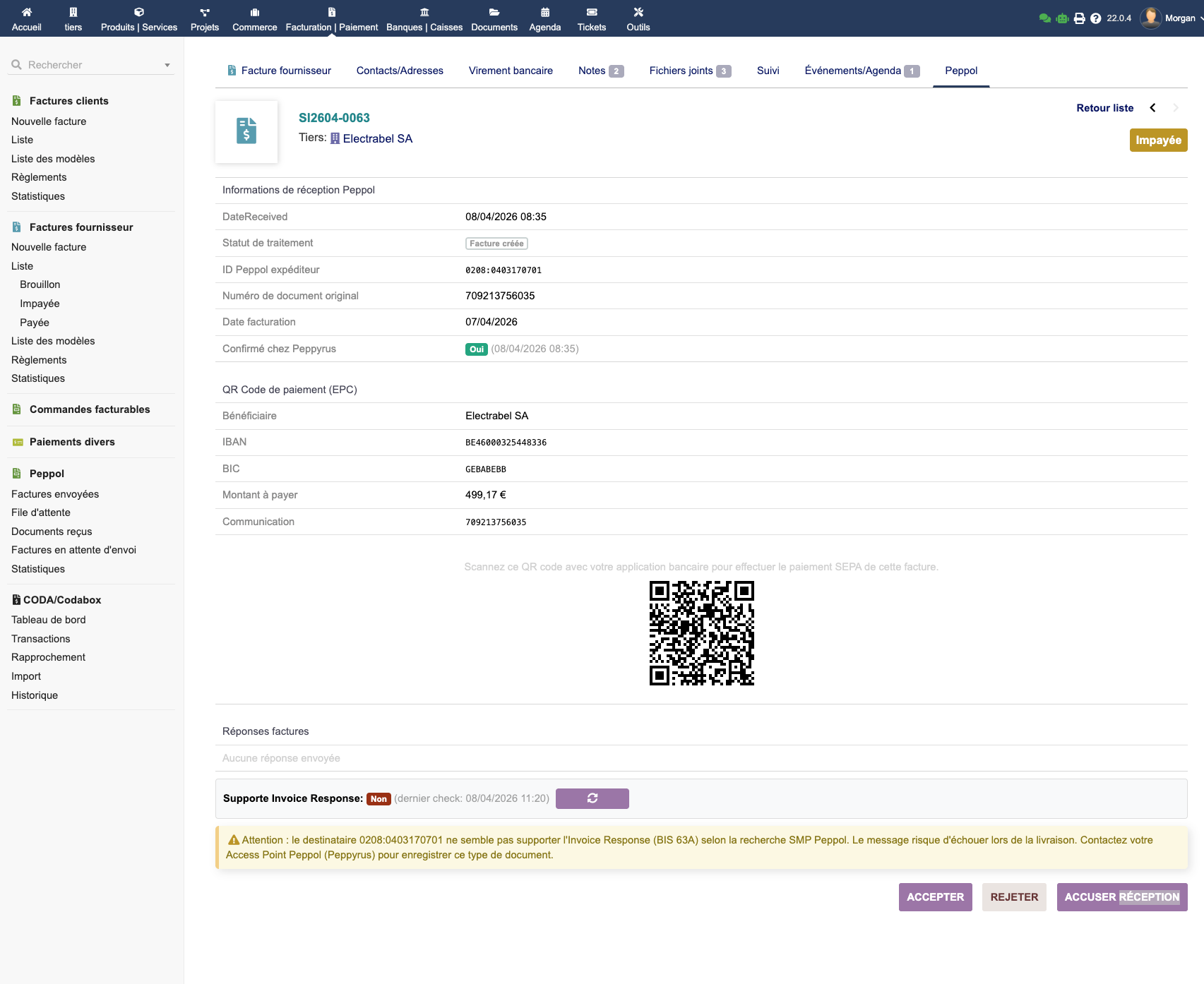
Payment QR Code
For received purchase invoices, EMPeppol displays an EPC QR code allowing quick payment via bank scan. Structured communication is supported.
For experts: In expert mode, you can configure automatic validation of received invoices, automatic document acknowledgement (MLR), synchronisation frequency, and stored attachments (source XML/UBL file).
Peppol Messaging (Invoice Message Response)
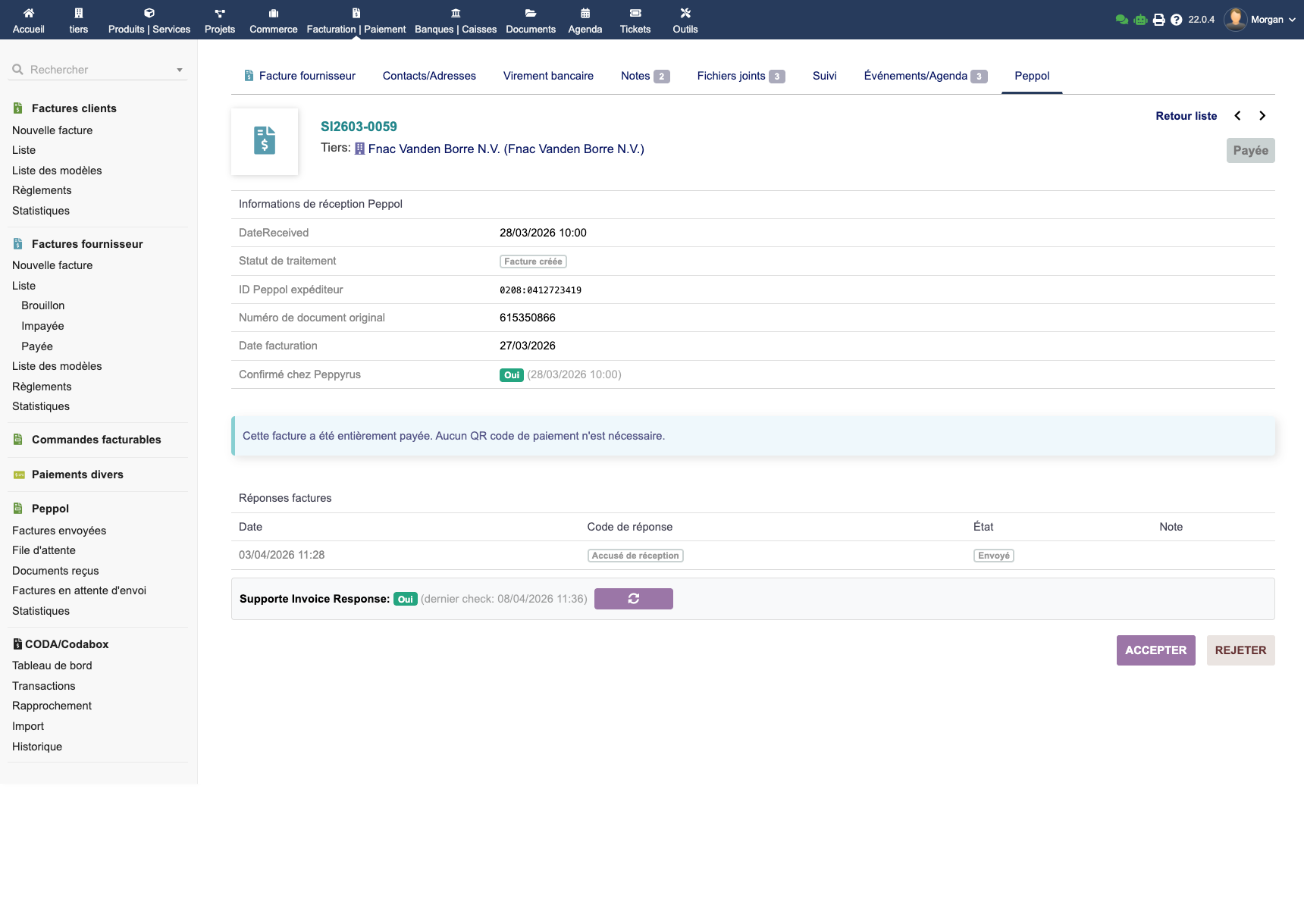
EMPeppol handles full Peppol responses (IMR — Invoice Message Response), a rare feature among Dolibarr modules. It works for both purchase and sales invoices.
Supported Response Types
| Response | Description |
|---|---|
| Acknowledgement | Confirmation that the document was received |
| Acceptance | The recipient accepts the invoice |
| Rejection with reason | The recipient rejects the invoice and explains why |
| Payment notification | The recipient signals that payment has been made |
Complete Workflow
For experts: Automatic acknowledgements (MLR) can be configured to automatically respond to received documents, in compliance with Peppol requirements.
Peppol Discovery & Multi-ID
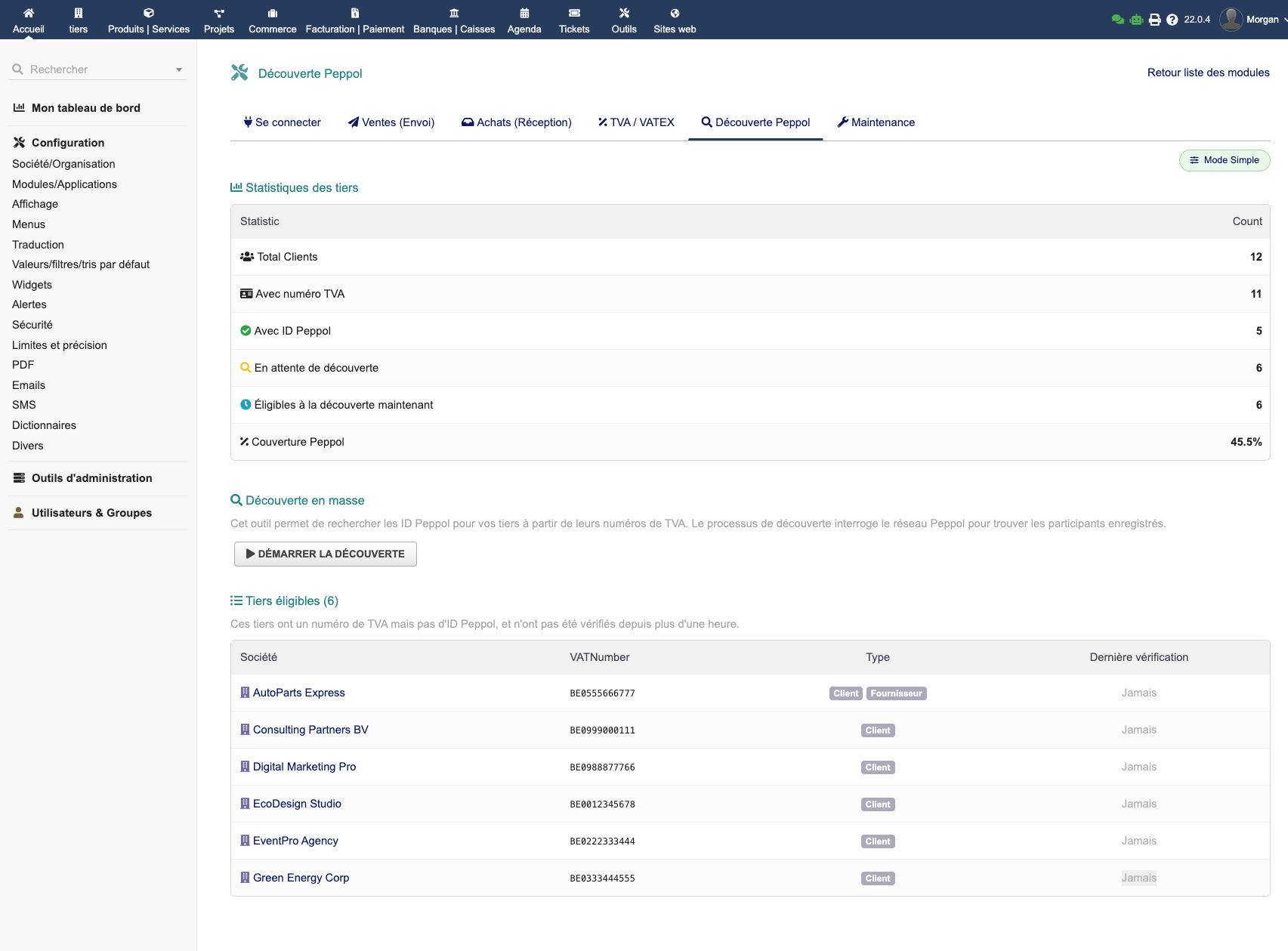
EMPeppol automatically detects whether your customers are registered on the Peppol network based on their VAT number.
Features
- Bulk discovery: scan all your customers in one click to find those on Peppol
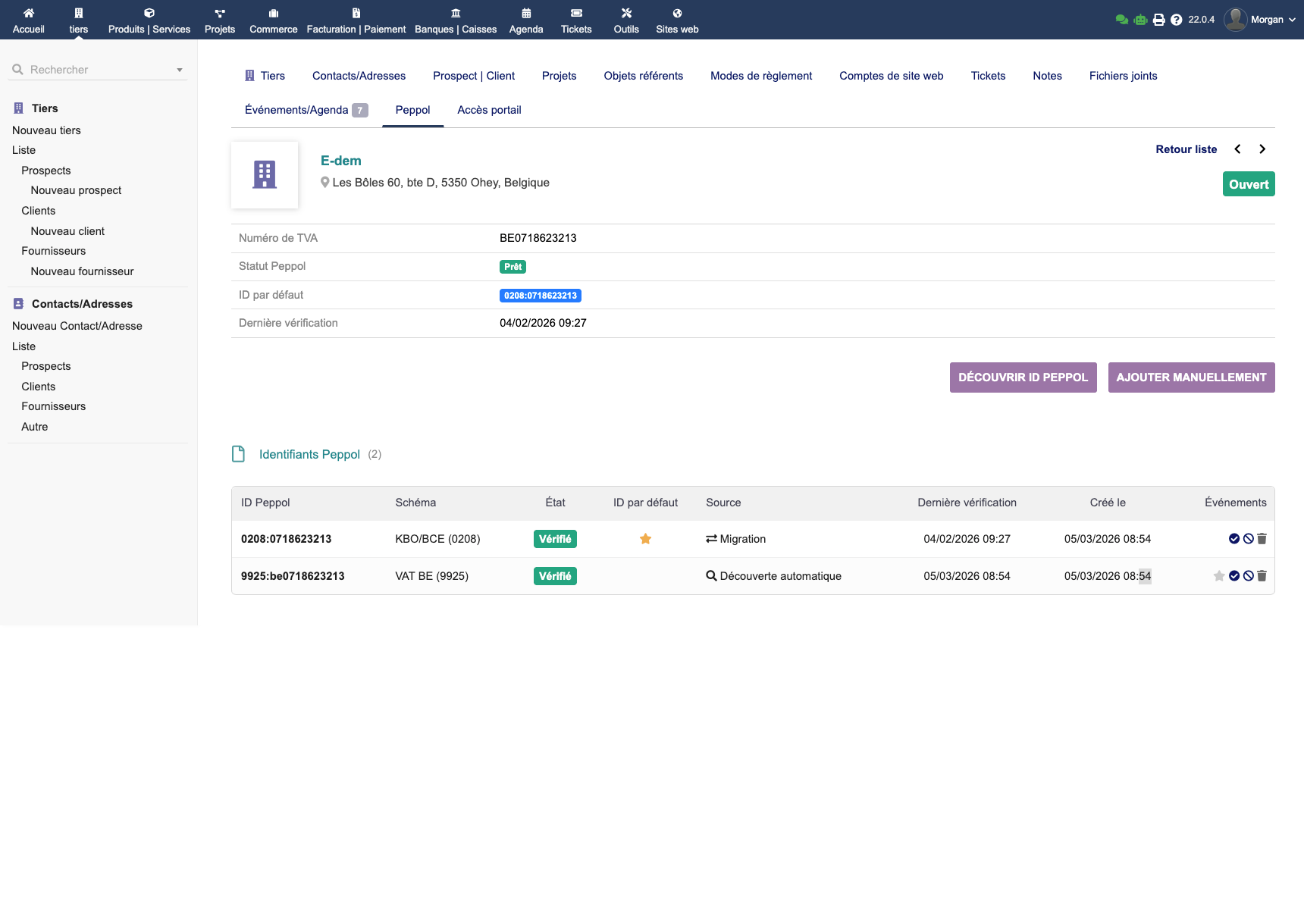
- Multi-ID: a customer can have multiple Peppol identifiers (company number, GLN, etc.). EMPeppol manages them all and lets you choose the right one when sending
- Peppol tab on third party card: view detected identifiers, Peppol status and exchange history
VAT / VATEX Mapping
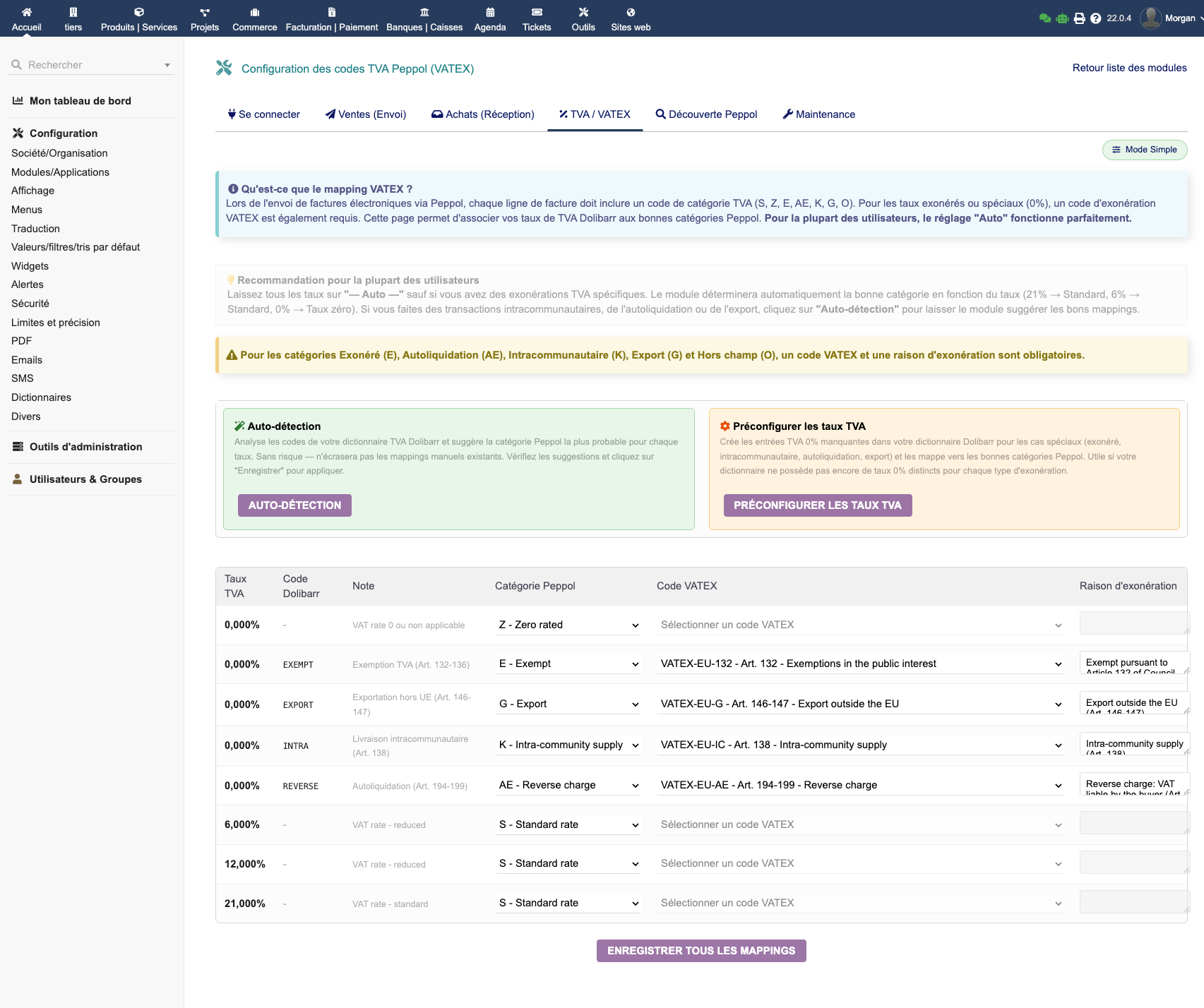
VAT mapping is essential for Peppol compliance. It establishes the correspondence between your Dolibarr VAT rates and Peppol categories.
Common VAT Codes
| Code | Description | Usage |
|---|---|---|
| S | Standard | Standard VAT rate (21%, 6%, etc.) |
| Z | Zero rated | 0% rate with right to deduct |
| E | Exempt | VAT exempt |
| AE | Reverse charge | Reverse charge (intra-community) |
| G | Export | Export outside the EU |
EMPeppol offers smart auto-detection that automatically maps your rates to the correct categories. You can also use the one-click pre-configuration for standard cases.
Important: Make sure to map all your VAT rates in use before sending invoices. An unmapped rate will cause an error when sending.
Tracking & Statistics
The EMPeppol dashboard gives you a complete overview of your Peppol exchanges.
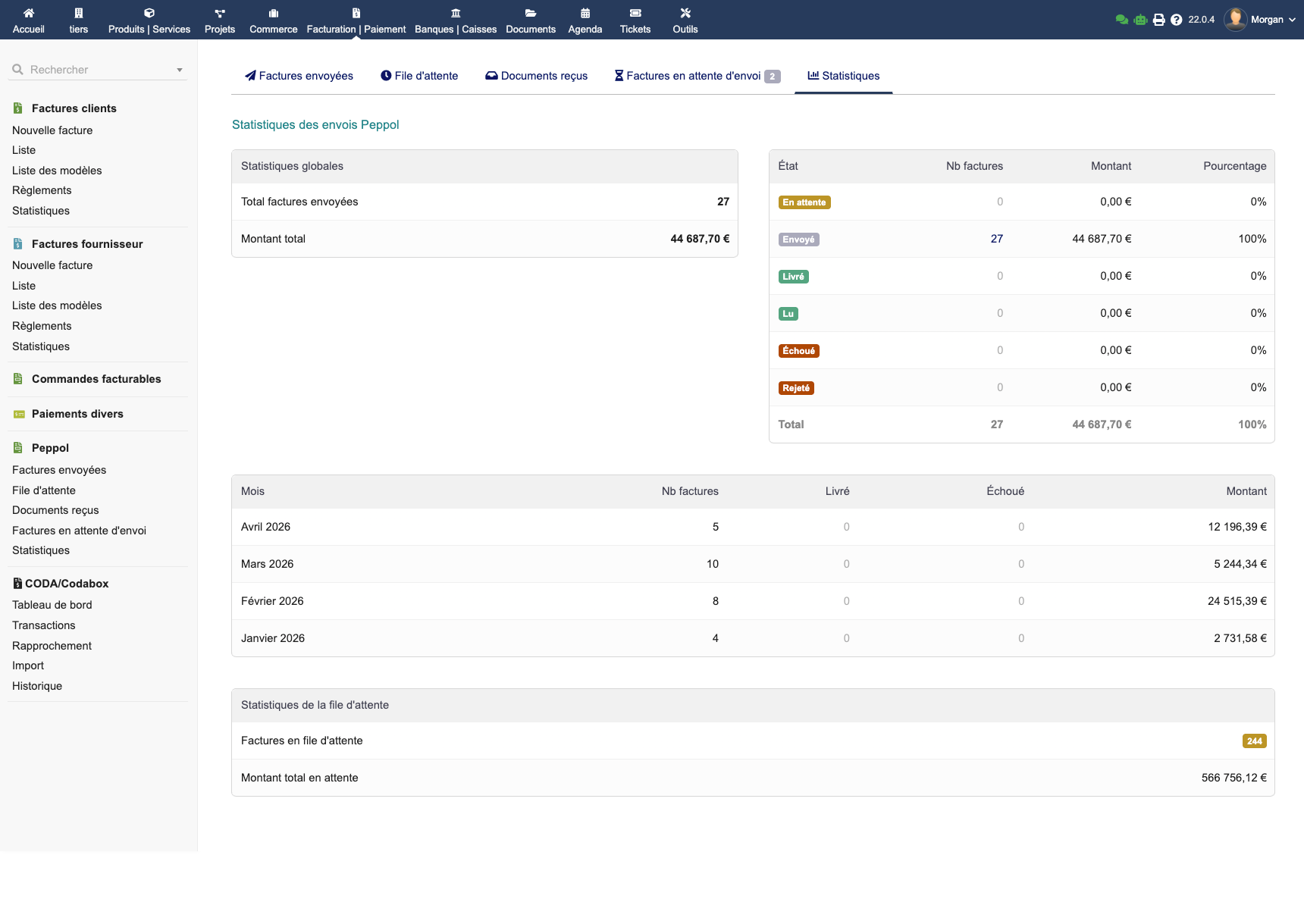
- Breakdown by status: delivered, pending, failed — with amounts
- Monthly history: sending and reception trends over time
- Sending queue: bulk processing of pending invoices
- Peppol columns in the invoice list: view the Peppol status directly from your invoice lists
Advanced Configuration
Simple Mode vs Expert Mode
EMPeppol offers two configuration modes:
- Simple Mode: essential options, perfect for getting started quickly
- Expert Mode: all customisation options for full control
Advanced Sending Options
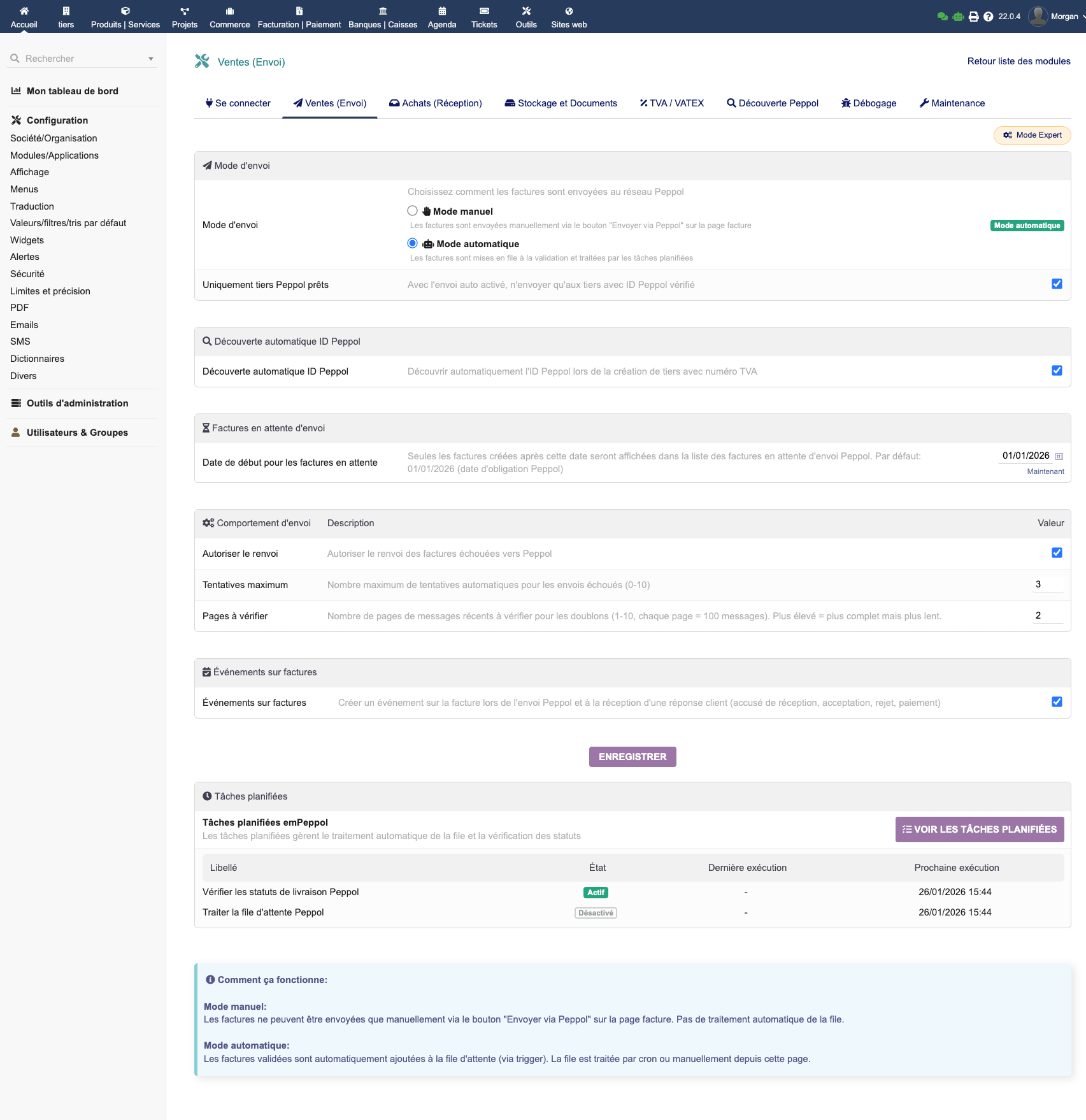
- Sending queue: configurable start date for historical catch-up
- Automatic retry: maximum number of attempts on failure
- Scheduled tasks: automatic queue processing and status verification via cron
- Events: trigger actions on invoice events (validation, sending)
Advanced Reception Options
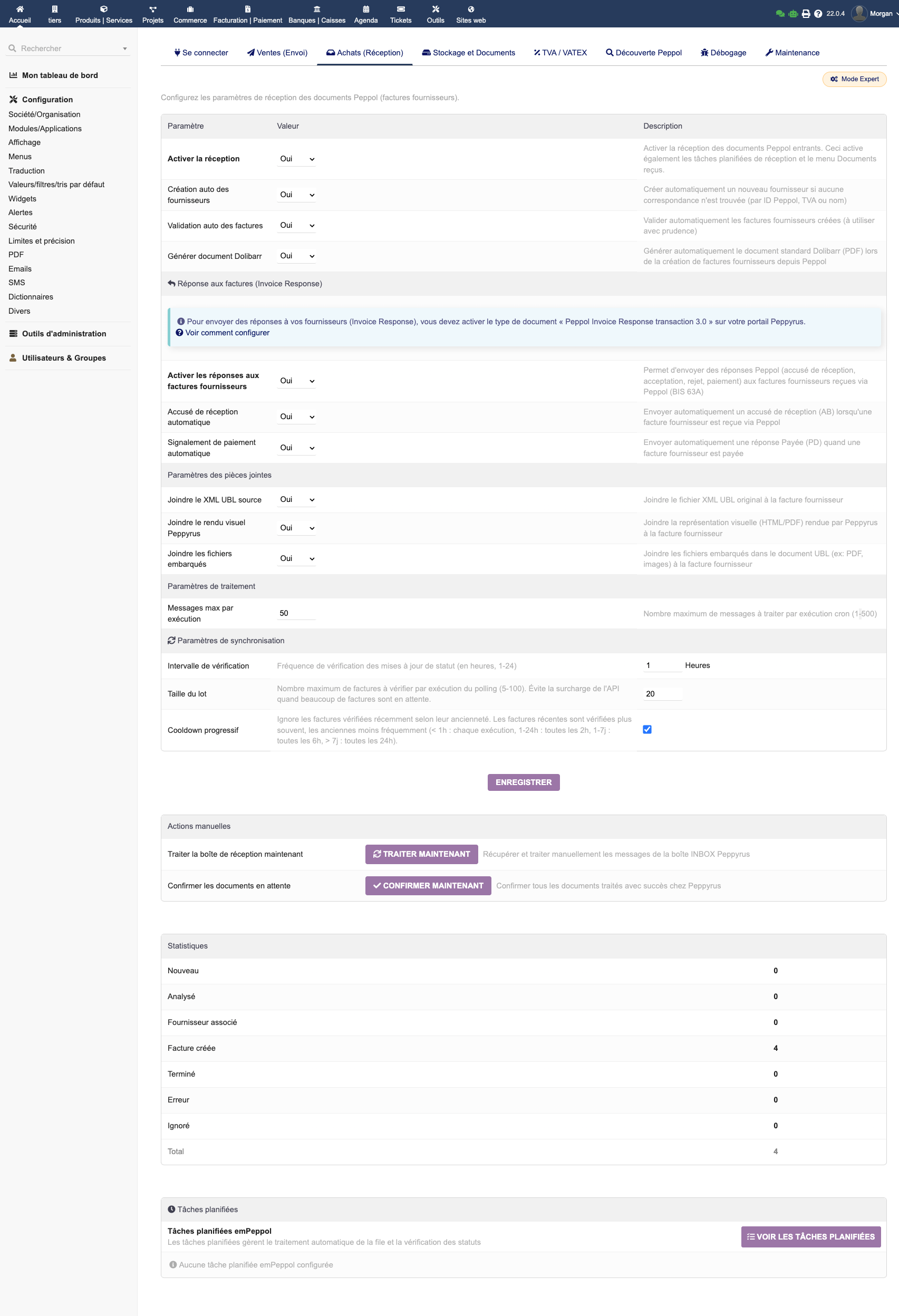
- Automatic validation: automatically validate received supplier invoices
- Automatic acknowledgement: automatically respond to documents (MLR)
- Invoice Response: send automatic responses (acknowledgement, acceptance)
- Attachments: store the source XML/UBL file
- Synchronisation frequency: configurable to suit your needs
Other Options
- Debug mode: detailed logs in
documents/empeppol/logs/ - API timeout: maximum wait time for Peppyrus API calls (default: 30s)
- Document storage: local storage of UBL documents
- Webhook: callback URL for reception notifications
Maintenance and Diagnostics
Go to EMPeppol → Maintenance to check the status of your installation:
- API connection: connectivity test with Peppyrus
- PHP extensions: verification of
soap,xml,curl - Configuration: module settings validation
- Logs: view sending and reception logs (debug mode)
Common Issues
Sending fails with "Invalid participant" → Verify that the recipient's Peppol identifier is correct and that they are registered on the network.
"VATEX mapping missing" → A VAT rate used in the invoice has no Peppol correspondence. Configure it in the VAT mapping.
API connection error → Check your API key, test connectivity from the Maintenance page, and make sure your server can reach the Peppyrus API (no firewall blocking).
Received invoices don't create third parties → Check that automatic supplier creation is enabled in the reception settings.
Statuses remain "Sent" without moving to "Delivered" → Status verification requires a scheduled task. Configure it in the advanced sending settings or run it manually.
FAQ
Which countries are supported?
All countries connected to the Peppol network: most EU countries, the United Kingdom, Singapore, Australia, New Zealand and others. Over 30 countries in total.
Does EMPeppol work with multi-entity?
Yes. Each Dolibarr entity can have its own configuration, API key and Peppol participant.
What invoice format is used?
The UBL 2.1 format compliant with the Peppol BIS Billing 3.0 profile, the European standard for electronic invoicing compliant with the EN 16931 norm.
Can I send credit notes?
Yes, EMPeppol supports sending credit notes. The process is identical to sending invoices.
Can I attach files to invoices?
Yes. The invoice PDF is automatically included in the UBL file, and you can add other documents (annexes, purchase orders, etc.) before sending.
Are there per-send fees?
No. With the Peppyrus access point, sending and receiving are free and unlimited. You pay for the module once.
How do I migrate from another Peppol module?
- If your current module already uses Peppyrus: sending history recovery is possible
- From another access point: set a start date and new invoices will be sent via EMPeppol
- In all cases, you save in the long term thanks to no subscription fees
How do I update the module?
- Download the new version from the DoliStore
- Replace the files in
htdocs/custom/empeppol/ - Access Dolibarr — the module detects the update and applies migrations automatically
Where can I find help?
- E-dem support: Contact us for any technical questions
- Peppol documentation: peppol.eu for network specifications