emRecupel The Recupel fee in Dolibarr, from quote to declaration.
emRecupel adds the Belgian Recupel fee to your proposals, orders, invoices and credit notes, displays it the way Recupel requires for each customer, and prepares your declaration. 2026 and 2027 scales included.
GPL v3 licence · source code on GitHub · no usage limit
Current version: 2.0.1 · all versions
Why emRecupel?
In Belgium, every electrical or electronic appliance placed on the market carries a Recupel fee, which funds its collection and recycling. The importer or manufacturer pays it to Recupel; a reseller buying from a Belgian supplier passes it on to its customers. Dolibarr does not handle it natively: people end up adding lines by hand, or forgetting them.
The scale changes on 1 January 2027: 77 of the 92 codes change amount (refrigerator from €10 to €13, television from €5 to €8, washing machine from €1 to €6, VAT included). emRecupel applies the rate of each document's date: a quote issued in December and invoiced in January gets the 2027 rate.
How the fee is shown depends on the customer: for an appliance with an “all-in” fee (household appliances, and professional cooling 1.50 from 2027) sold to a reseller of electrical appliances, the fee must appear separately, appliance by appliance; for an end user, business or consumer, the mention “Recupel fee included” is enough. emRecupel applies these rules document by document.
Display that follows the Recupel rule
The rule depends on the customer and the type of appliance. The module turns it into a display matrix you can adjust cell by cell.
- Reseller of electrical appliances and appliance with an “all-in” fee (household, and code 1.50 from 2027): separate line enforced under the product
- End user, business or consumer: fee “included”, with the amount under the line and the total in the PDF footer (or a separate line, your choice)
- Customer outside Belgium: no fee, based on the delivery country or, failing that, the customer's
- Recupel role and forced display can be set on each third-party card
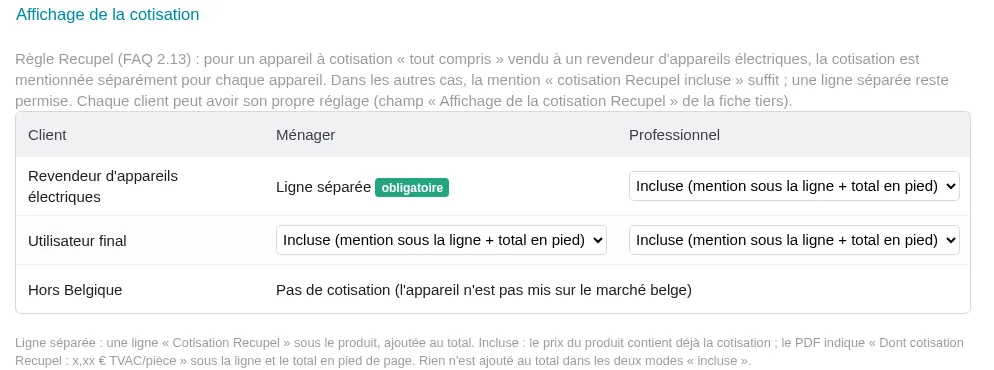
The display matrix: separate line mandatory for a reseller, “included” mention elsewhere (French interface)
Classify your catalogue, fast
The module never guesses: you choose the Recupel code of each product, with the tools to do it in one go.
- Recupel tab on each product: one or more codes with a quantity (luminaire and its lamps, kits), “not subject” status, origin, declarable weight
- “Products to classify” screen: filters by status, Dolibarr category or products sold this year, bulk assignment
- CSV import and export (reference, code, quantity, origin) to classify a catalogue in a spreadsheet
- Link to Recupel's official search engine to find the right code
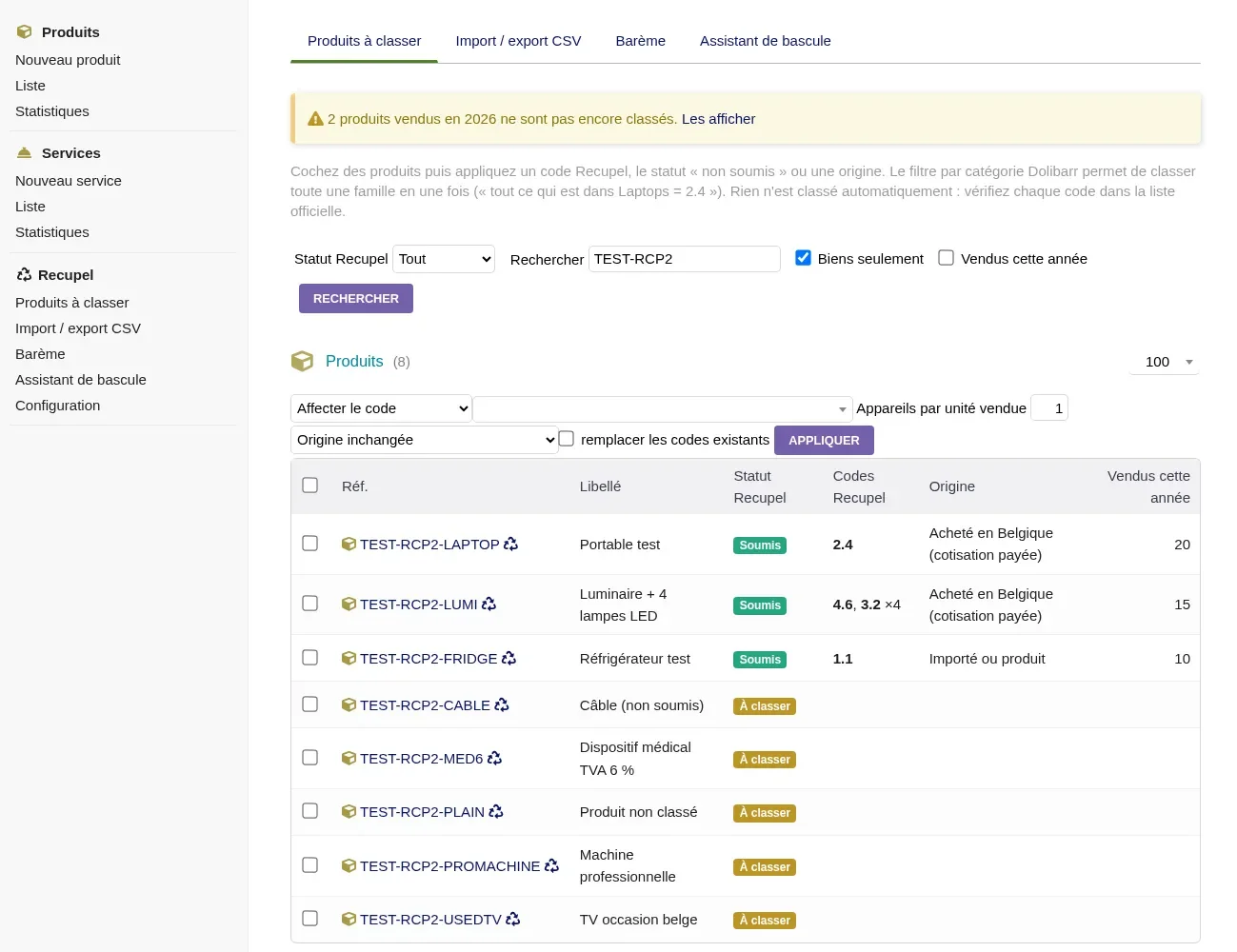
The “Products to classify” screen: tick, choose a code, apply (French interface)
Every sales document, no duplicates
The fee follows the product through the whole sales cycle, at the rate in force on the document date.
- Proposals, orders, invoices, credit notes, replacement invoices and template invoices
- Proposal → order → invoice conversion and cloning without duplicate lines; negative credit notes at the rate of the original invoice
- Fee VAT identical to the product's; VAT-included option to invoice the official round amount (10.00, not 9.99)
- A validated document is never modified; a Recupel tab explains the decision product by product
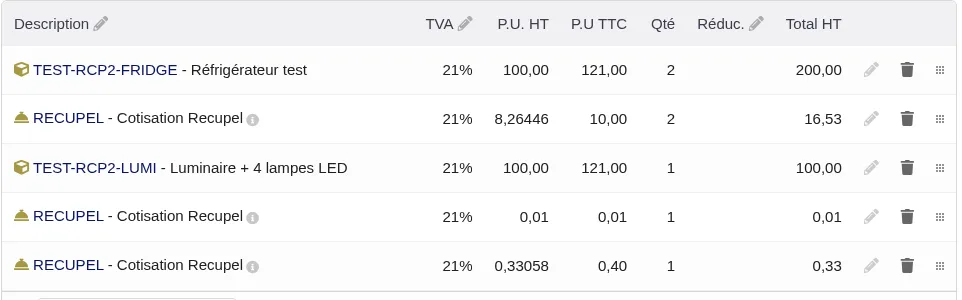
Invoice to a reseller: one fee line under each appliance, including the luminaire's lamps (French interface)
The switch to the 2027 scale, prepared
The official 2026 and 2027 scales ship with the module (92 codes, FR, NL and EN labels). The switch on 1 January 2027 is automatic, based on the document date.
- Switch assistant: codes that change, affected catalogue products, open proposals and orders dated before 01/01/2027
- Code changes flagged (dishwashers move from 4.1.2 to 4.1.1 in 2027)
- Scale screen: rates at a given date, history of each code
- CSV import of a later scale, checked before it is applied
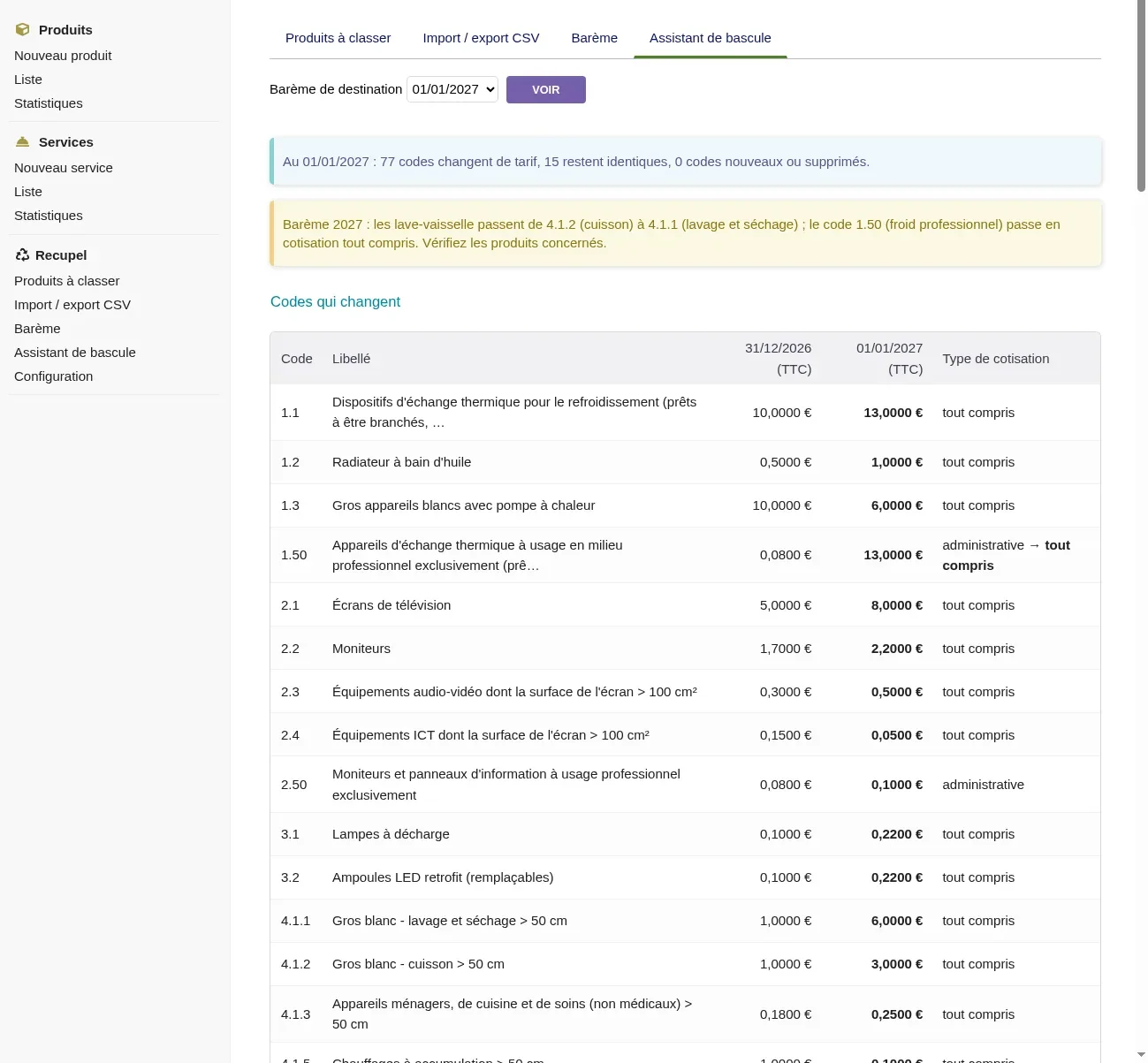
The switch assistant compares the current scale with the 01/01/2027 scale (French interface)
A report to prepare the declaration
For an importer or manufacturer who is a Recupel member, the report gives what the declaration asks for, based on validated invoices.
- By month, quarter or year, with the due date (the 20th of the month following the period)
- Household and professional appliances kept apart, with the weight for professional appliances
- “Brought to market” and “Returnable” columns (exported appliances whose fee was already paid in Belgium)
- Drill-down to the invoice and CSV export; a reseller gets a control statement of the fees passed on
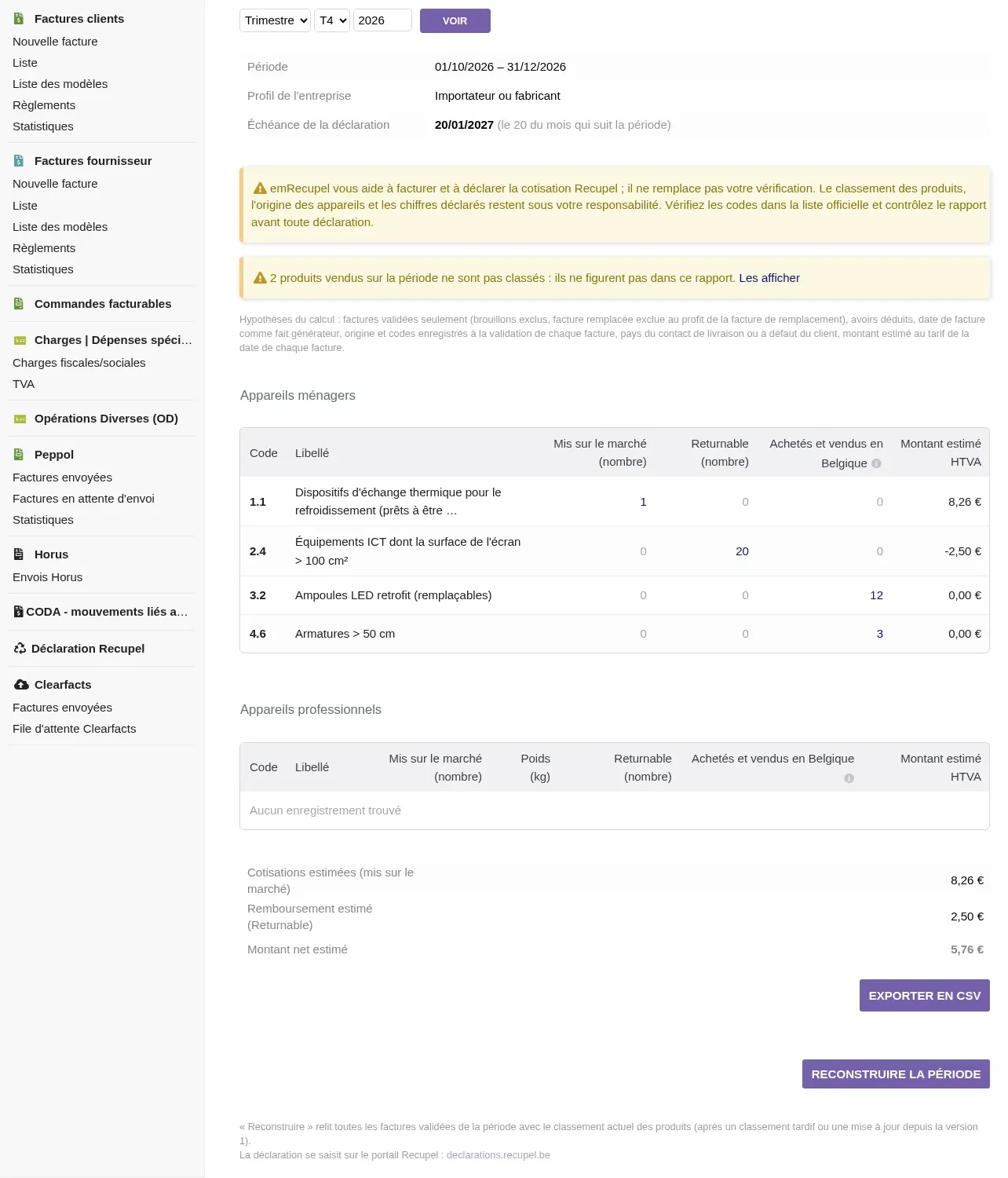
The declaration report for a quarter, by code and appliance type (French interface)
Who is it for?
Any Belgian business selling electrical or electronic appliances with Dolibarr. The module adapts to your profile.
Reseller
You buy from Belgian suppliers and sell in Belgium: you pass the fee on in your documents and declare nothing.
Reseller who exports
You are affiliated with Recupel to get the fee refunded on appliances sold abroad: the report produces the “Returnable” column.
Importer or manufacturer
You are a Recupel member and declare the appliances placed on the Belgian market: the report prepares your quarterly declaration.
Installation in 3 steps
Download and unzip
Unzip the archive into the htdocs/custom/ folder of your Dolibarr, or use “Deploy an external module”. Nothing to compile.
Enable the module
In Setup › Modules, enable emRecupel. The 2026 and 2027 scales and the RECUPEL service are created on activation.
Choose your profile and classify
Choose your company profile and the display matrix, then classify your products (“Products to classify” screen or CSV import).
Compatibility & technical requirements
Dolibarr
Server
Interface languages
Free software licence
Frequently asked questions
Is emRecupel really free?
Yes. The module is released under the GPL v3 licence: you can download, use, study and adapt it freely. If you wish, E-dem can help you install or adapt it.
I sell a PC to a company: separate line or fee included?
The mention “Recupel fee included” is enough: a company using the appliance is an end user. The separate line is only mandatory for an appliance with an “all-in” fee (household, and professional cooling 1.50 from 2027) sold to a reseller of electrical appliances. You set this role on the customer card.
A 2026 quote is invoiced in 2027: which rate applies?
emRecupel applies the rate of the invoice date, hence the 2027 rate (Recupel does not explicitly settle this case for a reseller: check it with your adviser). The switch assistant lists the affected open proposals and orders in advance.
My customer is abroad.
No fee is added: the appliance is not placed on the Belgian market. The country used is the one of the document's delivery contact, otherwise the customer's.
Does the module send the declaration to Recupel?
No. It prepares the figures (screen and CSV export); you then enter the declaration on Recupel's portal. Always review the report before declaring.
What are the requirements?
Dolibarr 21 or later, PHP 8.1 or later, MySQL or MariaDB, and the Invoices, Third parties and Products modules enabled (Commercial proposals and Orders for the fee on those documents).
⚠️ emRecupel helps you calculate the fee and prepare the declaration; it does not replace your own check. Product classification, origin and declared figures remain your responsibility. emRecupel is an independent module developed by E-dem, not affiliated with Recupel.
Need help installing or adapting it?
E-dem, a Dolibarr integrator in Belgium, can install emRecupel, classify your catalogue with you or adapt the module to your processes. Contact E-dem.