- Requirements
- Installation
- Configuration
- Classifying products
- Sales documents
- Switching to the 2027 scale
- Updating the scale
- Declaration report
- FAQ
- Does the module guarantee I am compliant?
- I sell a PC to a company: separate line or "included"?
- Why 9.99 and not 10.00?
- My customer is in France or the Netherlands.
- A product contains several appliances (luminaire and lamps, kit).
- USB stick, supplied charger, cable?
- Second-hand appliance?
- I deleted a fee line by mistake.
- Known limitations
- Disabling and uninstalling
- Need help?
emRecupel — Recupel fee for Dolibarr
emRecupel applies the Recupel fee (waste electrical and electronic equipment, Belgium) on Dolibarr proposals, orders, invoices and credit notes, displays it the way Recupel requires for each customer, and prepares the Recupel declaration. It ships the official 2026 and 2027 scales and switches on its own on 1 January 2027.
The module is free and open source (GPL v3 licence):
- source code: emRecupel GitHub repository;
- current version: 2.0.1 — download the zip (all versions);
- overview: emRecupel product page.
Responsibility: emRecupel helps you calculate the fee and prepare the declaration; it does not replace your own check. Product classification, appliance origin and declared figures remain your responsibility. Check the codes in Recupel's official list and review the report before declaring. emRecupel is an independent module, not affiliated with Recupel.
The module interface is available in French, Dutch and English. Screenshots on this page show the French interface.
Requirements
| Item | Minimum version |
|---|---|
| Dolibarr | Dolibarr ≥ 21 |
| PHP | PHP ≥ 8.1 |
| Database | MySQL or MariaDB |
| Dolibarr modules | Invoices, Third parties and Products (Commercial proposals and Orders for the fee on those documents) |
The module depends on no other E-dem module and has nothing to compile: everything is in the zip.
Installation
-
Download the version 2.0.1 zip (module_emrecupel-2.0.1.zip); earlier and later versions are on the all versions page.
-
Unzip it into
htdocs/custom/: you gethtdocs/custom/emrecupel/. You can also use Setup → Modules → Deploy an external module, or clone the repository:git clone https://github.com/momodemo333/emrecupel.git htdocs/custom/emrecupel -
In Setup → Modules/Applications, search for "emRecupel" and click Enable.
Activation creates the module tables, the third-party fields (Recupel role and display), the RECUPEL service used for fee lines, and loads the 2026 and 2027 scales.
Then:
- configure the module (profile, display: see below);
- set the sales accounting account of the RECUPEL service on its card (a sub-account of 70);
- grant the rights to users (Users → Permissions → emRecupel);
- classify your products.
Permissions
| Permission | Allows |
|---|---|
| Read Recupel data | scale, tabs, switch assistant |
| Classify products and recalculate | product tab, products to classify, CSV import, "Recalculate" button |
| Configure and import scales | setup, scale import |
| Read the declaration report | report, CSV export |
Updating the module
Replace the htdocs/custom/emrecupel/ folder with the one from the new zip. Database migrations run on their own the first time a page is displayed; the setup page offers a diagnostic and a Check and repair the database button.
If you used the 1.0.1 prototype, disable and re-enable the module once after replacing the files: product classification and existing fee lines are taken over without deleting anything. Then check the profile, product origins and display matrix, and rebuild the already invoiced periods in the report.
Configuration
Menu Products → Recupel → Setup (or the module setup).
Company profile
| Profile | Your situation | What the report shows |
|---|---|---|
| Reseller | You buy appliances from Belgian suppliers and sell them in Belgium. You pass the fee on and declare nothing. | A control statement of the fees passed on. |
| Reseller who exports | Same, but affiliated with Recupel to get the fee of appliances sold abroad refunded. | The "Returnable" column. |
| Importer or manufacturer | Recupel member: you declare the imported or produced appliances placed on the Belgian market. | "Brought to market" and "Returnable". |
The default origin of products follows the profile ("bought in Belgium" for a reseller, "imported or produced" for an importer). A mixed business sets the origin product by product.
Display matrix
Recupel's rule:
- an appliance with an all-in fee (household appliances, and code 1.50 from 2027) sold to a reseller of electrical appliances: the fee is shown separately, appliance by appliance. The module then enforces a separate line;
- every other case (end user, business or consumer; professional appliance): "Recupel fee included" is enough; a separate line remains allowed.
The criterion is not "business or consumer": a company buying a PC for its own use is an end user.
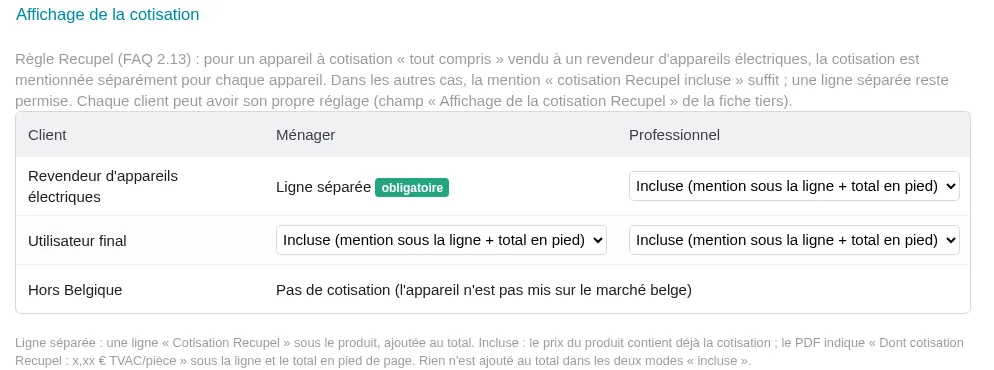
Three renderings, set for each cell of the matrix:
- Separate line: a line "Recupel fee — Cat. 1.1 — …" right under the product, same quantity, same VAT; it is added to the total.
- Included (mention under the line + total in the footer): your price already contains the fee. The PDF prints "Including Recupel fee: 10.00 EUR incl. VAT/piece (cat. 1.1)" under the product and the total of included fees in the footer. Nothing is added to the total.
- Included (total in the footer only).
Outside Belgium, no fee is due: nothing is added. The country used is the one of the document's delivery contact, otherwise the customer's.
Customer role
On the third-party card:
- Recupel role: End user (default), Reseller of electrical appliances, Exempt from the fee (e.g. a Recupel member who exports);
- Display of the Recupel fee: forces a rendering for this customer (empty = setup rule). The mandatory separate line of a reseller cannot be removed.
Other settings
- Documents concerned: proposals, orders, invoices and credit notes (ticked by default).
- Fee lines priced VAT included (recommended): the official scale publishes a round amount including VAT; the line is built from it so the customer pays 10.00 and not 9.99. For a product at a rate other than 21 %, the line starts from the amount excluding VAT and follows the product rate (VAT on the fee follows the VAT of the appliance).
- Line description per language, with the variables
{CODE},{LABEL},{AMOUNT}and{UNITS}.
Classifying products
The module never classifies anything automatically: you choose the code of each product. The "Official Recupel search engine" link on the module screens opens the appliance search of recupel.be.
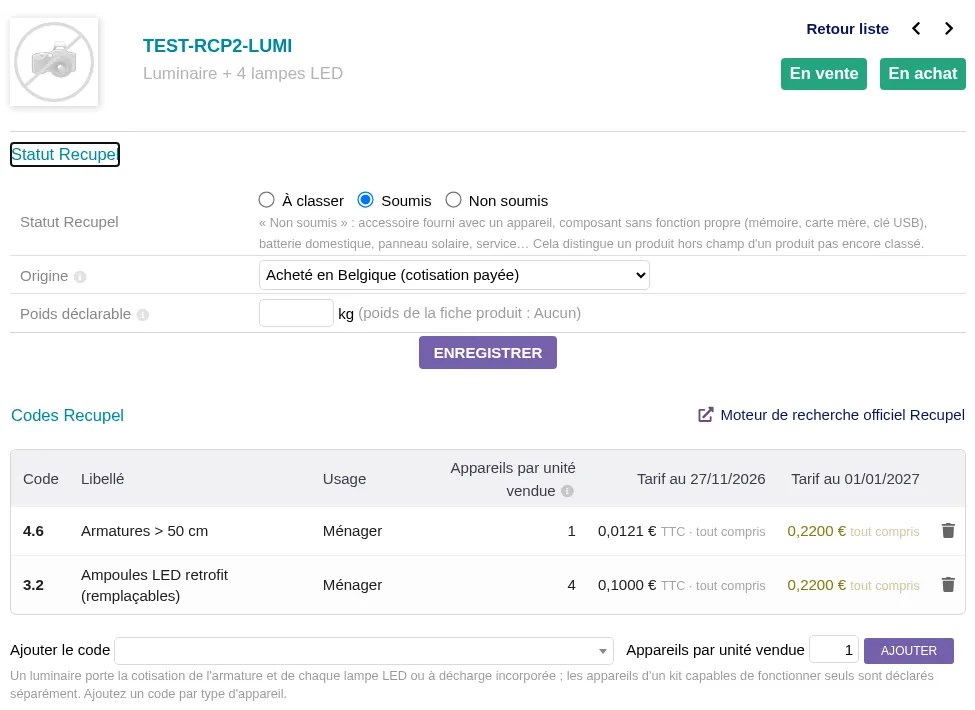
Recupel tab of a product
- Status: To classify, Subject, Not subject (accessory supplied with an appliance, component without its own function, USB stick, home battery, solar panel, service…).
- Origin: imported or produced (you declare it), bought in Belgium (your supplier charged you the fee), Belgian second-hand (already placed on the Belgian market: charging the fee is forbidden, the PDF says "Recupel fee included").
- Declarable weight: for professional appliances (product and accessories, cables included, without packaging, manual or batteries). Empty = weight of the product card.
- Codes: one or more, with the number of appliances per sold unit. A luminaire with 4 LED lamps carries the fitting code ×1 and the lamp code ×4; a CCTV kit, one code for the monitor, the recorder and each camera.
The tab shows today's rate and the next scale's. A variant without its own classification uses its parent's.
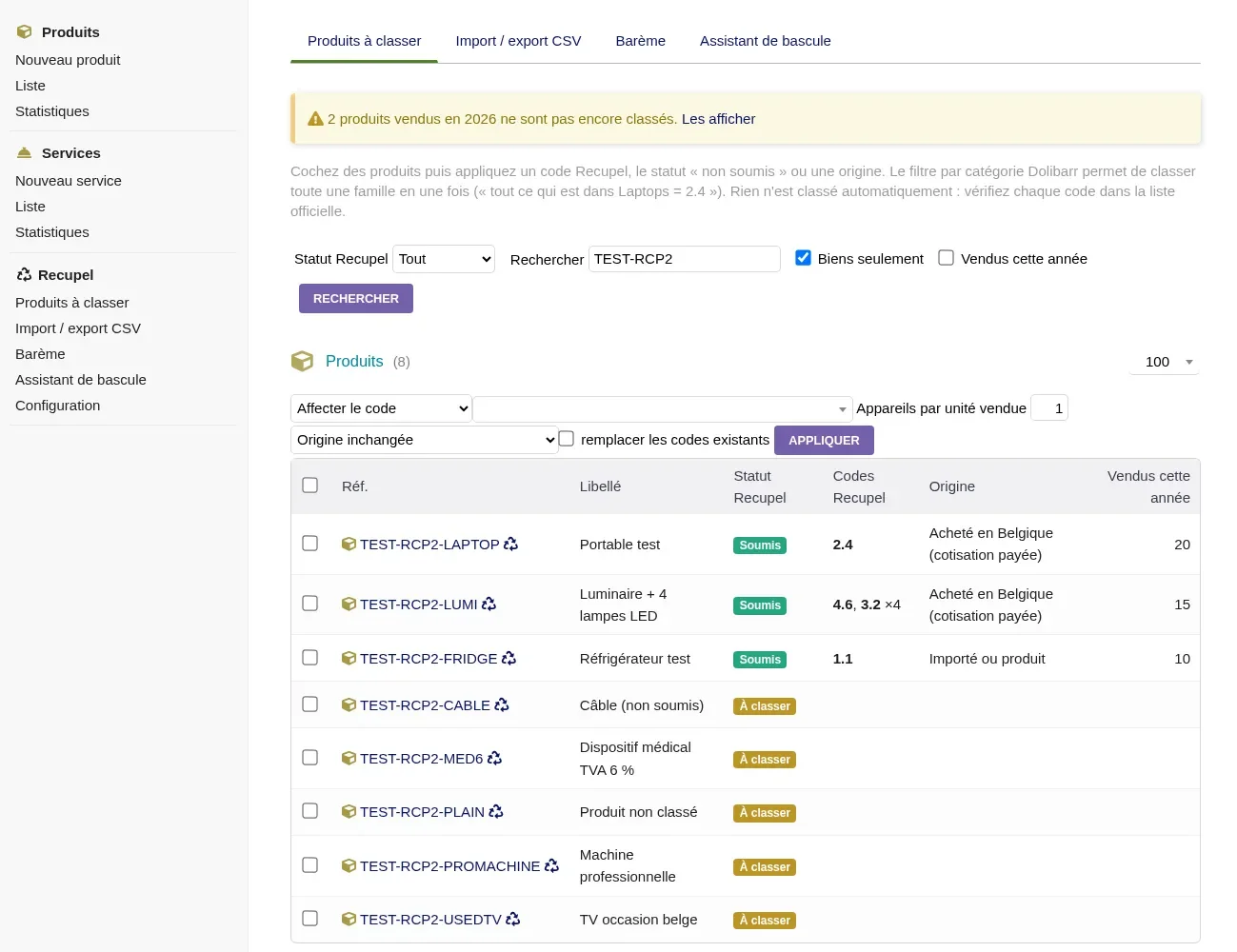
"Products to classify" screen
Products → Recupel → Products to classify: list filterable by status, text, Dolibarr category, goods only or products sold this year. A banner shows the products sold this year and not classified yet.
Tick products, choose the action (Assign code, Mark "not subject", Change origin, Reset to "to classify") then Apply. With the category filter, a whole product family is classified at once.
CSV import / export
Products → Recupel → CSV import / export. UTF-8 format, ; separator:
ref;code;quantity;origin
LAPTOP-14;2.4;1;local
FRIDGE-A;1.1;1;import
SPOT-KIT;5.6;1;import
SPOT-KIT;3.2;3;import
USB-CABLE;exempt;;
- several lines for the same reference = several codes;
exempt= not subject;- origin:
import,local,used, empty = profile default; - the codes in the file replace those of the product.
Check validates the file without writing anything; Import applies it. The export produces the same format, handy to classify a catalogue in a spreadsheet.
Sales documents
Add your products as usual. Depending on the customer and the product, the fee line appears under the product, or nothing is added and the PDF carries the mention.
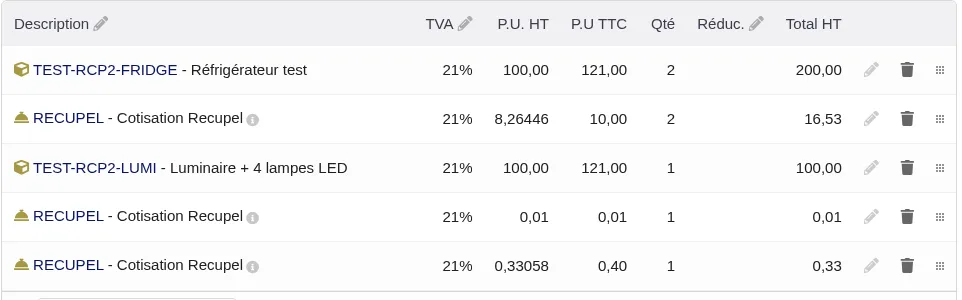
- Changing the quantity updates the fee; deleting the product deletes its fee.
- Deleting a fee line by hand removes it for that product and that code only; the Recalculate button in the document's Recupel tab restores it.
- Changing the date, customer or delivery contact of a draft recalculates the fee.
- A product line with a negative quantity (take-back) carries a negative fee.
- Proposal → order → invoice, clone, credit note copying the lines, replacement invoice, template invoice: fee lines follow, without duplicates; on a credit note they are negative.
- On invoicing, the rate is the one of the invoice date. A credit note or replacement invoice uses the rate of the original invoice: the credit note refunds exactly what was paid.
- A validated document is never modified.
- Down payments and situation invoices carry no fee.
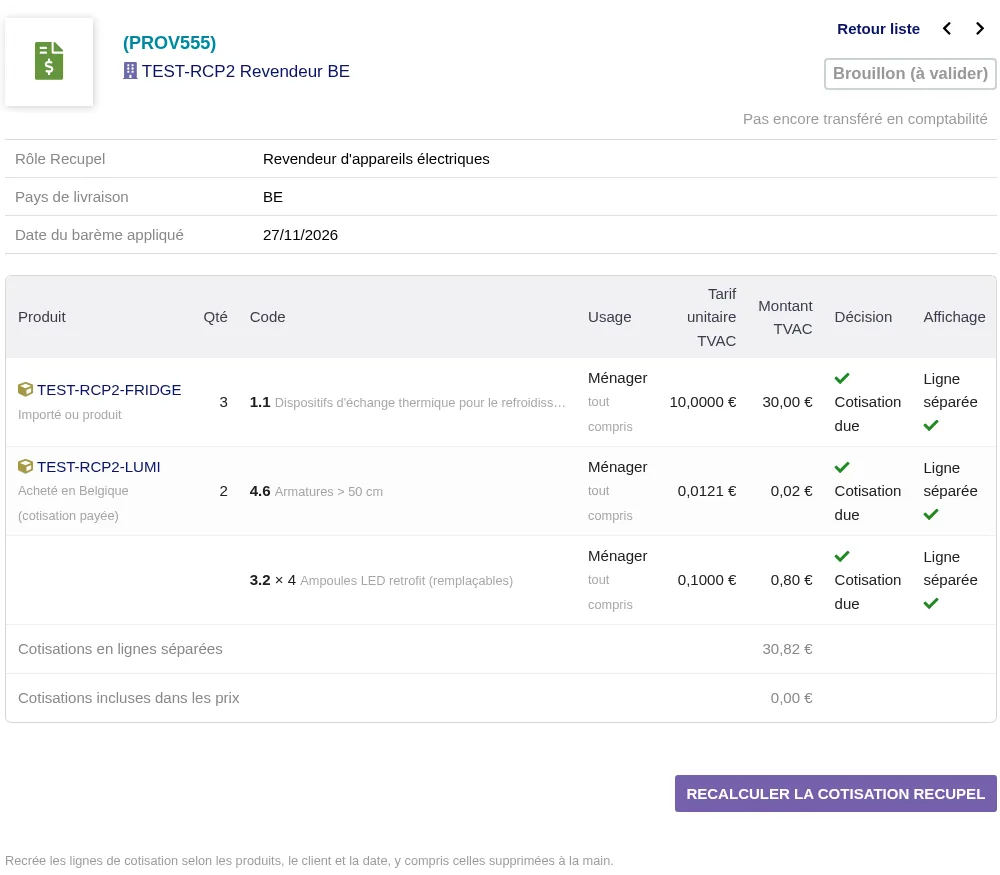
The Recupel tab of a proposal, order or invoice details, product by product: code, rate, decision (due, outside Belgium, second-hand, removed by hand…) and rendering.
Switching to the 2027 scale
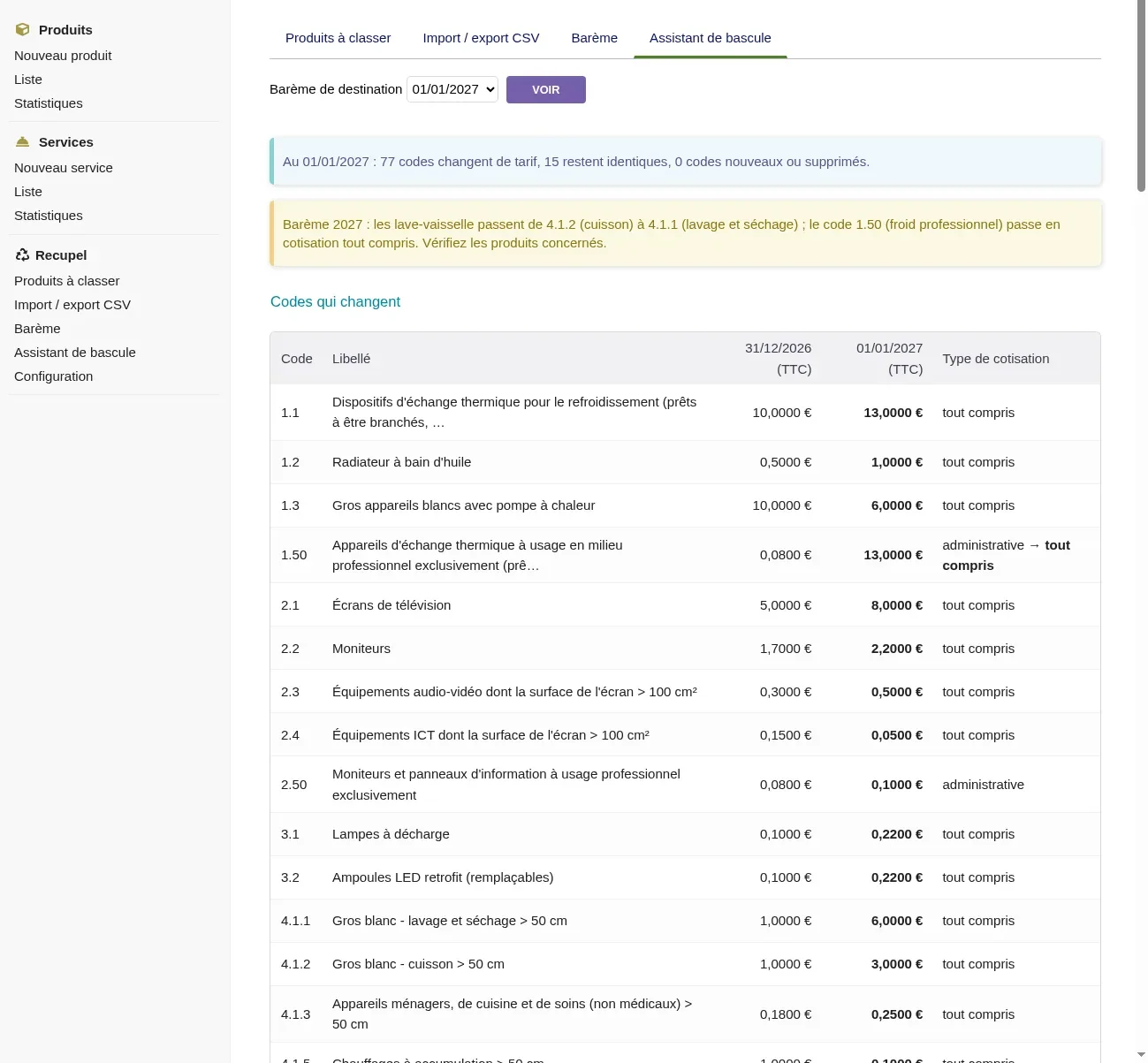
Recupel revises its scale on 1 January or 1 July, with six months' notice. The scale of 1 January 2027 changes the amount of 77 of the 92 codes. The module ships the 2026 and 2027 scales: the fee follows the document date, the switch is automatic.
Products → Recupel → Switch assistant lists:
- the codes whose rate changes;
- the products of your catalogue whose fee changes;
- open proposals and orders dated before the switch (a December 2026 quote invoiced in January 2027 gets the 2027 rate).
In 2027, dishwashers move from code 4.1.2 to code 4.1.1, and code 1.50 (professional cooling) becomes an all-in fee: the assistant flags them. Check the products concerned.
The Scale screen shows the rates at a given date, a "previous scale" column and the history of each code (click the code).
Updating the scale
For a scale after 2027, until a new module version is released: Products → Recupel → Scale → Import a scale (CSV, format described on screen).
- The check reports the number of codes, new or missing codes and variations of more than 50 %.
- The whole import is refused at the slightest error.
- A new rate closes the previous one the day before its start date, without deleting anything: documents already issued keep their rate.
Declaration report
Billing | Payment → Recupel declaration.
- Period: month, quarter (default) or year. Due date: the 20th of the month following the period.
- Two blocks, household and professional, by code:
- Brought to market: imported or produced appliances sold in Belgium (with the weight for professional ones);
- Returnable: appliances bought in Belgium (fee paid to the supplier) and sold outside Belgium;
- Bought and sold in Belgium: fee passed on, nothing to declare (control).
- Estimated amount at the rate of each invoice date; the "Returnable" refund only counts all-in fees; warning if the year's administrative fees exceed the €10,000 cap.
- Clicking a number opens the detail down to the invoices. Export to CSV.
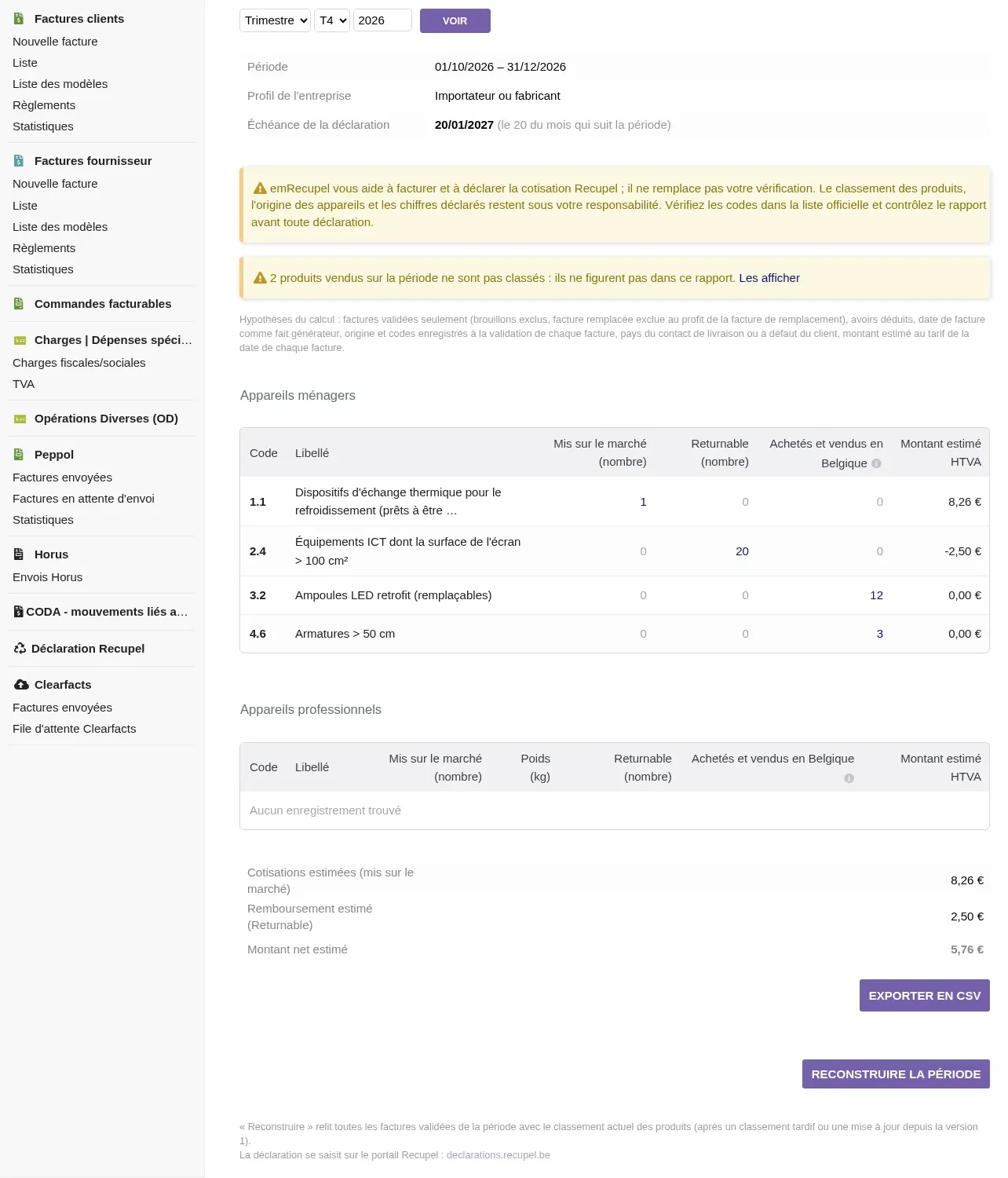
Assumptions (shown on screen): validated invoices only; a replaced invoice is excluded in favour of its replacement; credit notes deducted; codes and origin frozen when each invoice is validated. After a late classification, Rebuild the period rereads the invoices with the current classification.
You then enter the declaration on Recupel's portal: the module produces the screen and the CSV, it sends nothing.
FAQ
Does the module guarantee I am compliant?
No. It applies the rules published by Recupel (2026 and 2027 appliance lists, declarations FAQ, pages for producers and retailers). Product classification, origin and declared figures remain your responsibility.
I sell a PC to a company: separate line or "included"?
"Included" is enough: the company is an end user. The separate line is only mandatory for an all-in fee appliance sold to a reseller of electrical appliances. Set this role on the customer card.
Why 9.99 and not 10.00?
The line was calculated from the amount excluding VAT. Enable "Fee lines priced VAT included": the line starts from the official amount including VAT.
My customer is in France or the Netherlands.
No fee is added: the appliance is not placed on the Belgian market. If you bought it in Belgium (fee paid), it appears in the report's "Returnable" column for a "reseller who exports" or "importer" profile.
A product contains several appliances (luminaire and lamps, kit).
Add one code per type of appliance, with the quantity per sold unit.
USB stick, supplied charger, cable?
A USB stick, memory or component without its own function is not subject. An accessory is only subject when sold separately from a subject appliance. Use the "not subject" status and the recupel.be search engine.
Second-hand appliance?
The criterion is origin. Already placed on the Belgian market: origin "Belgian second-hand", no fee, the PDF says "Recupel fee included". Imported second-hand: origin "imported", like a new one.
I deleted a fee line by mistake.
Document's Recupel tab → Recalculate.
Known limitations
- Out of scope: Bebat and other eco-contributions, purchases and the check of fees charged by suppliers, specific TakePOS handling.
- No automatic submission of the declaration: the module prepares the figures, you enter them on Recupel's portal.
- Points Recupel does not settle (check with Recupel or your adviser):
- credit notes for a return in Belgium (the module deducts the credit note in the credit note's period);
- amount a reseller should show for stock bought in 2026 and sold in 2027 (the module applies the rate of the document date).
- The "fee included" mention does not appear on the PDF when the "hide description" option of the PDF models is on.
- Administrative fees of exported professional appliances are counted as "Returnable" without a refund amount.
- PostgreSQL is not supported.
- Multi-company: the scale is shared by all entities; setup, product classification and the ledger follow the entity of the product or invoice.
Disabling and uninstalling
Disabling the module deletes neither tables, nor data, nor configuration: re-enabling finds them again. Fee lines already on documents remain ordinary service lines.
To remove everything: disable the module, delete the htdocs/custom/emrecupel/ folder, then the llx_emrecupel_* tables, the EMRECUPEL_% constants and the emrecupel_* extra fields.
Need help?
emRecupel is free; questions and suggestions are welcome on GitHub. For an installation, classifying your catalogue or adapting the module to your processes, contact E-dem.