- Due dates
- Requirements
- Installation
- Configuration
- 1. Open the return
- 2. Check the grids
- 3. Clear the alerts and check the detail
- 4. Correct an invoice's classification
- 5. File and close
- Intra-community listing and client listing
- VAT mentions on invoices
- Known limitations
- Support
emtvabe — Belgian VAT for Dolibarr
emtvabe prepares the periodic Belgian VAT return from the invoices you already have in Dolibarr, produces the Intervat XML file (validated against the official schema), the intra-community listing and the annual client listing, and prints the Belgian VAT mentions on your invoices.
The module is free and open source (GPL v3 licence):
- source code: emtvabe GitHub repository;
- current version: 1.0.0 — download the zip (all versions);
- overview: emtvabe product page.
Responsibility: emtvabe helps you prepare your VAT returns; it replaces neither your own check nor your accountant. You and your accountant remain responsible for the classification of transactions, the amounts declared and the filing. emtvabe is an independent module, not affiliated with the FPS Finance.
The module interface is available in French, Dutch and English; the screenshots below show the French interface.
Due dates
- Quarterly return: the 25th of the month following the quarter. Q4 2026: 25 January 2027.
- Monthly return: the 20th of the following month. December 2026: 20 January 2027.
- Annual client listing: 31 March of the following year.
The official 2025-2026 dates are built into the module; later ones are calculated (without public holidays) and flagged “to be checked”. Since 2025, a return can no longer be corrected after its due date: corrections go into the next return. The screenshots below use 2019 test data; their due dates are calculated by the module and do not match the calendar of that time.
Requirements
| Item | Minimum version |
|---|---|
| Dolibarr | Dolibarr ≥ 21 |
| PHP | PHP ≥ 8.1, with the dom extension |
| Database | MySQL or MariaDB |
| Dolibarr modules | Invoices and Third parties |
| Company | Established in Belgium, with a valid VAT number |
The module does not depend on any other E-dem module and there is nothing to build: everything is in the zip, official XML schemas included.
Installation
-
Download the version 1.0.0 zip (module_emtvabe-1.0.0.zip); other versions are on the all versions page.
-
Install it through Home → Setup → Modules → Deploy/install external app/module, or unpack it into
htdocs/custom/: you gethtdocs/custom/emtvabe/. You can also clone the repository:git clone https://github.com/momodemo333/emtvabe.git htdocs/custom/emtvabe -
Enable Belgian VAT (emtvabe) in Home → Setup → Modules (financial modules).
-
Check Home → Setup → Company: country Belgium, valid VAT number, e-mail and phone (used in the Intervat files).
The module is then available under Billing → Belgian VAT.
Configuration
Billing → Belgian VAT → Setup:
- scheme: normal or small business exemption (“franchise”: no periodic return; the exemption mention is printed and the client listing carries the turnover);
- frequency of the return (monthly or quarterly) and of the intra-community listing;
- ET 14000 authorisation (import VAT deferred to the return);
- regularisation of credit notes on reverse-charged purchases (grids 61 and 62);
- printing of the VAT mentions on invoices.
Purchase profiles
Each purchase line goes into grid 81 (goods), 82 (services and miscellaneous goods) or 83 (capital goods), with a deductible share. Shipped values, to confirm with your accountant:
| Profile | Grid | Deductible share |
|---|---|---|
| Goods for resale, raw and consumable materials | 81 | 100 % |
| Services and miscellaneous goods | 82 | 100 % |
| Capital goods | 83 | 100 % |
| Car: costs and fuel | 82 | 50 % |
| Car: purchase | 83 | 50 % |
| Restaurant and reception | 82 | 0 % |
| Not deductible | 82 | 0 % |
| Not declared (salaries, taxes, fines…) | — | line ignored |
The profile is chosen on the line, on the product or on the supplier. Supplier invoices seldom have a product: use the Billing → Belgian VAT → Supplier purchase profiles screen, sorted by amount purchased.
VAT codes on 0% lines
For 0% sales, the module first relies on the line's VAT code: INTRA, EXPORT, REVERSE, EXEMPT. These codes are created on activation if missing. Use them on your 0% lines: the return and the mentions benefit from them.
1. Open the return
Billing → Belgian VAT → Periodic returns, then the period.
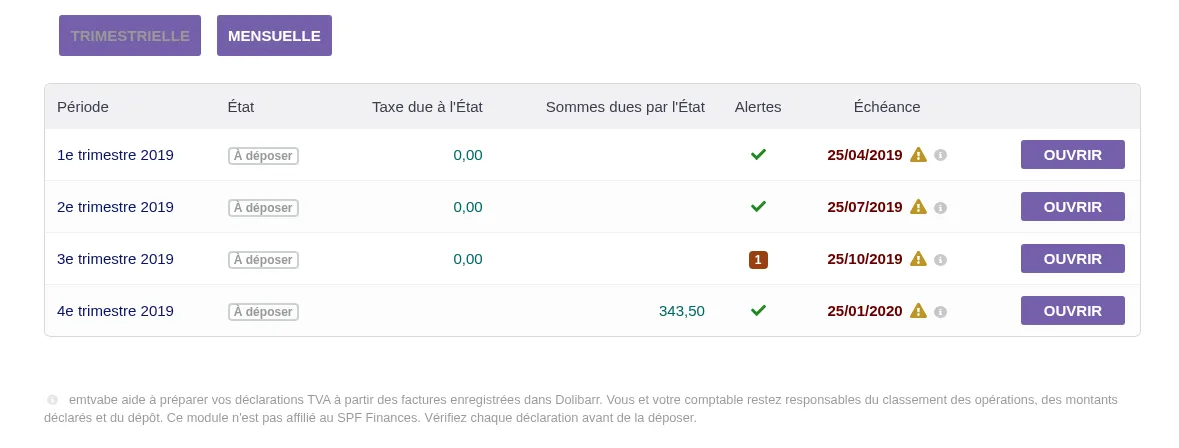
The list shows each period with its status, balance, alerts and due date.
2. Check the grids
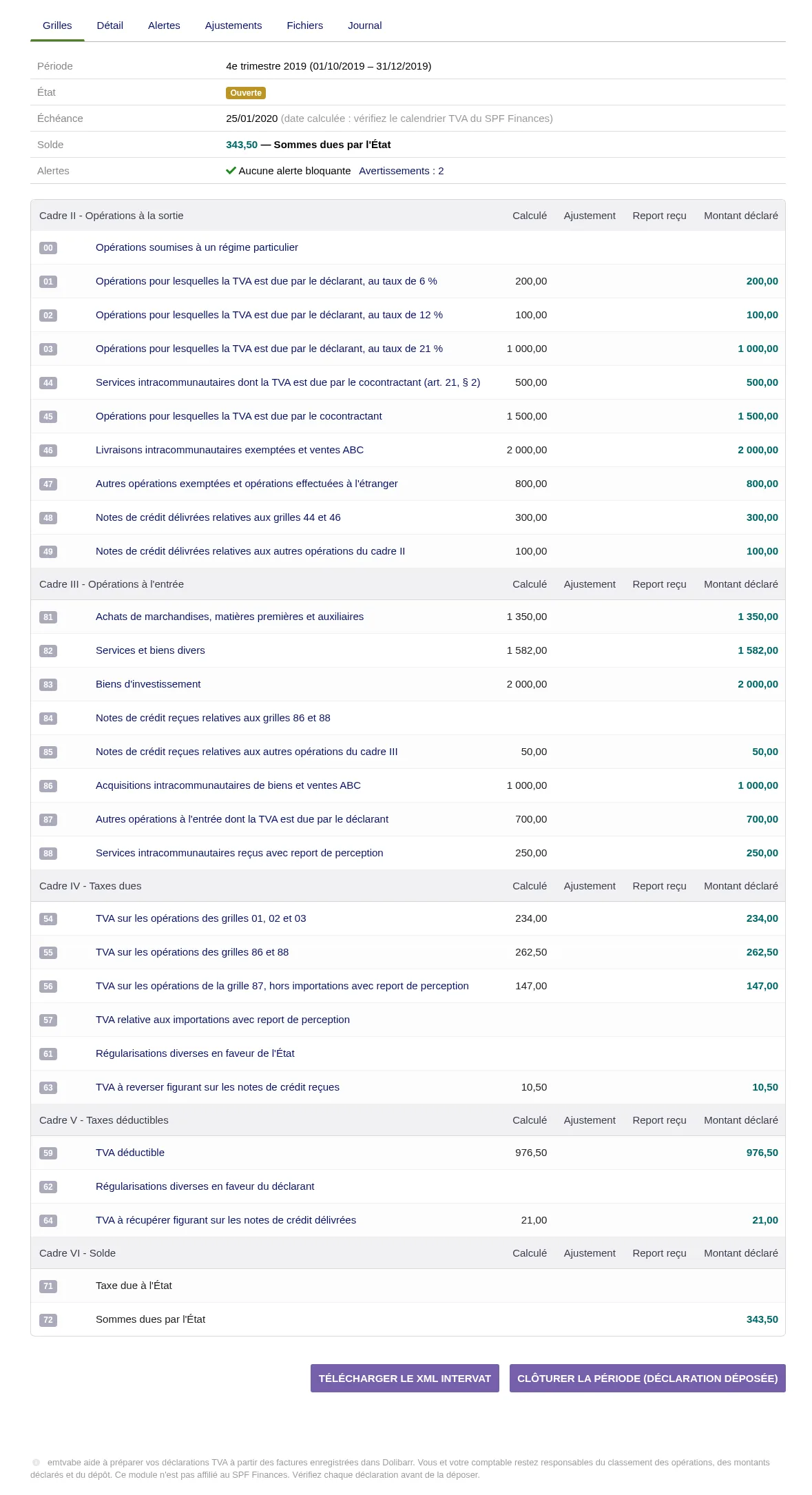
The Grids tab shows grids 00 to 88, 54 to 64 and the balance 71 / 72, each with the calculated amount, adjustments, carry-overs received and the declared amount. Some of the rules applied:
- Self-assessed VAT (intra-community purchases, domestic reverse charge, services and imports from outside the EU): Dolibarr does not store it, the module calculates it (grids 55, 56, 57) and takes the deductible part into 59.
- Credit notes issued: never deducted from grids 01 to 47; base in 49 (or 48 for original transactions in 44 or 46), VAT in 64.
- Credit notes received: reported in 85 (or 84) with the VAT in 63; a grid that would become negative is set to zero and the rest is carried forward to the next return.
- Amounts are rounded once per grid.
3. Clear the alerts and check the detail
- Alerts tab: blocking alerts (0% sale to a Belgian customer without a reason, EU customer without a VAT number, unknown rate, missing country…) prevent the XML file. Warnings, including the Intervat consistency checks, should be reviewed.
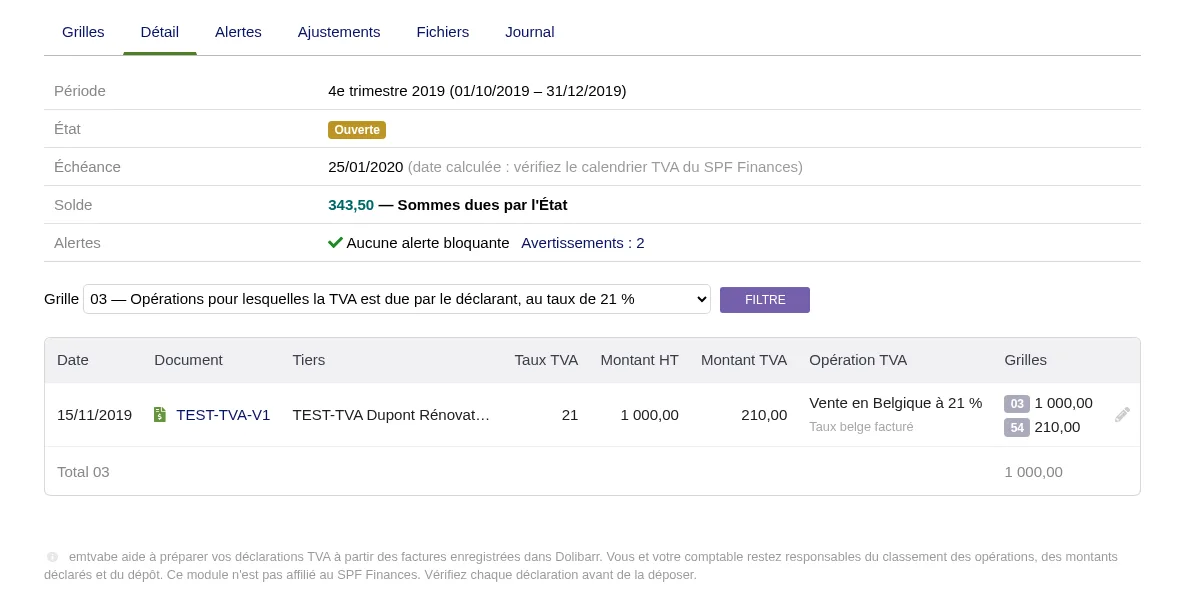
- Detail tab: every line used, filterable by grid, with the rule applied and a link to each invoice.
- Adjustments tab: grid, signed amount and mandatory reason, for anything that is not an invoice (VAT paid at customs, revisions…).
4. Correct an invoice's classification
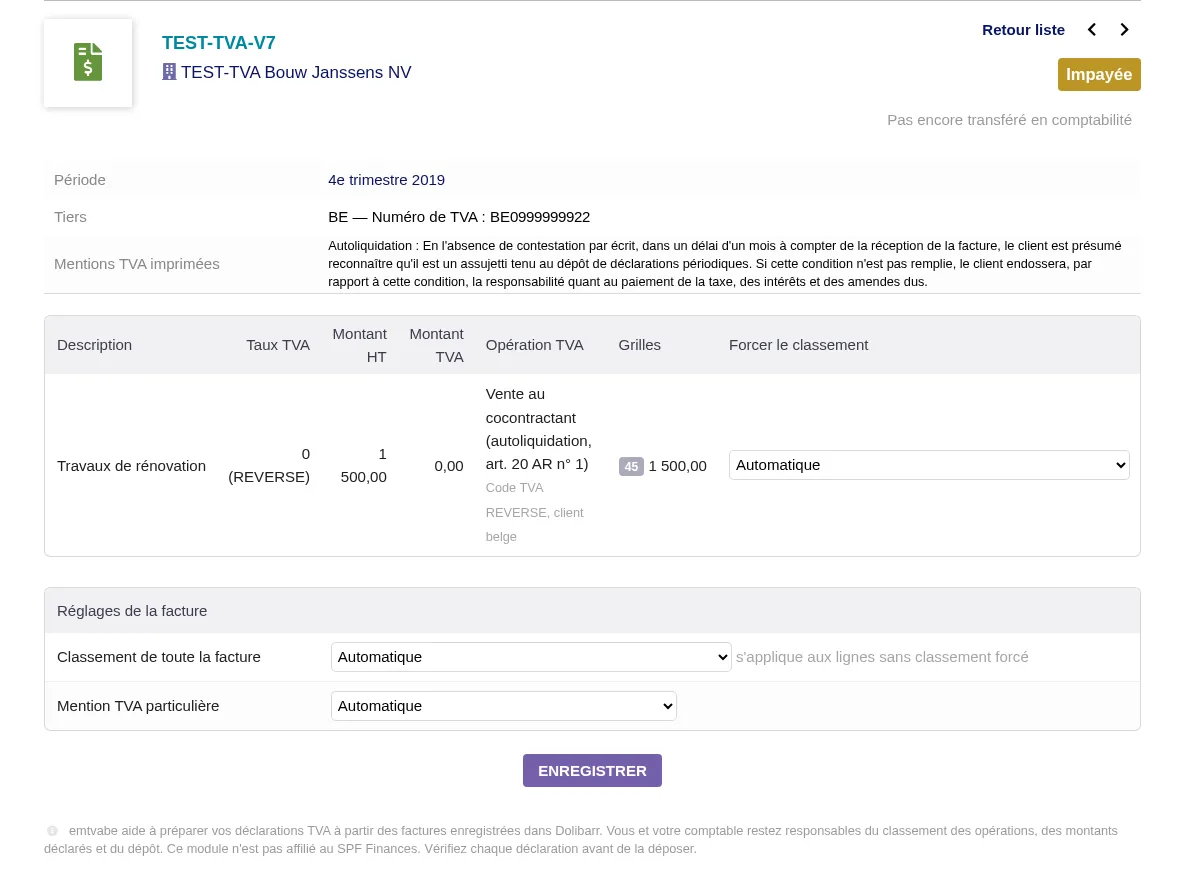
The Belgian VAT tab of customer and supplier invoices shows the transaction type used for each line, the grids concerned and the mention that will be printed. You can force the classification of the whole invoice or of a line, and choose a specific mention (for instance the 6% renovation rate).
5. File and close
- Files tab: click Download the Intervat XML (and, if needed, the PDF summary and the CSV for your accountant). The file is validated against the official schema before download.
- In Intervat: upload the XML file, then sign and submit.
- In Dolibarr: Close the period (return filed) (button on the Grids tab), with the acknowledgement reference if you have it.
After closing, the period is frozen:
- an invoice validated later with a date in a filed period is included in the first open period;
- if an already declared invoice changes, the difference is shown in the Alerts tab of the open period; the Carry the differences as adjustments button turns it into regularisations (a period with differences not carried over cannot be closed; a lower sales base goes to 49 or 48, lower tax due to 62, a lower deduction to 61);
- reopening a period requires a reason; after the due date, only an administrator can do it.
Intra-community listing and client listing
- Billing → Belgian VAT → Intra-community listing: one line per customer and code (L supplies, T triangular, S services), with correction lines for earlier periods.
- Billing → Belgian VAT → Annual client listing: customers with a Belgian VAT number and a total above €250 excluding VAT for the year.
Both files are produced in Intervat XML and validated against the official schema.
VAT mentions on invoices
Added at the bottom of the PDF invoice, whatever the template, in the customer's language (French or Dutch). Examples of the French texts:
| Case | Mention |
|---|---|
| Domestic reverse charge, construction work | « Autoliquidation : En l'absence de contestation par écrit… » (art. 20, § 3 Royal Decree no. 1) |
| Intra-community service | « Autoliquidation » / « Btw verlegd » |
| Intra-community supply | « Livraison intracommunautaire exemptée - art. 39bis du Code de la TVA… » |
| Export | « Exportation exemptée - art. 39 du Code de la TVA » |
| Service outside the EU | « Prestation de services non soumise à la TVA belge - art. 21, § 2 » |
| Exemption art. 44 | « Exemption de TVA - art. 44 du Code de la TVA » |
| 6% renovation (chosen on the invoice) | « Taux de TVA : En l'absence de contestation par écrit… » (Royal Decree no. 20, table A, heading XXXI) |
| Small business exemption | « Régime particulier de la franchise de taxe » |
The texts can be edited in the setup. Nothing is written to the database: the mention is recalculated each time the PDF is generated.
Known limitations
- Calculation from invoices (invoice date), not from the general ledger: transactions without an invoice go through adjustments.
- Not supported: partially exempt businesses (pro rata), VAT groups, margin scheme, travel agencies, agricultural and flat-rate schemes, OSS, special return 629, customs value of imports, deduction revisions, cash discount, expense reports.
- Progress (situation) invoices are taken as they are, with a warning; abandoned invoices are left out.
- Late documents are tracked from the first period closed in the module.
- The default deductible shares of the purchase profiles (car 50%, restaurant 0%) should be confirmed with your accountant.
- The XML files are validated against the official schema, but not yet tested on the Intervat test environment: try it there before your first real filing.
- No direct filing through the Intervat API: you upload the file yourself.
Support
The module is free; questions and suggestions are welcome in the GitHub issues. For installation, configuration with you or an adaptation, contact E-dem.