emtvabe Your Belgian VAT return, from invoices to the Intervat file.
emtvabe prepares your Belgian VAT return straight from your Dolibarr invoices and produces the Intervat XML file, validated against the official schema. Intra-community listing, annual client listing and legal VAT mentions on your invoices included.
GPL v3 licence · source code on GitHub · no usage limit
Current version: 1.0.0 · all versions
Why emtvabe?
Dolibarr already holds all your invoices, but not the Belgian VAT return: no grids, no Intervat file, and no record of the VAT you self-assess on intra-community or reverse-charge purchases. Grids end up being recalculated in a spreadsheet, or everything is sent to the accountant.
Since 2025, a return can no longer be corrected after its due date: a missed or changed invoice is regularised in the next return. emtvabe freezes each filed period, automatically picks up late documents and turns changes into regularisations in one click. Quarterly returns are due on the 25th of the month following the quarter (Q4 2026: 25 January 2027), monthly returns on the 20th.
The module classifies every invoice line, shows the rule applied and produces an XML file validated against the official schema of the FPS Finance, which you or your accountant upload and sign in Intervat. Your accountant gets a clean file set (XML, PDF, CSV) instead of re-keying every invoice.
The return calculated from your invoices
The grids of the periodic return are calculated from validated customer and supplier invoices, monthly or quarterly.
- Grids 00 to 88, 54 to 64 and balance 71 / 72, with the period's due date
- Self-assessed VAT calculated (grids 55, 56 and 57, deductible part in 59): Dolibarr does not store it
- Credit notes handled as the FPS Finance requires (48, 49 and 64 on sales; 84, 85 and 63 on purchases, with the negative balance carried forward)
- Intervat XML for the VAT return, the intra-community listing and the annual client listing, each validated against the official schema before download
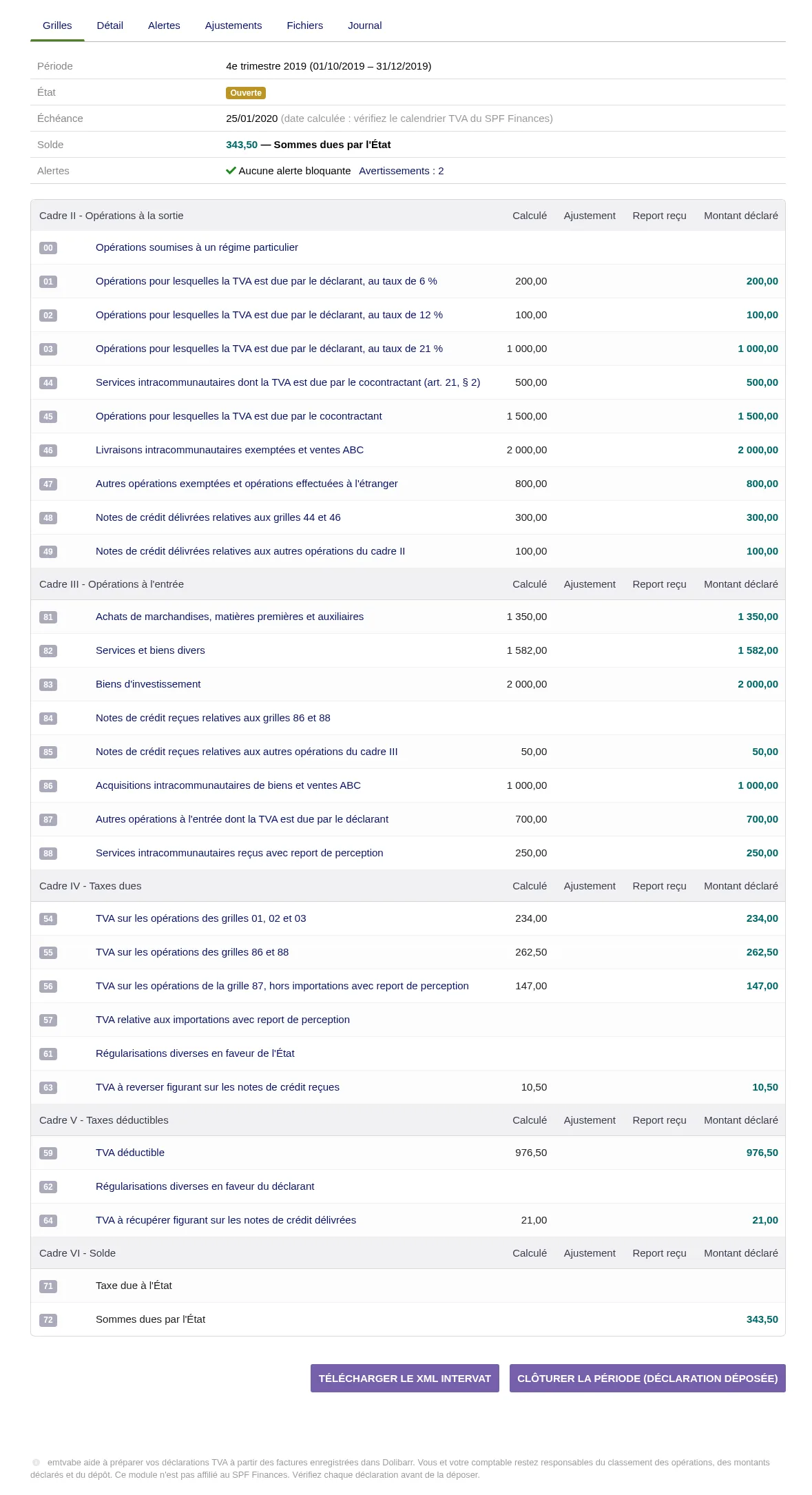
The grids of a quarterly return, from frame II to the balance
Every line classified, every invoice with the right mention
A “Belgian VAT” tab on customer and supplier invoices shows how each line is declared and the mention that will be printed.
- Automatic classification: Belgian rates, intra-community, triangular, export, services outside the EU, domestic reverse charge, self-assessed purchases, imports, foreign VAT
- Rule applied shown on each line, classification can be forced per invoice or per line
- Purchase profiles (grid 81, 82 or 83 and deductible part) per line, product or supplier, with a bulk screen for suppliers
- Belgian VAT mentions on invoices, with any PDF template: reverse charge, domestic reverse charge, intra-community supply, export, 6% renovation, small business exemption, in French and Dutch
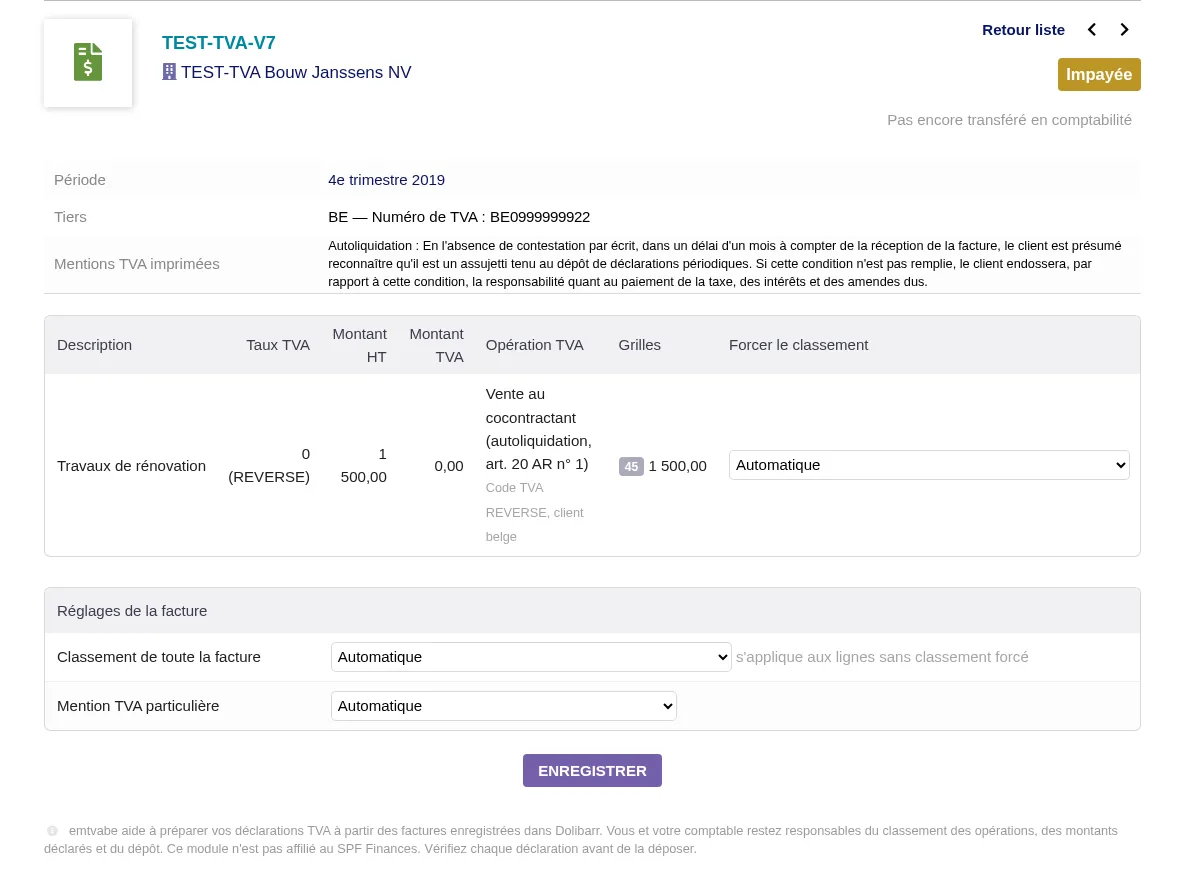
The “Belgian VAT” tab of an invoice: line classification and printed mention
Check before you file
Every amount can be traced down to the invoice, and common mistakes are flagged before the file goes out.
- Detail of each grid down to the invoices, filterable by grid
- Blocking alerts: 0% sale to a Belgian customer without a reason, EU customer without a VAT number, unknown rate, missing country
- Intervat consistency checks flagged before filing
- Logged adjustments (grid, amount, mandatory reason, author), PDF summary and CSV for the accountant
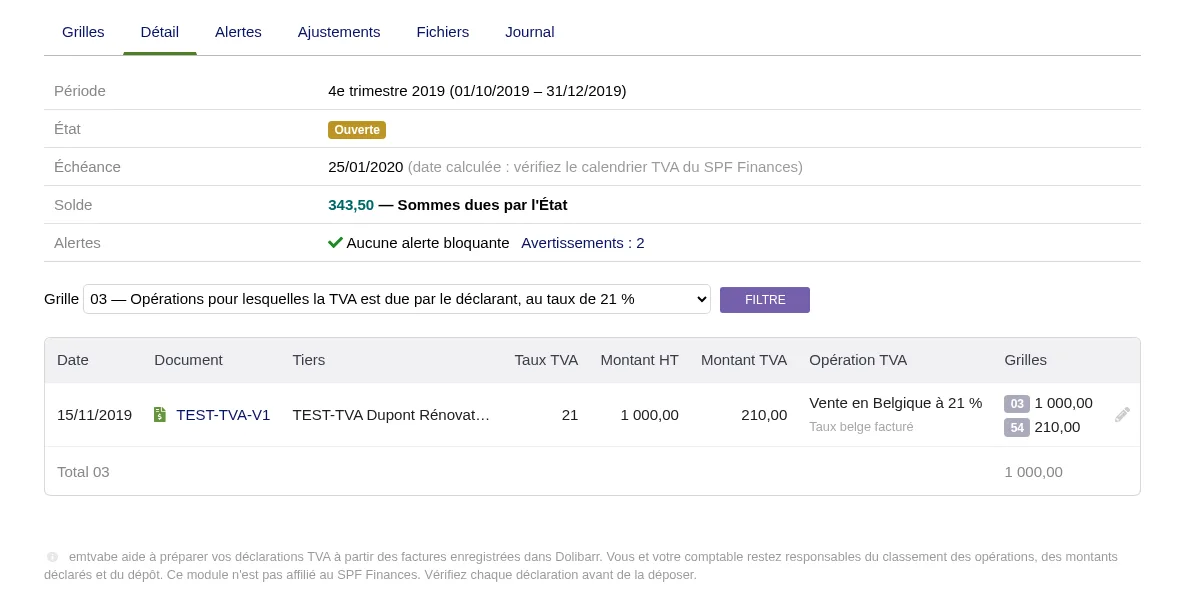
The detail of a grid, down to the invoice
Periods frozen after filing
A filed return can no longer be corrected after its due date: the module takes this into account.
- Period closed after filing, with a snapshot of every declared line
- Late invoices included in the first open period
- An already declared invoice that changes: the difference is flagged, then turned into regularisations in the next return in one click
- Reopening with a reason, logged (after the due date, administrators only)
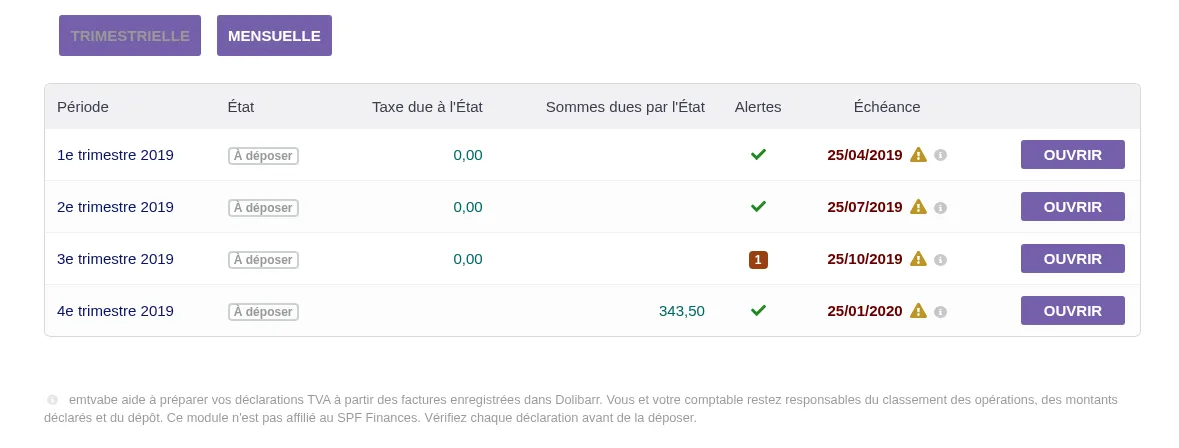
The year's periods (2019 test data), with their balance, alerts and calculated due date
Who is it for?
Belgian VAT-registered businesses that invoice with Dolibarr, under the normal scheme (monthly or quarterly returns) or the small business exemption scheme.
SMEs and freelancers
You file in Intervat yourself: the module calculates the grids, flags mistakes and produces the file to upload.
Businesses with an accountant
Your accountant gets a PDF, a detailed CSV and the XML instead of re-keying every invoice, and your invoices carry the right mentions.
Small business exemption scheme
No periodic return, but the exemption mention on invoices and the annual client listing with your turnover.
Installation in 3 steps
Download and install
Install the zip through “Deploy/install external app/module”, or unpack it into the htdocs/custom/ folder of your Dolibarr. Nothing to build.
Enable and configure
Enable “Belgian VAT (emtvabe)” in Setup › Modules, check your company's country and VAT number, then choose the filing frequency and options.
File
Give a purchase profile to your main suppliers, open the period, clear the alerts, download the XML and upload it to Intervat.
Compatibility & technical requirements
Dolibarr
Server (dom extension)
Interface languages
Free software licence
Frequently asked questions
Does the module file the return for me?
No. It produces the XML file, which you or your accountant upload and sign in Intervat. After filing, you close the period in Dolibarr.
My accountant handles my VAT: why would I need it?
Your accountant gets a clean file set (PDF, CSV and XML) instead of re-keying every invoice, and your invoices carry the right VAT mentions.
Do I need to keep my accounts in Dolibarr?
No. The calculation starts from customer and supplier invoices (invoice date). Transactions without an invoice in Dolibarr, such as VAT paid at customs, go through adjustments.
Which schemes are supported?
The normal scheme, with monthly or quarterly returns, and the small business exemption scheme (mentions and client listing). Not supported: partially exempt businesses (pro rata), VAT groups, the margin scheme and OSS.
Who is responsible for the return?
You and your accountant. emtvabe is an independent module, not affiliated with the FPS Finance: check every return before filing it.
Is emtvabe really free?
Yes. The module is released under the GPL v3 licence: you can download, use, study and adapt it freely. E-dem offers installation and support if you need them.
⚠️ emtvabe helps you prepare your VAT returns; it replaces neither your own check nor your accountant. You and your accountant remain responsible for the classification of transactions, the amounts declared and the filing. emtvabe is an independent module developed by E-dem, not affiliated with the FPS Finance. Before your first real filing, run a test on the Intervat test environment.
Need help?
E-dem, a Dolibarr integrator in Belgium, can install emtvabe, configure it with you or adapt it to your processes. Contact E-dem.