- What changes for income year 2026
- Requirements
- Installation
- Configuration
- 1. Qualify the suppliers
- 2. Complete the supplier's Belcotax tab
- 3. Create the year's declaration
- 4. Review and adjust a form
- 5. Validate, file, record the filing
- 6. Correct a filed declaration
- Known limitations
- FAQ
- Support
emBelcotax — 281.50 forms for Dolibarr
emBelcotax prepares the Belgian 281.50 tax forms (commissions, fees, benefits in kind and expenses paid to non-employees) from Dolibarr supplier invoices, and produces the JSON Lines file accepted by Belcotax-on-web 2.0 for income year 2026 onwards. Every file is checked against the official JSON schemas of the FPS Finance before you file it.
The module is free and open source (GPL v3 licence):
- source code: emBelcotax GitHub repository;
- current version: 1.0.0 — download the zip (all versions);
- overview: emBelcotax product page.
Responsibility: emBelcotax helps you prepare 281.50 forms; it does not replace your accountant. You and your accountant remain responsible for the choice of beneficiaries, the amounts and the filing. emBelcotax is an independent module, not affiliated with the FPS Finance.
The module interface is available in French, Dutch and English; the screenshots below show the French interface.
What changes for income year 2026
- Belcotax-on-web 2.0 opens in February 2027 and no longer accepts XML: only JSON Lines files (
.jsonl) are accepted for income year 2026. - The 325.50 summary and its control totals disappear from the file. emBelcotax provides a PDF summary instead, for your internal checks.
- Filing deadline for income year 2026: 29 June 2027.
Rules applied by the module:
- no form is due when a proper VAT invoice was issued by a VAT-registered business established in the EU, Norway, Iceland or Liechtenstein;
- no form either below the threshold of €250 per beneficiary per year;
- amounts excluding VAT, except benefits in kind (VAT included), never negative.
Requirements
| Item | Minimum version |
|---|---|
| Dolibarr | Dolibarr ≥ 21 |
| PHP | PHP ≥ 8.1 |
| Database | MySQL or MariaDB |
| Dolibarr modules | Third parties and Suppliers (supplier invoices) |
The module does not depend on any other E-dem module and there is nothing to build: everything is in the zip, official schemas included.
Installation
-
Download the version 1.0.0 zip (module_embelcotax-1.0.0.zip); other versions are on the all versions page.
-
Install it through Setup → Modules → Deploy/install external app/module, or unpack it into
htdocs/custom/: you gethtdocs/custom/embelcotax/. You can also clone the repository:git clone https://github.com/momodemo333/embelcotax.git htdocs/custom/embelcotax -
Enable emBelcotax in Setup → Modules (financial modules).
-
Grant the permissions to the users concerned (see below).
The module is then available under Billing → Belcotax 281.50.
Configuration
Setup → Modules → emBelcotax, or Billing → Belcotax 281.50 → Setup.
| Setting | Purpose |
|---|---|
| Debtor | Your company: name, enterprise number (derived from the Belgian VAT number if empty), street, number, box, postcode, town, country. A debtor who is an individual enters their national number. |
| Contact person | E-mail and language (fr, nl or de) are mandatory for Belcotax; phone in international format. |
| Calculation | Threshold (€250 by default); option “only lines covered by a rule”. |
| File | Key prefix (unique to your company: do not change it after a first filing), schema identifier, forced country codes. |
| Heading rules | Accounting account prefix or product/service category → heading. Suggested at installation: 61320 → a) commissions, 61321 → b) fees. |
Permissions
Five permissions: read, edit, declare, setup and sensitive data.
- The national number is only visible and editable with the “sensitive data” permission.
- Downloading the Belcotax file requires “declare” and “sensitive data”, because it contains national numbers in plain text.
- Forms and the Belcotax tab also follow the Dolibarr third-party permissions.
1. Qualify the suppliers
Billing → Belcotax 281.50 → Beneficiaries to qualify.
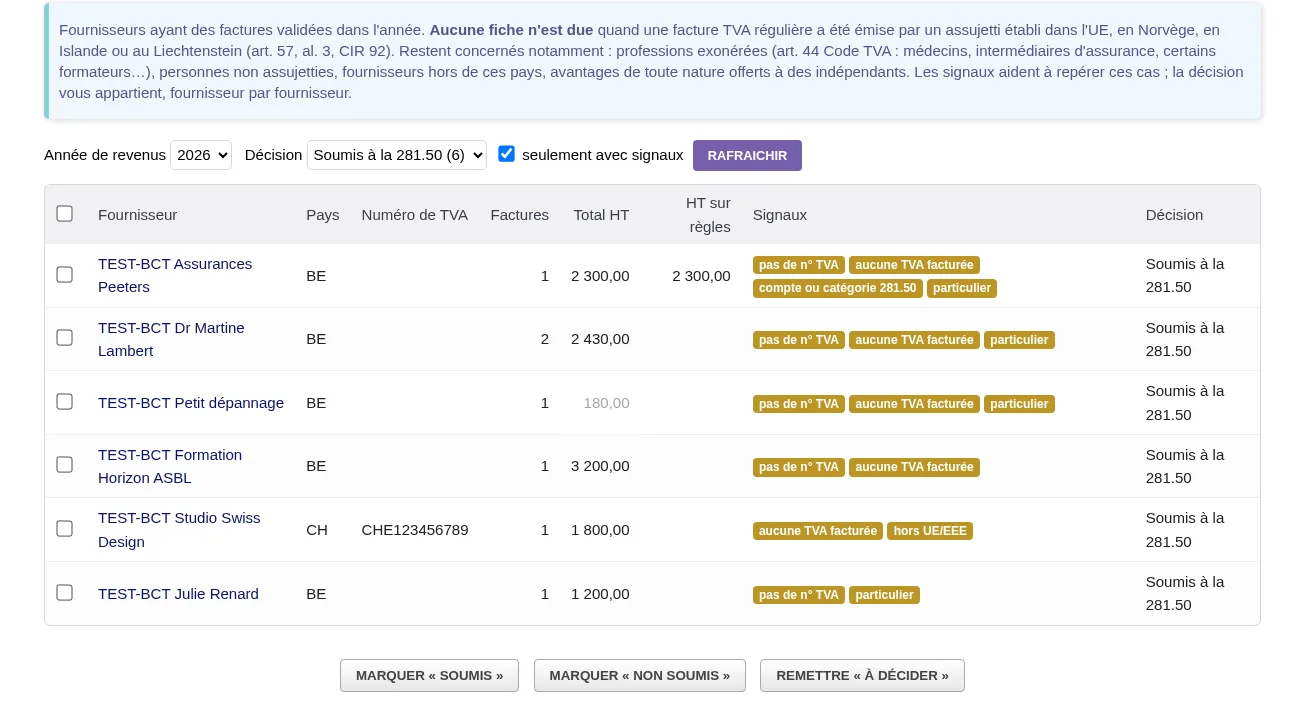
The list shows the suppliers with validated invoices in the year, with signals: no VAT number, no VAT charged, outside the EU/EEA, account or category of a 281.50 heading, private individual. Tick the suppliers and mark them “subject” or “not subject”. The decision stays human: the signals only guide you.
Usually still concerned: VAT-exempt professions (doctors, insurance intermediaries, some trainers), people not registered for VAT, suppliers established outside the EU/EEA, benefits given to self-employed people.
2. Complete the supplier's Belcotax tab
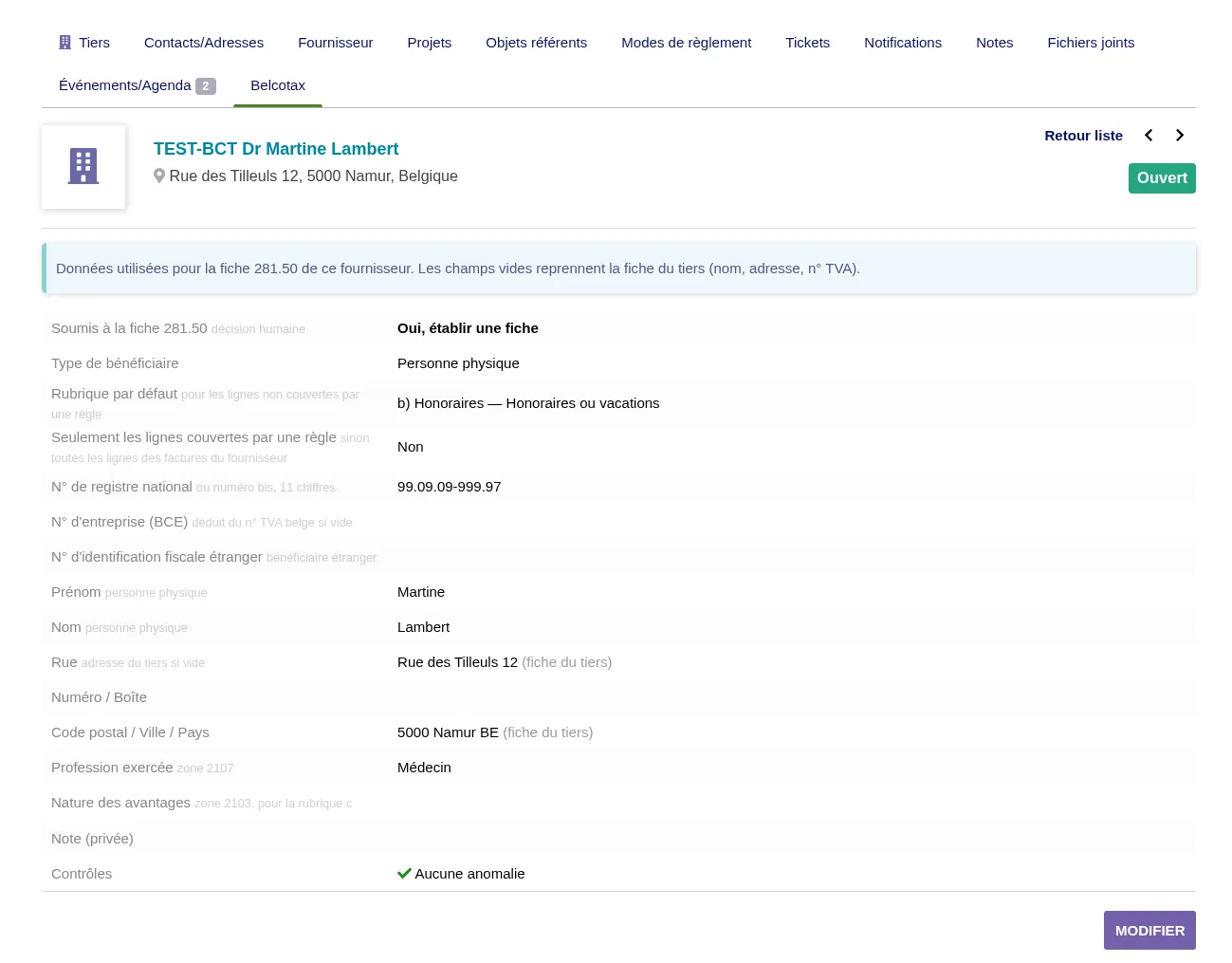
On each supplier marked as subject, the Belcotax tab holds:
- the beneficiary type (individual or organisation, otherwise derived from the third-party type);
- the national register number or the enterprise number, the foreign tax ID for a foreign beneficiary;
- first and last name (individual), street / number / box if the third party's address is a single block;
- the profession (fees), the nature of benefits (heading c) and the default heading.
The checks are shown at the bottom of the tab: modulo 97 of the national number (born before and after 2000, bis numbers) and of the enterprise number, minimum data required by Belcotax, country code.
Without a default heading or a rule, the invoices of a supplier marked as subject are flagged “lines without rubric” and block validation.
3. Create the year's declaration
Billing → Belcotax 281.50, choose the year, then Create the 2026 declaration (the button shows the chosen year).
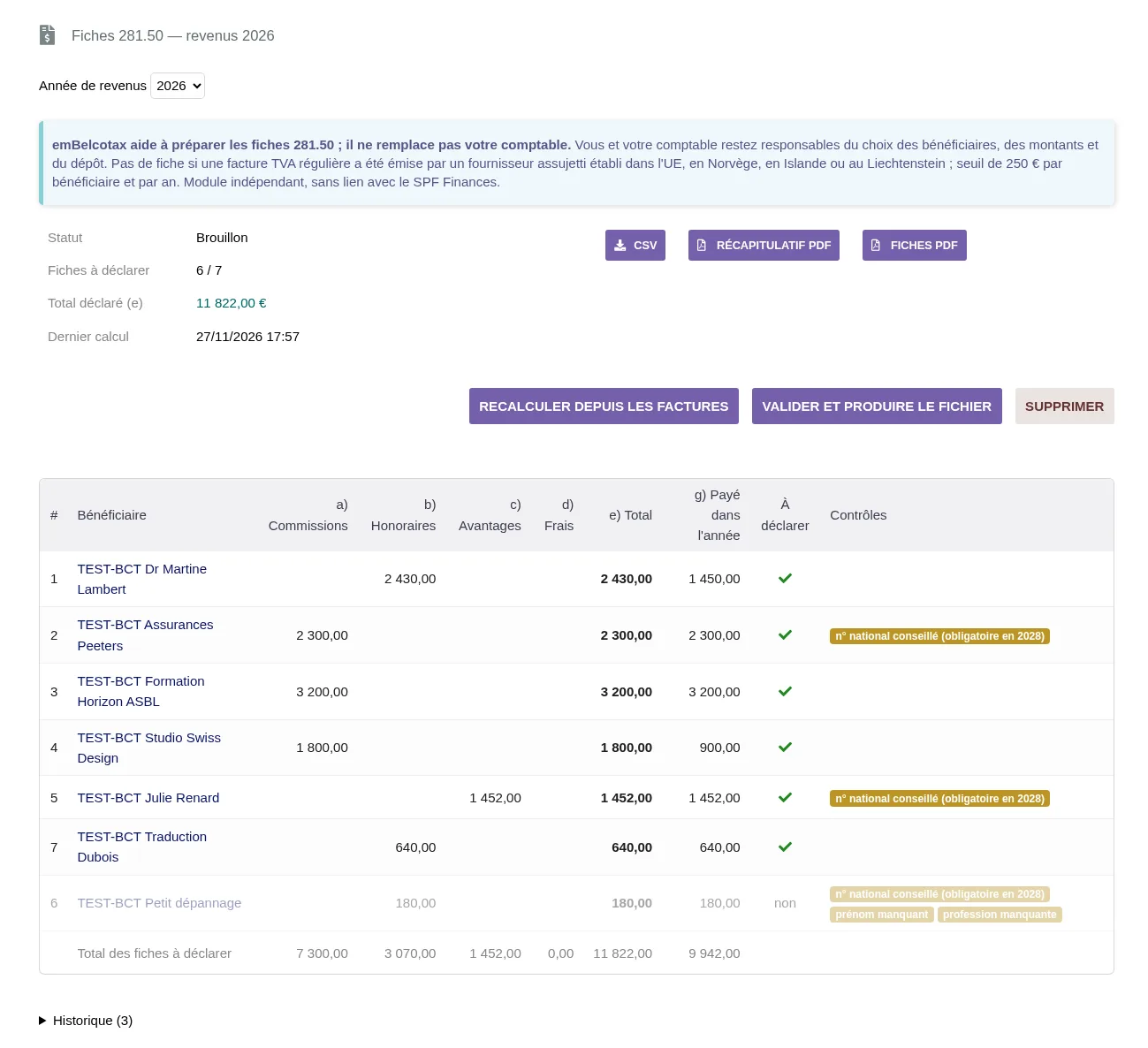
For each beneficiary marked as subject, the module calculates:
- headings a) commissions, b) fees, c) benefits in kind (VAT included), d) expenses, excluding VAT and with credit notes deducted;
- the total e);
- the amount paid during the year g) (box 2065), marked “nil” when nothing was paid.
The invoices used are those whose invoice date falls in the year; the amount paid includes the year's payments, even for invoices of other years. A form is only declared when the total exceeds the threshold, unless its inclusion is forced.
4. Review and adjust a form
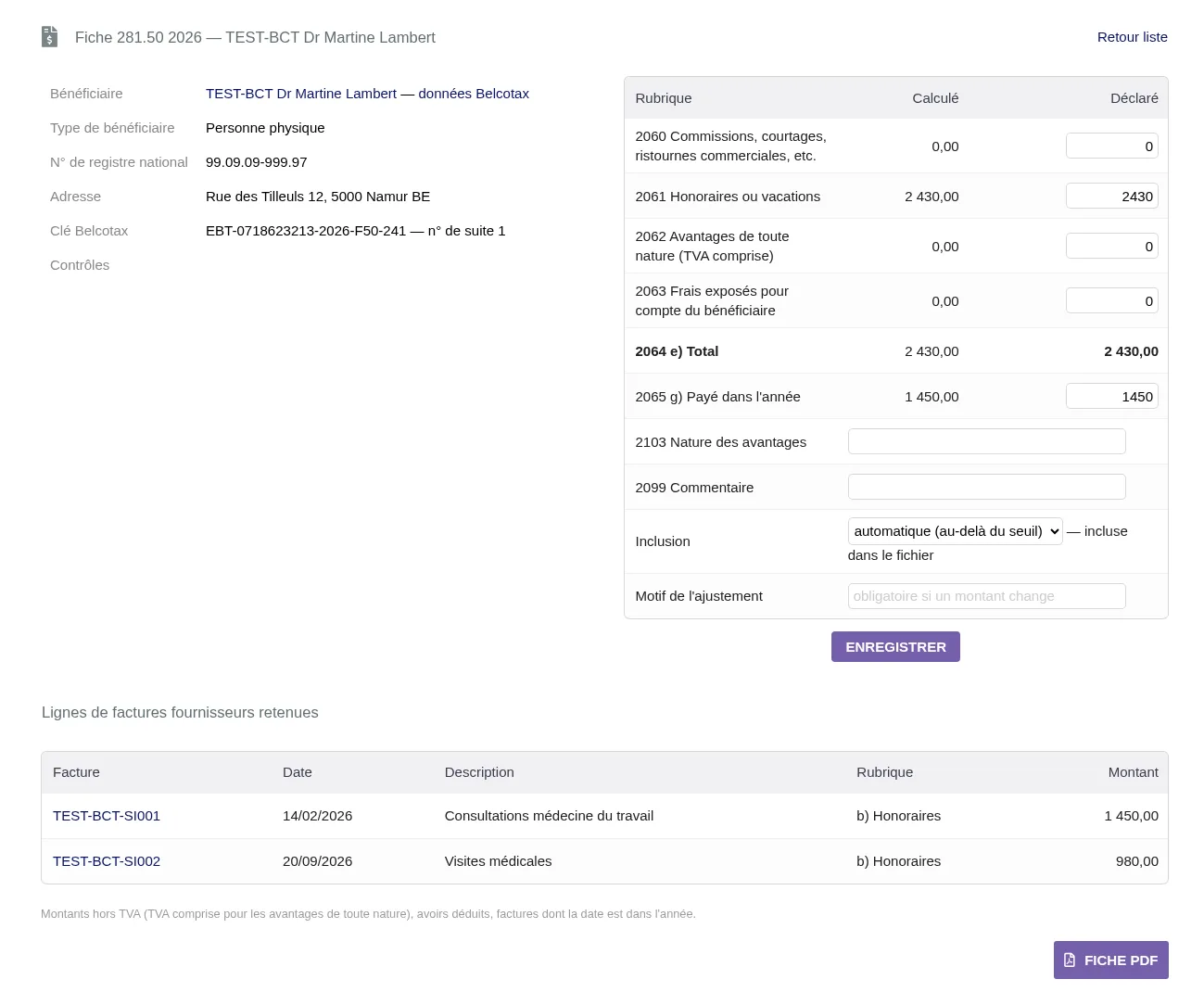
Click a beneficiary to see the invoice lines used. You can adjust an amount (reason required, history kept), force or exclude the form, add a comment (box 2099). Recompute from invoices reads the invoices again without overwriting adjusted amounts.
5. Validate, file, record the filing
Validate and produce the file: blocking anomalies are listed (identification, debtor address, contact e-mail…). Validation freezes the beneficiaries' data and produces belcotax-28150-<year>-….jsonl, checked against the official schemas, with its SHA-256 fingerprint.
Upload the file to Belcotax-on-web (try it in the test module first), then click Mark as sent and enter the filing reference.
Available exports:
- control CSV for the accountant;
- PDF summary (it replaces the former 325.50 summary);
- PDF copy of each form for the beneficiary.
6. Correct a filed declaration
Reopen to correct, make your changes, then validate again. Two files are produced: the full file and a corrective file that only contains the forms changed since the last filing (same key: Belcotax replaces the form) and deletion lines for excluded forms. Upload either one. Files are no longer accepted after 30 September of the third year following the income year.
Known limitations
- Provisional official schemas: the JSON schemas for income year 2026 are the “pre-opening” version provided by the FPS in November 2026; the final brochure is announced for December 2026. The schema identifier is configurable and a module update will follow any change.
- No real filing tested yet: files are checked locally against the official schemas, not in the Belcotax-on-web test environment (eID login required). Upload your file to the test module first.
- Box 2205 (“cancels and replaces”) is disabled by default.
- The 3-digit country codes come from the 2025 Belcotax brochure; a code can be forced in the setup.
- A form covers the year of the invoice date; expense reports, miscellaneous payments and accrued charges are not read: adjust the form by hand.
- The amount paid (box 2065) is prorated per invoice: check it on invoices with several VAT rates or down payments.
- Not covered: 281.30 and 281.45 forms, XML for income year 2025 and earlier, filing through the Belcotax API.
- The treatment of companies established outside the EEA (software subscriptions, for example) should be confirmed with your accountant.
FAQ
Do I need a form for my accountant, my lawyer, my software provider? Not if they gave you a proper VAT invoice and are VAT-registered and established in the EU or EEA. Usually yes for a VAT-exempt doctor, insurance intermediary or trainer, a person not registered for VAT, or for benefits given to a self-employed person.
What about the €125 threshold? It was replaced by a legal threshold of €250 per beneficiary per year in 2022.
Is the national number mandatory? For an individual beneficiary, the national number or the name and full address are enough today; the national number will become mandatory on 1 January 2028 at the latest.
Does the module file the declaration? No. You upload the file to Belcotax-on-web, then record the filing reference in Dolibarr.
Support
The module is free; questions and suggestions are welcome in the GitHub issues. For installation, configuration with you or an adaptation, contact E-dem.